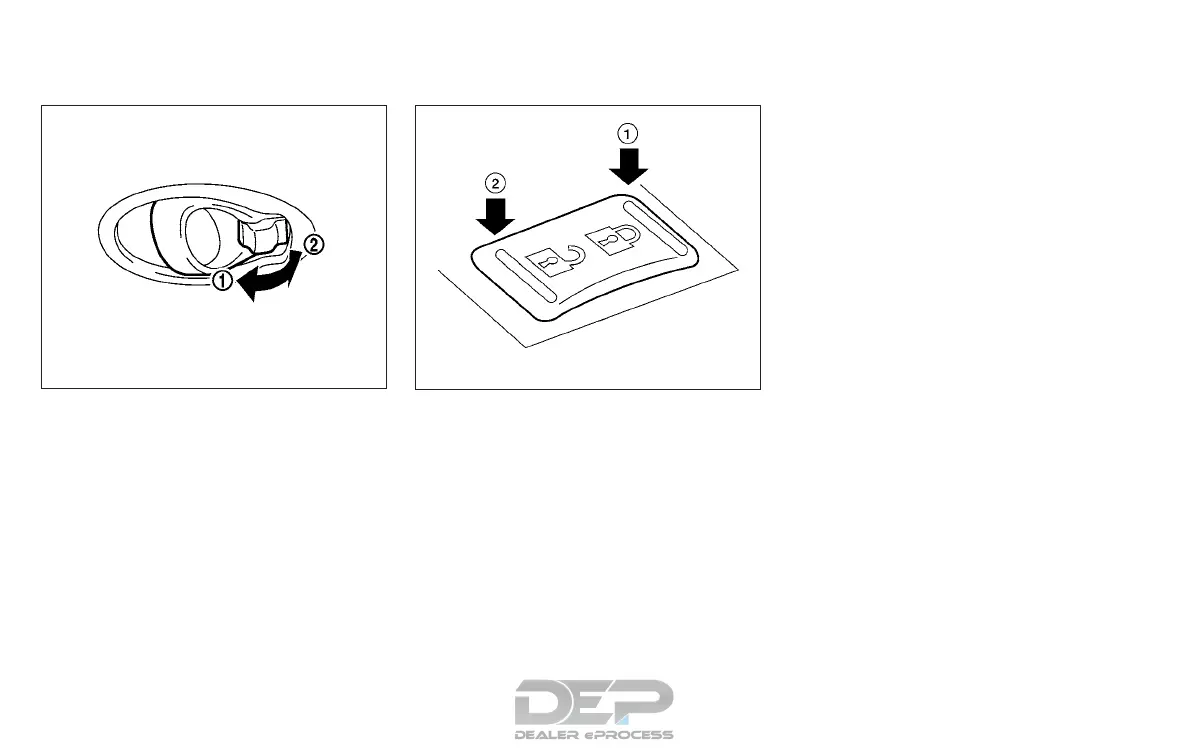
LOCKING WITH INSIDE LOCK
KNOB
To lock the door without the key, move the inside
lock knob to the lock position
䊊
1
, then close the
door.
To unlock the door without the key, move the
inside lock knob to the unlock position
䊊
2
.
LOCKING WITH POWER DOOR
LOCK SWITCH (if so equipped)
To lock all the doors without a key, push the door
lock switch (driver’s or front passenger’s side) to
the lock position
䊊
1
. When locking the door this
way, be certain not to leave the key inside the
vehicle.
To unlock all the doors without a key, push the
door lock switch (driver’s or front passenger’s
side) to the unlock position
䊊
2
.
Lockout protection
When the power door lock switch is moved to the
lock position and any door is open, all doors will
lock and unlock automatically. With the Intelligent
Key left in the vehicle and any door open, all doors
will unlock automatically and a chime will sound
after the door is closed.
These functions help to prevent the Intelligent
Key from being accidentally locked inside the
vehicle.
AUTOMATIC DOOR LOCKS (if so
equipped)
● All doors lock automatically when the vehicle
speed reaches 15 mph (24 km/h).
● All doors unlock automatically when the ig-
nition is placed in the OFF position.
Inside lock
SPA2760
WPD0381
3-6 Pre-driving checks and adjustments



 To Next Page