● The system is designed as an aid to the
driver in showing large stationary ob-
jects directly behind the vehicle, to help
avoid damaging the vehicle.
● The distance guide line and the vehicle
width line should be used as a reference
only when the vehicle is on a level
paved surface. The distance viewed on
the monitor is for reference only and
may be different than the actual dis-
tance between the vehicle and dis-
played objects.
CAUTION
Do not scratch the camera lens when
cleaning dirt or snow from the front of the
camera.
The RearView Monitor system automatically
shows a rear view of the vehicle when the shift
lever is shifted into the R (Reverse) position.
Press the CAMERA button (if so equipped) while
in the R (Reverse) position to cycle through
guideline options. The radio can still be heard
while the RearView Monitor is active.
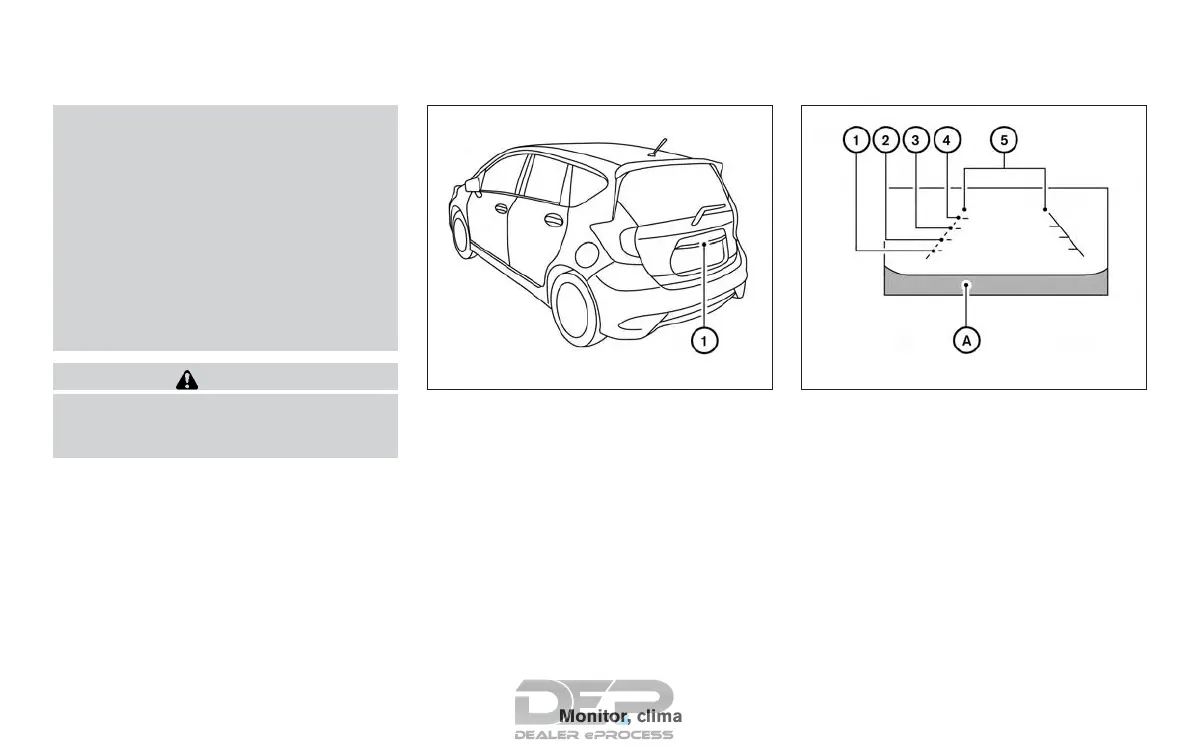
To display the rear view, the RearView Monitor
system uses a camera located next to the rear
hatch handle
䊊
1
.
REARVIEW MONITOR SYSTEM
OPERATION
With the ignition switch in the ON position, move
the shift lever to the R (Reverse) position to
operate the RearView Monitor.
HOW TO READ THE DISPLAYED
LINES
Guiding lines which indicate the vehicle width
and distances to objects with reference to the
vehicle body line
䊊
A
are displayed on the monitor.
Distance guide lines
Indicate distances from the vehicle body.
● Red line
䊊
1
: approx. 1.5 ft (0.5 m)
● Yellow line
䊊
2
: approx. 3 ft (1 m)
● Green line
䊊
3
: approx. 7 ft (2 m)
● Green line
䊊
4
: approx. 10 ft (3 m)
LHA3824 LHA2944
Monitor, climate, audio, phone and voice recognition systems 4-11



 To Next Page