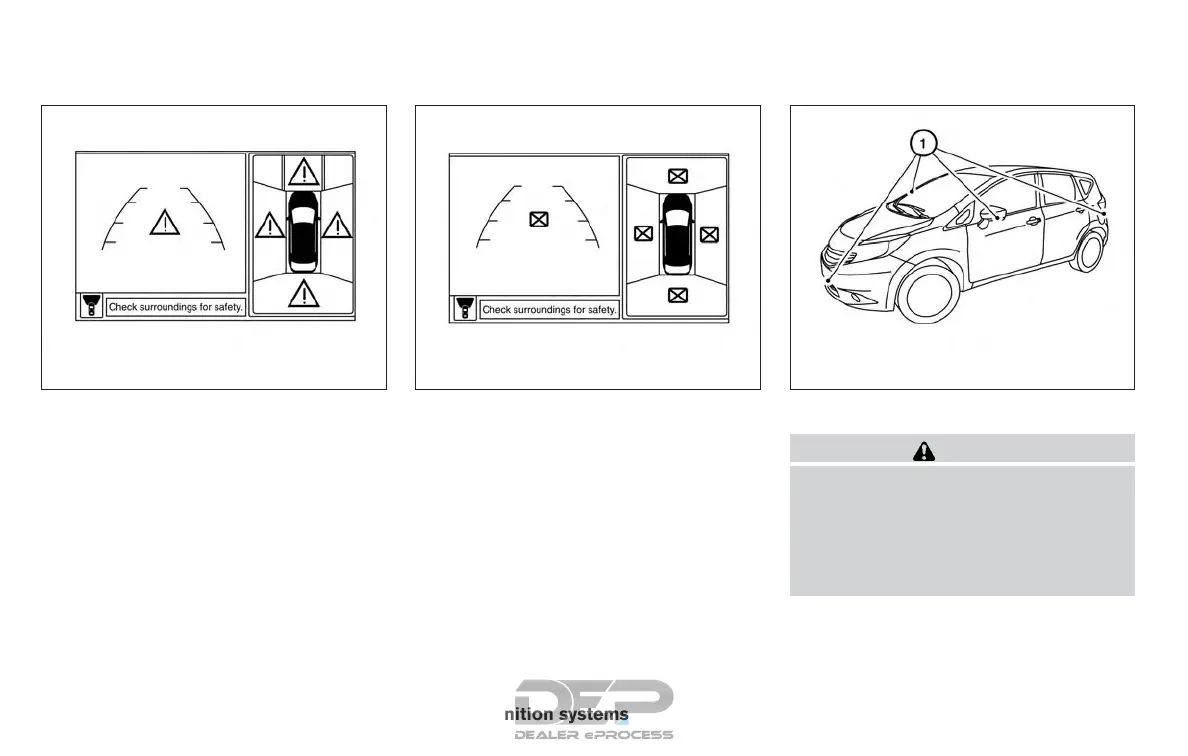
System temporarily unavailable
When the “!” icon is displayed on the screen,
there are abnormal conditions in the Around
View® Monitor. This will not hinder normal driving
operation but the system should be inspected. It
is recommended that you visit a NISSAN dealer
for this service..
When the “[X]” icon is displayed on the screen,
the camera image may be receiving temporary
electronic disturbances from surrounding de-
vices. This will not hinder normal driving opera-
tion but the system should be inspected. It is
recommended that you visit a NISSAN dealer for
this service.
SYSTEM MAINTENANCE
CAUTION
● Do not use alcohol, benzine or thinner
to clean the camera. This will cause
discoloration.
● Do not damage the cameras as the
monitor screen may be adversely
affected.
If dirt, rain or snow accumulates on any of the
cameras
䊊
1
, the Around View® Monitor may not
display objects clearly. Clean the camera by wip-
ing with a cloth dampened with a diluted mild
cleaning agent and then wiping with a dry cloth.
LHA3591 LHA3592 LHA4382
4-26 Monitor, climate, audio, phone and voice recognition systems



 To Next Page