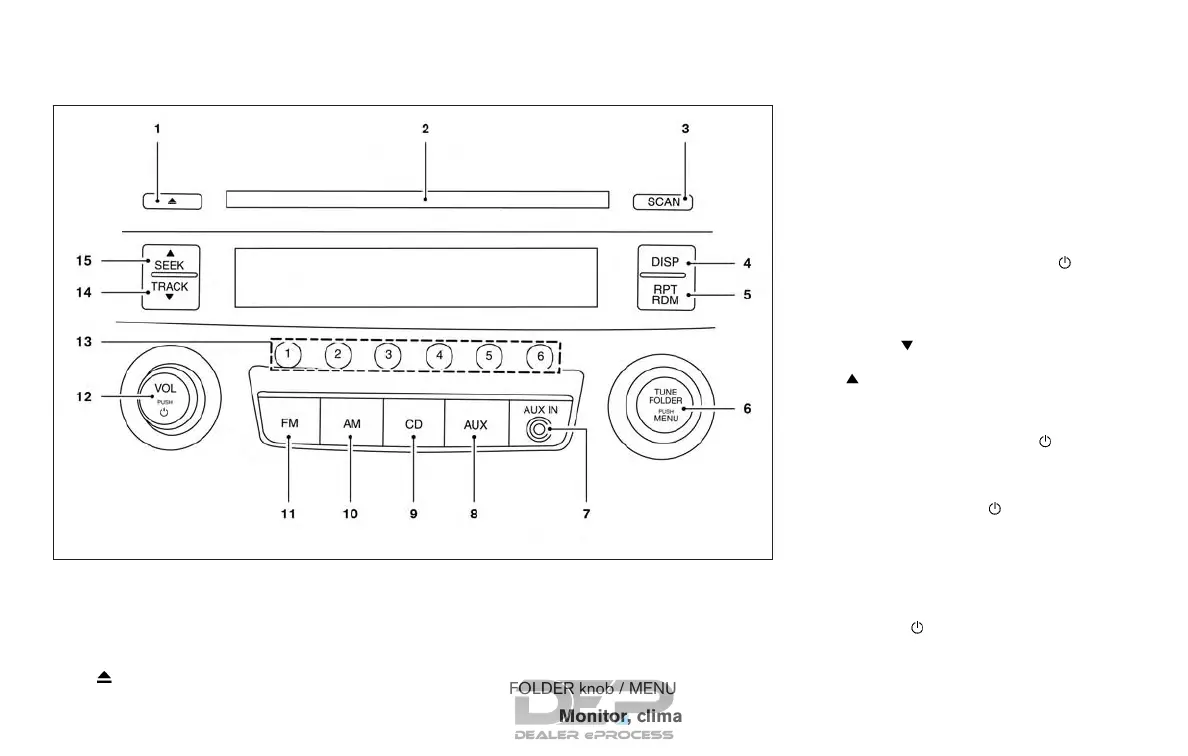
FM/AM RADIO WITH COMPACT
DISC (CD) PLAYER (if so equipped)
For additional information, refer to “Audio opera-
tion precautions” in this section.
1.
CD eject button
2. CD insert slot
3. SCAN button
4. DISP (display) button
5. RPT (repeat )/ RDM (random) button
6. TUNE/FOLDER knob / MENU button
7. AUX IN jack
8. AUX button
9. CD button
10. AM button
11. FM button
12. VOL (volume) control knob /
(power)
button
13. Station select (1 - 6) buttons
14. TRACK
button
15.
SEEK button
Audio main operation
VOL (volume) control knob/ (power)
button
Place the ignition switch in the ACC or ON
position, then press the
(power) button. If
you listen to the radio with the engine not running,
place the ignition in the ACC position. The mode
(radio or CD) that was playing immediately before
the system was turned off resumes playing.
When no CD is loaded, the radio comes on.
Pressing the
(power) button again turns
the system off.
Turn the VOL (volume) control knob to the right to
increase volume or to the left to decrease volume.
LHA8804
Monitor, climate, audio, phone and voice recognition systems 4-43



 To Next Page