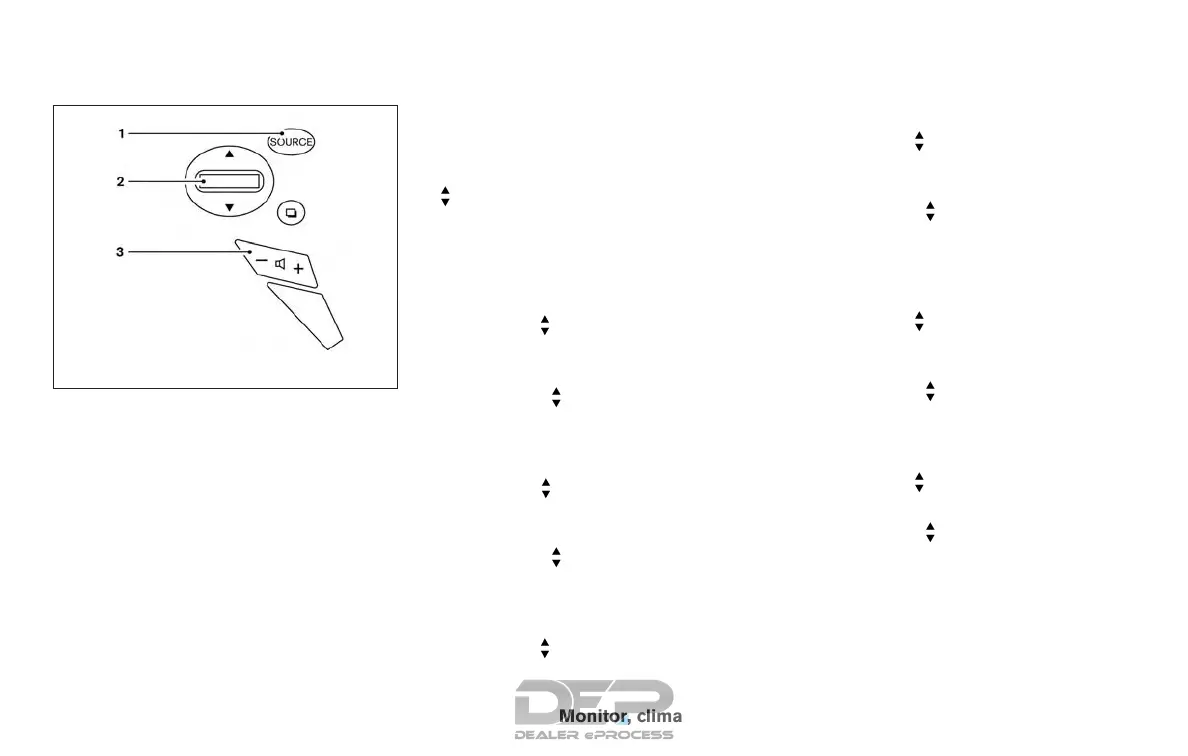
SOURCE switch
Push the SOURCE switch to change the mode in
the following sequence:
AM → FM1 → FM2 → XM1 (satellite radio, if so
equipped) → XM2 (satellite radio, if so equipped)
→ XM3 (satellite radio, if so equipped) → CD* →
USB/iPod®* (if so equipped) → Bluetooth® Au-
dio* (if so equipped) → AUX* → AM.
* These modes are only available when compat-
ible media storage is inserted into the device or
connected to the system.
Volume control switches
Push the volume control switch to increase or
decrease the volume.
Tuning switch
For most audio sources, pressing the switches
for more than 1.5 seconds provides a different
function than pressing for less than 1.5 seconds.
AM and FM:
● Push the
switch for less than 1.5 sec-
onds to increase or decrease the preset
station.
● Push the
switch for more than
1.5 seconds to seek up or down to the next
station.
XM (if so equipped):
● Push the
switch for less than 1.5 sec-
onds to increase or decrease the preset
station.
● Push the
switch for more than
1.5 seconds to go to the next or previous
category.
iPod® (if so equipped):
● Push the
switch for less than 1.5 sec-
onds to increase or decrease the track num-
ber.
CD:
● Push the
switch for less than 1.5 sec-
onds to increase or decrease the track num-
ber.
● Push the
switch for more than
1.5 seconds to increase or decrease the
folder number (if playing compressed audio
files).
USB (if so equipped):
● Push the
switch for less than 1.5 sec-
onds to increase or decrease the track num-
ber.
● Push the
switch for more than
1.5 seconds to increase or decrease the
folder number.
Bluetooth® Audio (if so equipped):
● Push the
switch for less than 1.5 sec-
onds to skip ahead or back to the next song.
● Push the
switch for more than
1.5 seconds to reverse or fast forward the
current song.
Type B (if so equipped)
LHA3052
Monitor, climate, audio, phone and voice recognition systems 4-71



 To Next Page