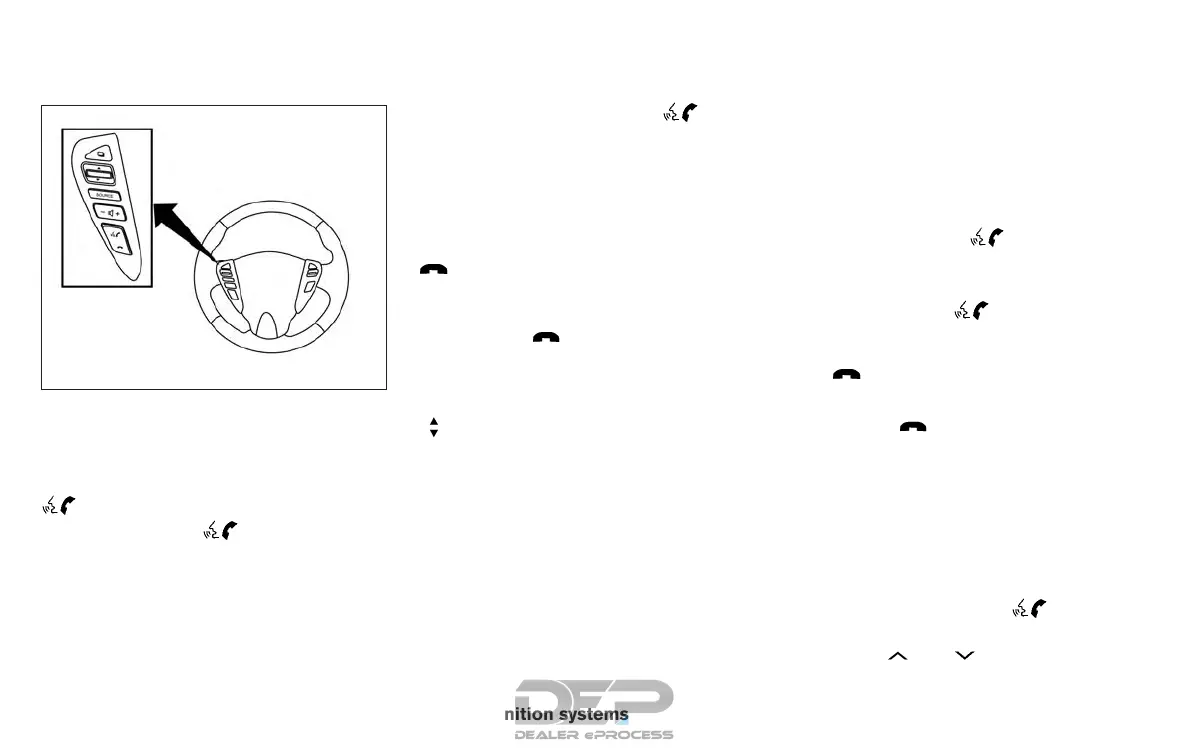
CONTROL BUTTONS
The control buttons for the Bluetooth® Hands-
Free Phone System are located on the steering
wheel.
PHONE/SEND
Press the
button to initiate
a Voice Recognition session or
answer an incoming call.
You can also use the
button
to interrupt the system feedback
and give a command at once. For
additional information, refer to
“List of voice commands” and
“During a call” in this section.
PHONE/END
While the Voice Recognition sys-
tem is active, press and hold
the
button for 5 seconds to
quit the Voice Recognition system
at any time.
Tuning switch
While using the Voice Recogni-
tion system, tilt the tuning switch
up or down to manually control
the phone system.
GETTING STARTED
The following procedures will help you get
started using the Bluetooth® Hands-Free Phone
System with NISSAN Voice Recognition. For ad-
ditional information, refer to “List of voice com-
mands” in this section.
Choosing a language
You can interact with the Bluetooth® Hands-
Free Phone System using English, Spanish or
French.
To change the language, perform the following.
1. Press and hold the
button for more
than 5 seconds.
2. The system announces: “Press the
PHONE/SEND (
) button for the
hands-free phone system to enter the voice
adaptation mode or press the PHONE/END
(
) button to select a different lan-
guage.”
3. Press the
button.
For additional information on voice adapta-
tion, refer to “Voice Adaptation (VA) mode”
in this section.
4. The system announces the current language
and gives you the option to change the lan-
guage to Spanish (in Spanish) or French (in
French). To select the current language,
press the PHONE/SEND (
) button. To
select a different language, tilt the tuning
switch (
or ) up or down.
LHA2499
4-78 Monitor, climate, audio, phone and voice recognition systems



 To Next Page