LOCKING WITH KEY
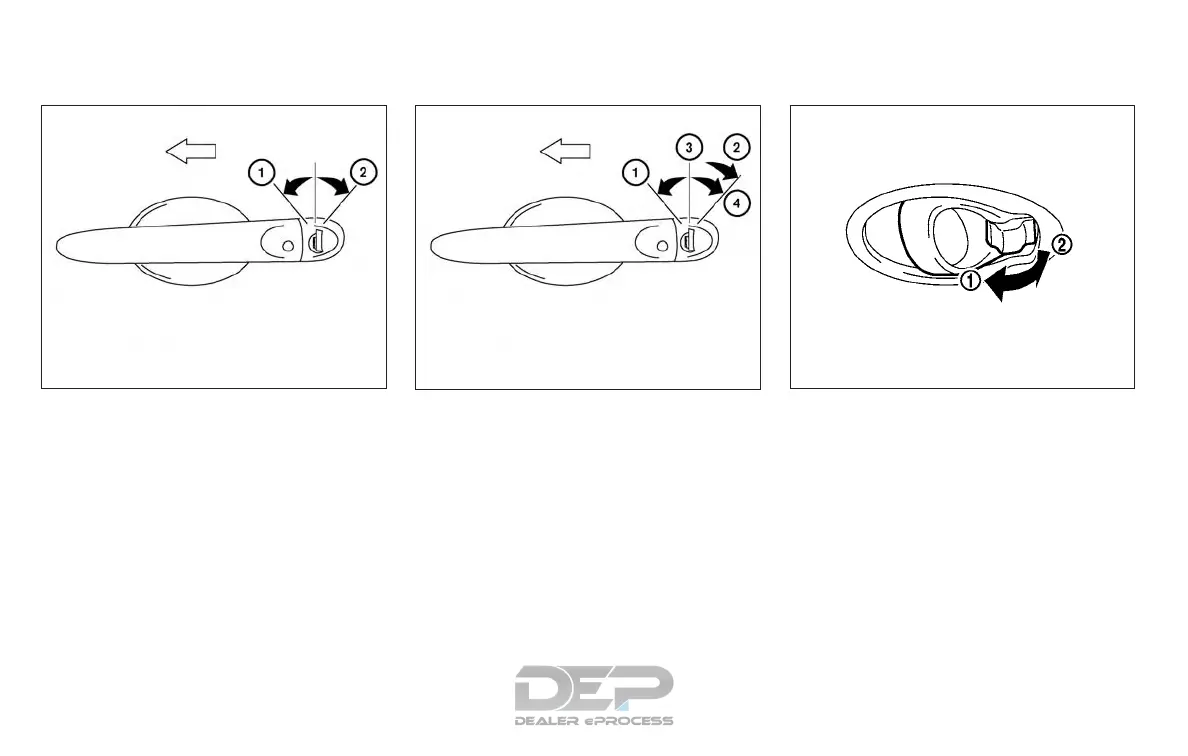
To lock or unlock the vehicle, turn the key as
shown.
Manual (if so equipped)
To lock a door, turn the key toward the front
of the vehicle
䊊
1
. To unlock, turn the key
toward the rear of the vehicle
䊊
2
.
Selective Open (if so equipped)
The power door lock system allows you to
lock or unlock all doors at the same time.
Turning the key toward the front
䊊
1
of the
vehicle locks all doors.
Turning the key one time toward the rear
䊊
2
of the vehicle unlocks that door. From
that position, returning the key to neutral
䊊
3
(where the key can only be removed and
inserted) and turning it toward the rear
again within 5 seconds unlocks all doors
䊊
4
.
LOCKING WITH INSIDE LOCK KNOB
To lock the door without the key, move the
inside lock knob to the lock position
䊊
1
,
then close the door.
To unlock the door without the key, move
the inside lock knob to the unlock position
䊊
2
.
Driver’s side
LPD2160
LPD2161
Inside lock
SPA2760
3-6 Pre-driving checks and adjustments



 To Next Page