EMERGENCY ENGINE SHUT OFF
To shut off the engine in an emergency
situation while driving, perform the follow-
ing procedure:
∙ Rapidly push the push-button ignition
switch three consecutive times in less
than 1.5 seconds, or
∙ Push and hold the push-button ignition
switch for more than 2 seconds.
NISSAN INTELLIGENT KEY®
BATTERY DISCHARGE
If the battery of the NISSAN Intelligent Key®
is discharged, or environmental conditions
interfere with the Intelligent Key operation,
start the engine according to the following
procedure:
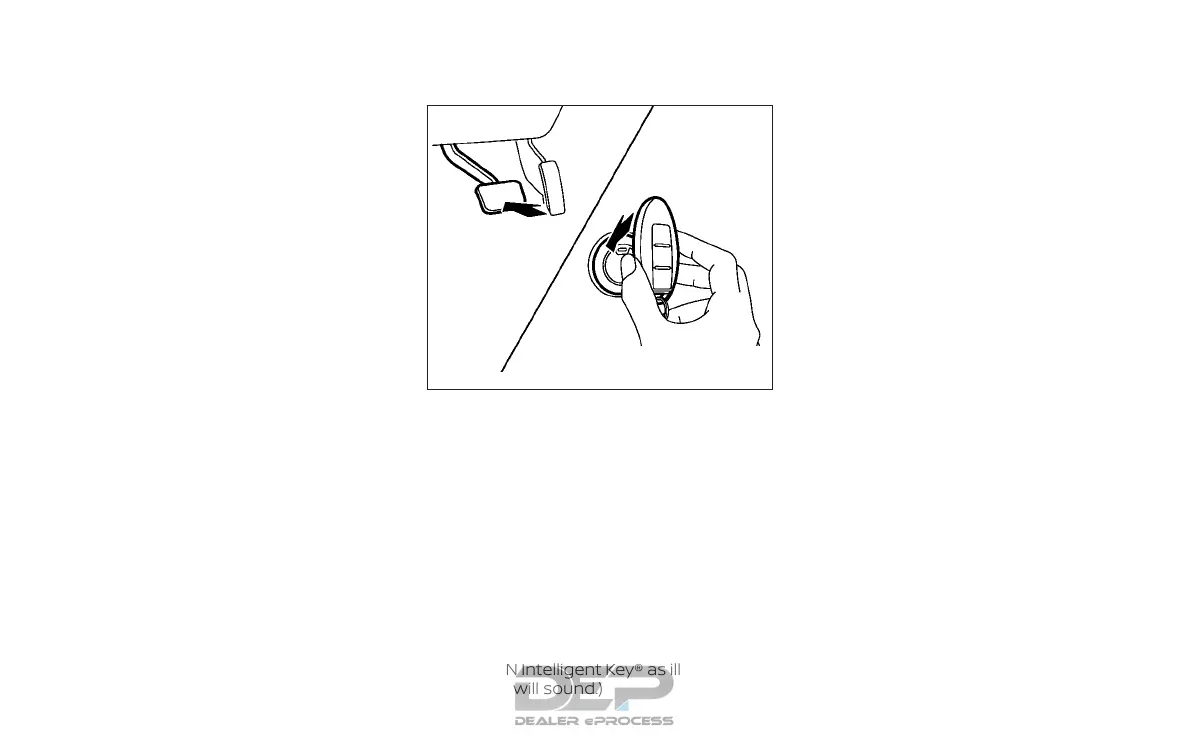
1. Move the shift lever to the P (Park) or N
(Neutral) position.
2. Firmly apply the foot brake.
3. Touch the ignition switch with the
NISSAN Intelligent Key® as illustrated. (A
chime will sound.)
4. Push the ignition switch while depress-
ing the brake pedal within 10 seconds
after the chime sounds. The engine will
start.
After step 3 is performed, when the ignition
switch is pushed without depressing the
brake pedal, the ignition switch position will
change to ACC.
NOTE:
∙ When the ignition switch is pushed to
the ACC or ON position or the engine
is started by the above procedures,
the NISSAN Intelligent Key® warning
light may blink in yellow (on the me-
ter) even if the NISSAN Intelligent
Key® is inside the vehicle. This is not a
malfunction. To stop the warning
light from blinking, touch the ignition
switch with the NISSAN Intelligent
Key® again.
∙ If the NISSAN Intelligent Key® warning
light in the meter is blinking in green,
replace the battery as soon as pos-
sible. For additional information, re-
fer to “Battery replacement” in the
“Do-it-yourself” section of this
manual.
SSD0860
Starting and driving 5-13



 To Next Page