CAUTION
Be careful not to allow children to swal-
low the battery or removed parts.
KEY FOB (if so equipped)
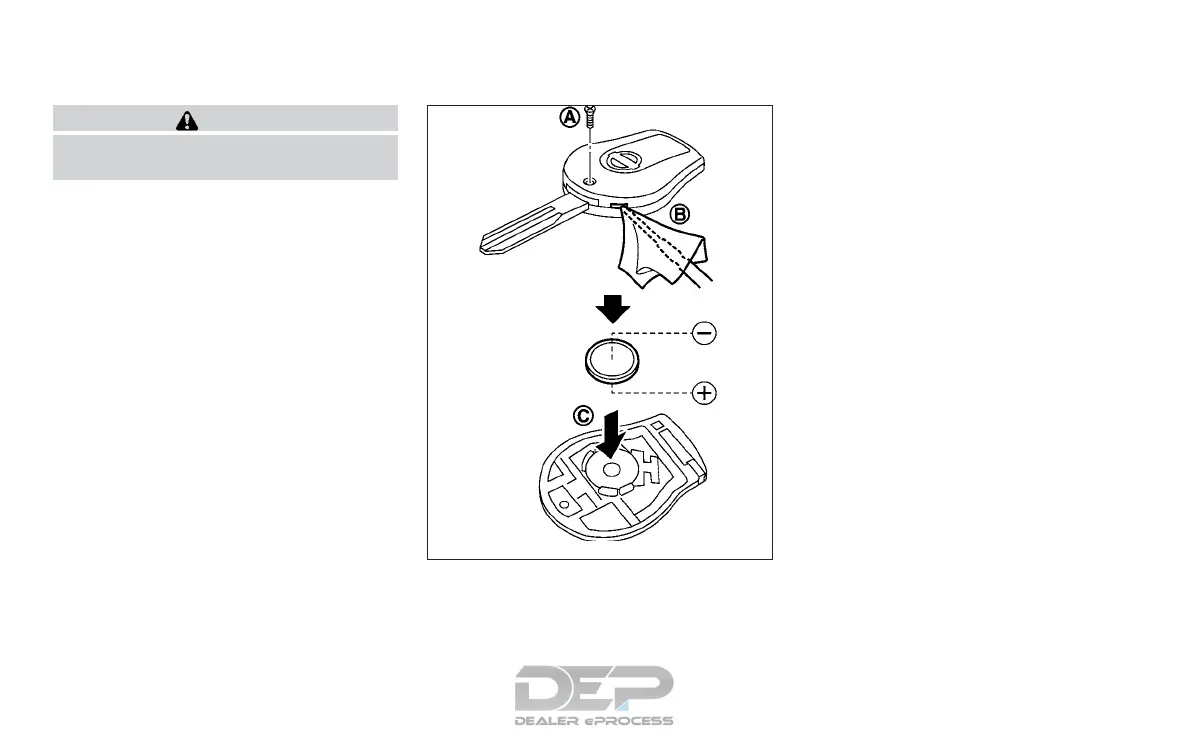
Replace the battery in the key fob as fol-
lows:
1. Remove the screw
䊊
A
.
2. Insert a small screwdriver into the slit of
the corner
䊊
B
and twist it to separate
the upper part from the lower part. Use
a cloth to protect the casing.
3. Replace the battery with a new one.
∙ Do not touch the internal circuit and
electric terminals as doing so could
cause a malfunction.
∙ Make sure that the + side faces the
bottom of the case
䊊
C
.
Recommended battery: CR1620 or equiva-
lent.
4. Close the lid and install the screw se-
curely.
5. Operate the buttons to check its op-
eration.
If you need assistance for replacement, it is
recommended that you visit a NISSAN
dealer for this service.
If the battery is removed for any reason
other than replacement, perform step 5.
∙ An improperly disposed battery can
hurt the environment. Always con-
firm local regulations for battery dis-
posal.
SDI2134A
BATTERY REPLACEMENT
Do-it-yourself 8-21



 To Next Page