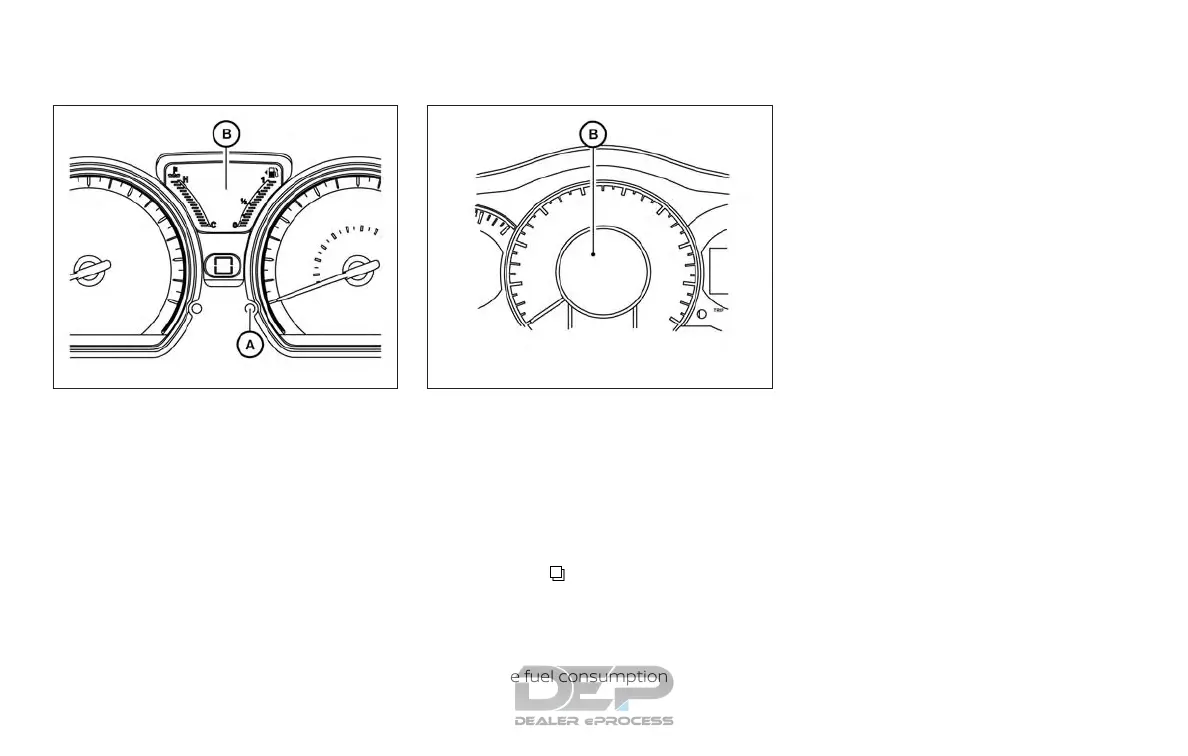
TRIP COMPUTER
Type A: When the ignition switch is placed
in the ON position, modes of the trip com-
puter can be selected by pushing the trip
computer change button
䊊
A
on the instru-
ment panel located near the speedometer.
The following modes can be selected in the
display
䊊
B
:
∙ Odometer
∙ Trip A
∙ Trip B
∙ Instant fuel consumption
∙ Average fuel consumption
∙ Distance to empty
∙ Outside air temperature (if so equipped)
Type B: When the ignition switch is placed
in the ON position, modes of the trip com-
puter can be selected by pushing the
menu button
on the steering wheel.
The following modes can be selected in the
display
䊊
B
:
∙ Instant fuel consumption
∙ Average fuel consumption
∙ Distance to empty
∙ Average speed
∙ Travel time
∙ Outside air temperature (if so equipped)
Instant fuel consumption
The instant fuel consumption mode shows
the instant fuel economy. The display up-
dates instantly when driving.
Average fuel consumption (mpg
or l (liter)/100km)
The average fuel consumption mode
shows the average fuel consumption since
the last reset. Resetting is done by pressing
the trip or change button for more than
approximately 1 second. The display is up-
dated every 30 seconds. At about the first
1/3 mi (500 m) after a reset, the display
shows (----).
Distance to empty
The distance to empty mode provides you
with an estimation of the distance that can
be driven before refueling. The range is
constantly being calculated, based on the
amount of fuel in the fuel tank and the
actual fuel consumption.
Type A (if so equipped)
LIC2138
Type B (if so equipped)
LIC2764
Instruments and controls 2-11



 To Next Page