Need help?
Do you have a question about the niu KQi2 and is the answer not in the manual?
Steps to secure neck tube, connect handlebar, and tighten screws for assembly.
Instructions on how to fold the scooter safely and hold it for transport.
Connect scooter to APP via Bluetooth and use the app or button to lock the scooter.
Start the scooter by pressing the power button or unlock it via the APP.
Scan QR code, install app, bind scooter via Bluetooth, complete new user tutorial.
Activate scooter via app, learn safe riding, check status, and interact with others.
Check steering, folding, wheel axle, brake system, tire pressure, and wear before riding.
Steps for powering on, balancing, accelerating, braking, and turning the scooter.
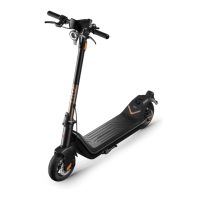
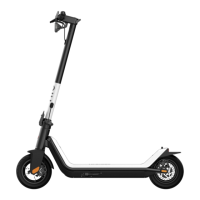
This document serves as the user manual for the NIU Kick Scooter, specifically the KQi2 model. It provides comprehensive instructions for assembly, operation, maintenance, and safety, ensuring users can effectively and safely utilize their kick scooter.
The NIU Kick Scooter is designed as a personal transportation and recreational tool. Its primary function is to provide an efficient and enjoyable way to travel, particularly in urban environments or designated recreational areas. The scooter is equipped with features that prioritize both user convenience and safety.
The scooter's operation begins with a straightforward assembly process. Users are guided to secure the neck tube, open the kickstand, connect the handlebar to the main line connector of the vertical tube, and then install the handlebar. After confirming power functionality, screws are alternately locked on both sides using a hexagon wrench, completing the assembly.
Folding and handling are made simple for portability and storage. To fold, the scooter must be powered off. The user holds the vertical tube, opens the folding wrench, aligns it to the mudguard hook, and hooks the dashboard's hook to the rear end of the body. Unfolding involves pressing the buckle button on the mudguard, separating the hook, straightening the vertical tube, locking the folded plate, and turning the folding wrench back. For transport, the standpipe can be held with one or both hands. Parking is facilitated by turning on the parking device after use.
Charging the scooter is a critical aspect of its usage. The process involves opening the charging port, plugging the charging plug into the body's charging port, and then connecting to a power supply. Once charging is complete, the charging port must be fastened to prevent water intake. Several cautions are highlighted for charging: avoid charging when the port, charger, or socket is wet; turn off power before charging; only use the original Niu charger; do not charge or use a damaged or flooded battery; fasten the rubber plug of the charging port; do not charge outdoors; and do not ride while charging.
The scooter incorporates fast locking and unlocking features, enhancing security and ease of use. To fast lock, the user connects the scooter to the Niu Technologies APP via Bluetooth and activates the fast locking function within the APP. A long press (5 seconds) of the On/Off button locks the scooter, indicated by a lock icon on the meter and a two-times/second flash with an alarm. Unlocking is achieved by a 2-second long press of the On/Off button to start the scooter, followed by clicking the "Unlock" button on the APP interface.
Before riding, the manual emphasizes several precautions. Users must ensure the steering and folding systems are working correctly and components are tightly secured. The wheel axle should be fastened, allowing normal wheel rotation and proper brake system function. Tire pressure should be checked, with a recommended range of 45-50psi. The wear of tires and brake pads should also be inspected, and replacements sought from the dealer if wear is serious. The manual strongly advises wearing a helmet and protectors due to the inherent risk of fall injuries during practice.
The riding process is detailed step-by-step. First, turn on the power and check the power indicator. Then, stand on the pedal with one foot and push off with the other. Once sliding and the speed exceeds 4km/h, stand on the pedal with both feet stable and gently press the throttle twistgrip to accelerate. Deceleration is achieved by releasing the throttle twistgrip, utilizing energy recovery (adjustable via the app). Emergency braking requires a powerful grip on both brake levers. For turning, the body should lean slightly in the desired direction, and the handlebar should be turned slowly.
The scooter's dashboard provides essential information at a glance. It displays Bluetooth status, abnormal temperature warnings, light status, fault warnings, real-time vehicle speed/fault code, battery indicator, riding mode (Eco, Sport, Custom), and pedestrian mode status. Operating keys allow users to turn the device on/off, switch gears, control lights, change speed units, and enter/exit pedestrian mode.
The NIU E-Scooter App is integral to the user experience. Users scan a QR code to install the app, then bind and activate the scooter. The app guides new users through a teaching process, which must be completed before the scooter can be fully utilized. The scooter remains locked in E-save position until all teaching content is completed. The app requires Bluetooth functional version 4.2 or above, iOS system version 9.0 or above, or AndroidTM system version 5.0 or above. After logging in and registering, users power up the scooter, and the Bluetooth icon flashes. Connecting the scooter via Bluetooth makes it beep, and the icon stops flashing, indicating a successful connection. The first account paired becomes the vehicle owner, and changes to mobile connection or account require resetting Bluetooth pairing or unbinding the original account. Once activated through the app, users can start the scooter, check its status, and interact with other riders.
While the manual primarily focuses on usage and safety, it implicitly touches upon maintenance through its "Warnings" and "Troubleshooting" sections (though these specific sections are not detailed in the provided text, their presence in the table of contents suggests their importance). The "Maintenance and Care" section (also indicated in the table of contents) would likely provide explicit instructions for keeping the scooter in optimal condition. However, based on the provided text, the following can be inferred:
Regular checks are crucial for maintenance. Users are advised to check the basic condition of the kick scooter before each ride. This includes inspecting for loose or damaged parts, significant decreases in battery life, flat or excessively worn tires, and abnormal noises or alarms. If any of these issues are found, use should be discontinued, and the scooter should not be ridden forcibly.
The manual also emphasizes the importance of proper packaging. Users are instructed to keep the original product packaging for future returns or repairs. Using non-original packaging may result in responsibility for damage during transportation, additional logistics costs, and other related expenses. This suggests that proper handling and storage, including using original packaging, are considered part of the maintenance and care routine to prevent damage.
Overall, the NIU Kick Scooter is designed for intuitive use, with a strong emphasis on safety and user education through its comprehensive manual and integrated app features.
 General
| Range | 40 km |
|---|---|
| Battery Capacity | 365 Wh |
| Battery | Lithium-ion |
| Max Load | 100 kg |
| Water Resistance | IP54 |
| Top Speed | 28 km/h |
| Motor Power | 300W |
| Brakes | Front Drum Brake; Rear Electric Brake |
| Tires | pneumatic |
| Weight | 44.1 lbs (20 kg) |

 To Next Page