Checking the vertical plane
This procedure should be done after calibration of the horizontal plane.
1. Set the laser centered between the walls distanced from each other of 30 m
2. Turn on the laser level.
3. Place the paper sheets on the walls and mark the position of the laser beam.
4. Turn off the instrument. Set the instrument in vertical position near to one of the walls.
5. Turn on the instrument.
6. Mark the position of the laser beam on the paper sheet. Measure the distance
between the markers
7. Do not change the position of the laser and spin it 180°.
8. Mark the position of the laser beam on the paper sheet. Measure the distance
between the markers
9. If the distance between the markers is less than 3mm calibration is not necesery.
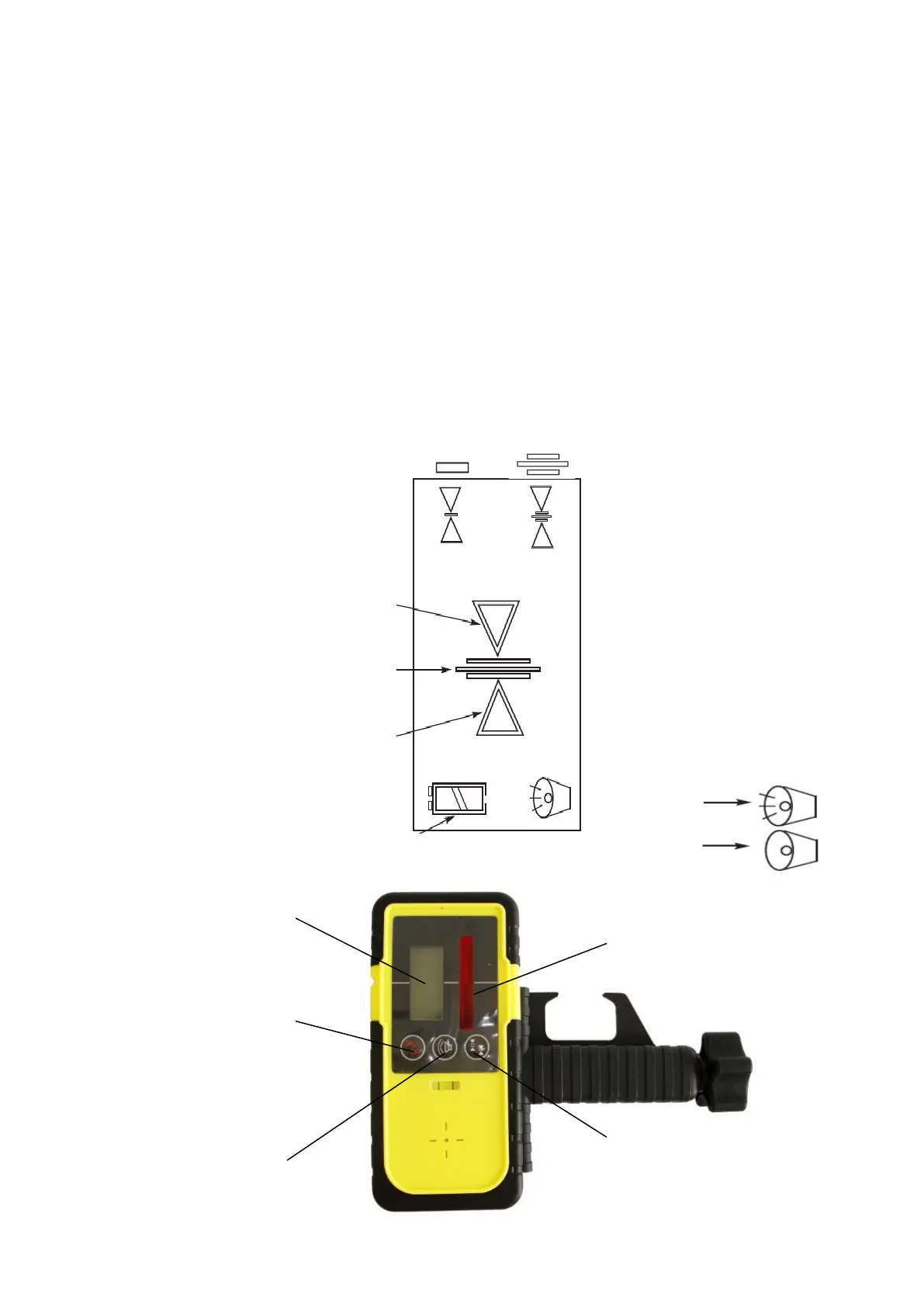
LASER SENSOR RD200
LCD Display Precise mode Coarse mode
Too high,
the laser signal is below
(please Lower the sensor)
- you will hear a high frequency sound
You are in the right position
- you will hear a continuous sound
Too low,
the laser signal is above
- you will hear a high frequency sound
buzzer on:
discharged batteries buzzer off:
Sensor panel
LCD display
laser signal
receiver
ON/OFF button
working mode of a sensor
buzzer


 To Next Page