EasyManua.ls Logo

Nokia 1209 User Instructions

Nokia 1209
2 pages
To Next Page IconTo Next Page
Page #1 background imageLoading...
Page #1 background image
international wireless solutions
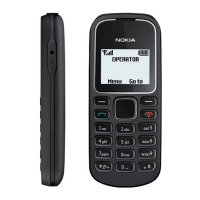
Nokia 1208/1209
CALL KEY
SCROLL
KEY
ChARgER
COnnECtOR
(on bottom)
POWER
On/OFF KEY
& EnD KEY
Nokia1208/1209
User
Instructions
Lost/Stolen Equipment
If your equipment is lost or stolen you must call Cellhire
immediately. All calls made are the responsibility of the
customer until the line is suspended by the network.
24 Hour Technical Support
Cellhire’s Support Center is available
24 hours a day, 7 days week:
Within the US: 1 877 244 7242
Outside the US: +1 214 355 5200
support@cellhire.com
www.cellhire.com/support
Please note: This phone does not work in the US
Your Mobile Number
© 2010 Cellhire USA LLC. All rights reserved. Cellhire is a trademark of Cellhire USA.
All other trademarks are the property of their respective owners.REV 05-18-10 v.1


Other manuals for Nokia 1209

Question and Answer IconNeed help?

Do you have a question about the Nokia 1209 and is the answer not in the manual?

Nokia 1209 Specifications

General IconGeneral
Display TypeCSTN, 65K colors
Resolution96 x 68 pixels
Phonebook200 entries
Battery TypeRemovable Li-Ion 700 mAh battery (BL-5CA)
Talk timeUp to 7 h
Dimensions102 x 44.1 x 17.5 mm (4.02 x 1.74 x 0.69 in)
Network TechnologyGSM
2G bandsGSM 900 / 1800
StatusDiscontinued
SIMMini-SIM
Call records20 dialed, 20 received, 20 missed calls
LoudspeakerYes
3.5mm jackNo
MessagingSMS
GamesYes
JavaNo
Predictive text inputYes
CalculatorYes
RemindersYes
BatteryRemovable Li-Ion 700 mAh battery (BL-5CA)
Internal Memory4 MB
Alert typesVibration; Polyphonic
ColorsBlue
Display Size1.4 inches, 6.2 cm2 (~14.7% screen-to-body ratio)

Related product manuals