Sound Generation
15
▶
Then set the Drive to [ 20.0 dB ].
▶
Press Fold (Shaper A).
▶
Turn the Encoder slowly and play some notes.
▶
Press Asym (Shaper A).
▶
Turn the Encoder slowly and play some notes.
ߊ Fold, Drive and Asym(metry) warp the signal to generate various wavesh-
apes with very dierent harmonic content and timbral results.
▶
Press PM Self (Oscillator A) again.
▶
Turn the Encoder to [ 50.0 % ] and play some notes.
▶
Press PM Self (Oscillator A) again.
▶
Turn the Encoder slowly and play some notes.
ߊ Now you have just fed the Shaper with the self-modulated (resp. saw-
tooth wave) signal instead of a sine wave.
߃
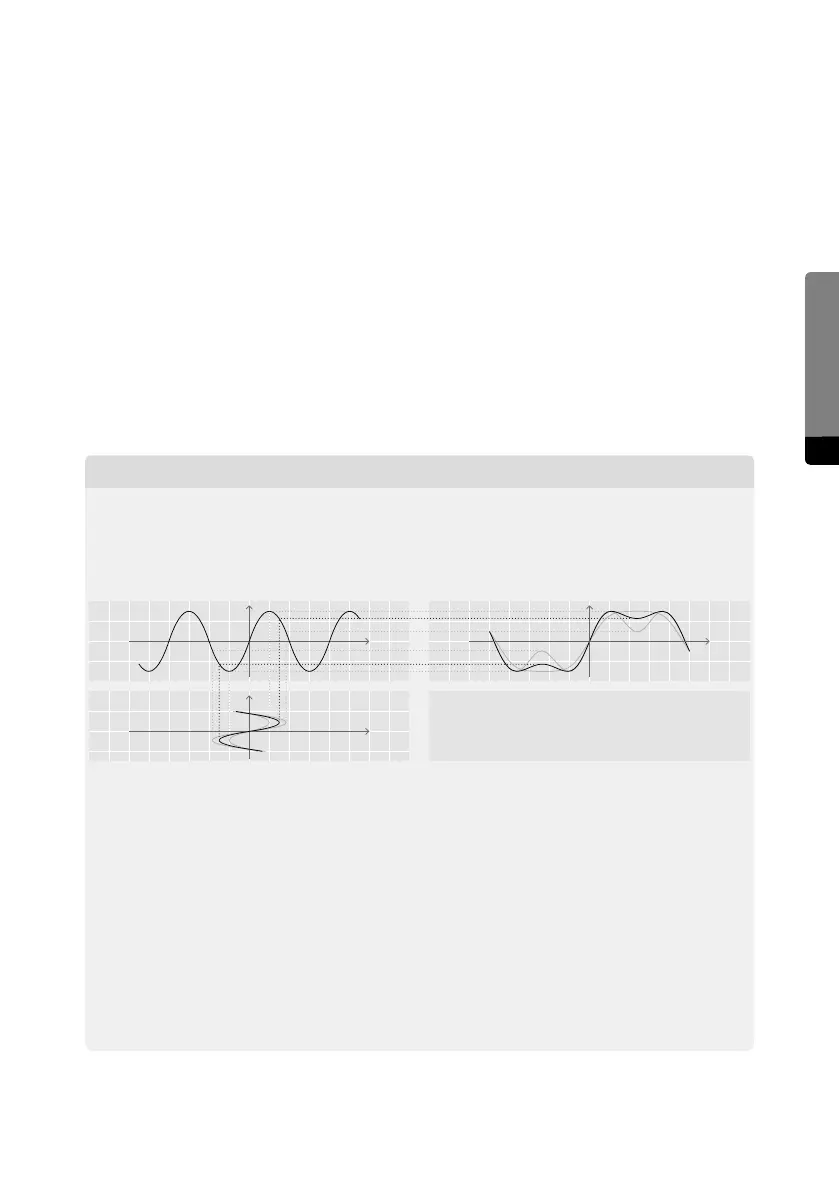
Excursion – what’s that Shaper doing?
In simple words, the Shaper distorts the oscillator signal in various ways. It maps the
input signal to a shaping curve to produce a more complex waveform. Depending on
the settings, a vast range of dierent harmonic spectra can be created.
The Drive parameter controls the intensity of distortion induced by the Shaper and
can produce a vaguely filter-like eect.
The Fold parameter controls the amount of ripples in the waveform. It emphases
some odd harmonics while the fundamental is attenuated. The sound gets some
characteristic “nasal” quality, not unlike a resonating filter.
Asymmetry treats the upper and the lower part of the input signal dierently and
generates even harmonics (2nd, 4th, 6th etc) that way. At high values, the signal is
pitched one octave higher while the fundamental is eliminated.
All three parameters interact with each other, producing countless variations of
distortion curves and resulting waveforms.
Drive: 3.0 dB, 6.0 dB, 8.0 dB
Fold: 100 %
Asymetry: 0 %
t
t
y
x
Input
Output


 To Next Page