2 Parameter Boxes – Display and control
BU 0040 GB-1611 Subject to technical alterations 21
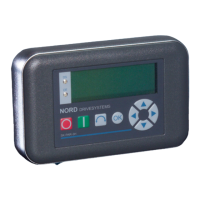
Control with the SimpleBox
The frequency inverter can only be controlled via the SimpleBox, if it has not previously been enabled via the
control terminals or via a serial interface (P509 = 0 and P510 = 0).
As well as this, with the series SK 500E and SK 700E no technology unit (SK TU3-PAR or SK TU1-PAR) may be
plugged into the inverter.
If the "START" key is pressed, the frequency inverter in the operating display changes (selection P001). The
frequency inverter supplies 0Hz or the minimum frequency (P104) or jog frequency (P113) which has been set.
Parameter set display:
The LEDs indicate the actual operating parameter set in the operating display (P000) and the current parameter set
being parameterised (≠ P000). In this case, the display appears in binary form.
The parameter set can also be changed during operation via the parameter P100 (control via SimpleBox).
Frequency setpoint:
The current frequency setpoint depends on the setting in the parameters jog frequency (P113) and minimum
frequency (P104). This value can be altered during keyboard operation with the value keys and permanently
stored in P113 as the jog frequency by pressing the ENTER key.
Parameterisation with the SimpleBox
The parameterisation of the frequency inverter can be performed in the various operating states. All parameters
can always be changed online. Switching to the parameter mode occurs in different ways depending upon the
operating states and the enabling source.
1. If there is no
enable (if necessary, press the STOP key ) via the SimpleBox, the control terminals or a
serial interface, it is still possible to switch to the parameterisation mode directly from the operating value
display with the value keys
or . Æ P 0 _ _ ... P 7 _ _
2. If an enable is present via the control terminals or a serial interface and the frequency inverter is producing
an output frequency, it is also possible to switch to the parameterisation mode directly from the operating
value display using the value keys
or . Æ P 0 _ _ ... P 7 _ _
3. If the inverter is enabled via the ControlBox (START key ), the parameterisation mode can be accessed
by pressing the START and ENTER keys
+ simultaneously.
4. Switching back to the control mode is achieved by pressing the START key .
OK
P1
P2
NORD DRIVESYSTEMS
O
SK CSX-3H
STOP
(no enable)
START
(enable)
Rotation
direction reversal
Store current
frequency
Increase or
decrease frequency
Parameter set display
P set No.. P1 P2
1 Off Off
2 On Off
3 Off On
4 On On


 To Next Page
 Loading...