2 Parameter Boxes – Display and control
BU 0040 GB-1611 Subject to technical alterations 27
Control of the inverter
The speed and direction of rotation of the inverter can be fully controlled via the ParameterBox. Different settings
are necessary according to the inverter series.
Series Parameter setting (P509) Comments
SK 200E {0} "Control terminal or keyboard"
Control with the ParameterBox is only possible if no enable has been carried out via
the control terminals.
(The interface which is used first has priority.)
SK 300E {0} "Control terminal or keyboard"
Control with the ParameterBox is only possible if no enable has been carried out via
the control terminals.
(The interface which is used first has priority.)
SK 500E {2} "USS"
No further control via the control terminals or the keyboard of a plugged in technology
unit is possible.
SK 700E {4} "USS"
No further control via the control terminals or the keyboard of a plugged in technology
unit is possible.
SK 750E {4} "USS"
No further control via the control terminals or the keyboard of a plugged in technology
unit is possible.
Vector mc {0} "Control terminal or keyboard"
Control with the ParameterBox is only possible if no enable has been carried out via
the control terminals.
(The interface which is used first has priority.)
Note: If the frequency inverter is enabled in this mode, then the parameter set selected for this frequency
inverter in the Menu >Parameterisation< >Basic parameters< in the >Parameter set< parameter
(P100) is used. After changing the parameter set during operation, this must be activated with the
buttons
or . However, it is safer to carry out the switchover at a standstill.
Attention: Following the START command, the frequency inverter may start up immediately with a pre-
programmed frequency (minimum frequency P104 or jog frequency P113).
DS
DE
NORD DRIVESYSTEMS
O
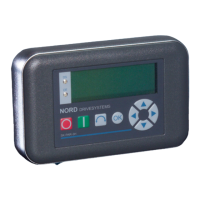
SK PAR-3H
STOP
(no enable)
START
(enable)
Rotation direction
reversal
Store current
frequency
Increase or
decrease frequency
No function
SK PAR 2H / SK PAR 2E
Keyboard functions identical with SK PAR-3H
vector
R
DS DE
SK PAR 3H
SK PAR 2H/2E
O


 To Next Page
 Loading...