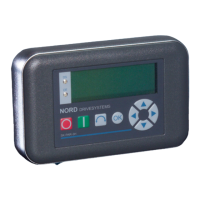
2 Parameter Boxes – Display and control
BU 0040 GB-1611 Subject to technical alterations 19
P1
P2
P1
P2
P1
P2
P1
P2
2.2 Functions of the Parameter Boxes
2.2.1 SimpleBox
2.2.1.1 Display
After connection of the SimpleBox and switching on the mains voltage (or the 24V DC control voltage) of the
frequency inverter, communication between the frequency inverter and the SimpleBox commences automatically.
After brief illumination of all he display segments and diodes of the box a
bus scan is carried out while the middle bars of the display (4-digit, 7-
segment display) may flash rapidly.
If the bus scan is completed successfully, the frequency inverter power
appears briefly in the display (e.g.: 0.37 = 0.37 KW). This step is skipped if
the SimpleBox is connected to a frequency inverter which is already in
operation.
The horizontal bars which then appear in the display indicate that the
frequency inverter is ready for operation.
If a jog frequency value is pre-set in parameter P113, or a minimum
frequency is pre-set in P104, the display flashes with this initial value.
If the frequency inverter is enabled, the display changes automatically to the operating value selected in parameter
>Selection Display value< P001 (factory setting = current frequency).
The actual parameter set is shown by the 2 LEDs next to the display on the left in binary code.
After the frequency inverter is switched off, an "OFF" appears briefly in the
display before the display is completely switched off.
"OFF" is also shown in the display if the SimpleBox is operated via an
external 24V control voltage, although the power supply (230V or 400V) is
inactive.
In this state, almost unrestricted parameterisation
of the inverter (no measurement of motor resistance or
parameter identification is possible (P208 / P220)) can be carried out as described in the following section.
However, control (enabling) is not possible due to the lack of the power supply.
NOTE
The digital frequency setpoint is factory set to 0Hz. To check whether the motor is working, a
frequency setpoint must be entered with the or keys or a jog frequency via the respective
parameter >Jog frequency< (P113).
Settings should only be implemented by qualified personnel, strictly in accordance with the
warning and safety information.
ATTENTION: The motor may start immediately after pressing the START key
!



 To Next Page
 Loading...