

EasyManua.ls Logo

Nordic DELTACO ARM-1102 - User Manual

Nordic DELTACO ARM-1102
12 pages
Print Icon
To Next Page IconTo Next Page
Loading...
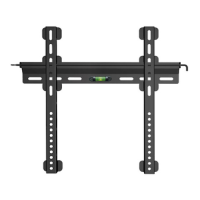
Fixed TV wall mount
ARM-1102
A N O R D I C B R A N D
ENG User manual
SPA Manual del usuario
SWE Användarmanual
FIN Käyttöopas
DAN Brugermanual
HUN Felhasználói kézikönyv
NOR Brukermanual
LIT Naudojimo instrukcija
LAV Lietošanas pamācība
EST Kasutusjuhend
DEU Benutzerhandbuchl
FRA Manuel d’utilisation
POL Instrukcja obsługi
NLD Gebruiksaanwijzing
M U L T I M E D I A
Question and Answer IconNeed help?

Do you have a question about the Nordic DELTACO ARM-1102 and is the answer not in the manual?

Overview

This document describes the Deltaco ARM-1102 Fixed TV Wall Mount, a product designed to securely attach a television to a wall. The manual provides instructions for installation and usage in multiple languages, including Danish, German, English, Estonian, Finnish, French, Hungarian, Latvian, Lithuanian, Dutch, Norwegian, Polish, Spanish, and Swedish.

Function Description

The Deltaco ARM-1102 is a fixed TV wall mount, meaning it holds the television in a static position once installed, without options for tilt, swivel, or extension. Its primary function is to provide a stable and secure mounting solution for televisions, freeing up floor space and offering a clean, wall-mounted aesthetic. The mount is designed for indoor use only and is suitable for installation on wooden stud walls, solid concrete walls, or brick walls. It is crucial to ensure that the mounting surface can safely support the combined weight of the equipment, hardware, and components.

Important Technical Specifications

The wall mount itself has a maximum width of 450mm and a maximum height of 440mm. The TV mounting brackets are adjustable to accommodate various VESA patterns. The horizontal adjustment range for the TV mounting brackets is from a minimum of 68mm to a maximum of 420mm. The vertical adjustment range for the TV mounting brackets is from a minimum of 58mm to a maximum of 410mm.

The package includes various screws and components for installation:

  • Wall Plate Components:
    • (x2) Horizontal wall plates
    • (x1) Level
    • (x1) Drill template
  • Mounting Hardware (M-series):
    • M5x14 (x4) screws (M-A)
    • M6x14 (x4) screws (M-B)
    • M6x30 (x4) screws (M-C)
    • M8x30 (x4) screws (M-D)
    • M8x50 (x4) screws (M-E)
    • Washers (x4) (M-F)
    • Spacers (x4) (M-G)
    • Spacers (x8) (M-H)
  • Wall Mounting Hardware (W-series):
    • (x2) Wall anchors (W-A)
    • (x2) Wall screws (W-B)
    • (x2) Washers (W-C)

The manual explicitly states a maximum weight capacity for the mount. Exceeding this weight can lead to instability, serious injury, or property damage. Users must not overtighten the mounting screws during installation.

Usage Features

The installation process is divided into several steps:

  1. Wall Plate Installation (Two Options):

    • Option 1a (Wooden Stud Wall):
      • Locate a wooden stud using a stud finder.
      • Place the drill template on the wall, ensuring it is level.
      • Mark the drilling points.
      • Drill pilot holes with a 4.5mm (ø 0.18") drill bit to a depth of 55mm (2.2").
      • Attach the wall plates to the wall using the W-B screws and W-C washers. Do not use wall anchors (W-A) for wooden studs.
    • Option 1b (Solid Concrete/Brick Wall):
      • Place the drill template on the wall, ensuring it is level.
      • Mark the drilling points.
      • Drill pilot holes with a 10mm (ø 0.39") drill bit to a depth of 60mm (2.4").
      • Insert the W-A wall anchors into the drilled holes.
      • Attach the wall plates to the wall using the W-B screws and W-C washers, screwing them into the wall anchors.
  2. Attaching TV Brackets to the TV (Two Options based on TV back panel):

    • Option 2a (Flat Back Panel):
      • Choose the appropriate M-A or M-B screws and M-F washers that fit your TV's VESA mounting holes.
      • Attach the TV brackets to the back of the TV using these screws and washers. Ensure the brackets are oriented correctly (indicated by arrows in the diagram).
    • Option 2b (Curved/Irregular Back Panel or Recessed Holes):
      • Choose the appropriate M-C, M-D, or M-E screws, M-F washers, and M-G or M-H spacers that fit your TV's VESA mounting holes and accommodate the back panel design.
      • Attach the TV brackets to the back of the TV using these components. Ensure the brackets are oriented correctly.
  3. Mounting the TV to the Wall Plate:

    • Carefully lift the TV with the attached brackets.
    • Hook the TV brackets onto the installed wall plates.
    • Ensure the TV is securely seated on the wall plates.

Maintenance Features

The manual emphasizes the importance of regular checks to ensure the wall mount remains secure and safe for use. It recommends checking the wall mount at least every three months. This involves verifying that all screws are tight and that the mount is still firmly attached to the wall. If any parts are missing or faulty, users are instructed to contact Deltaco or the retailer where the product was purchased.
Nordic DELTACO ARM-1102 Specifications

General IconGeneral
BrandNordic
ModelDELTACO ARM-1102
CategoryTV Mount
LanguageEnglish