Need help?
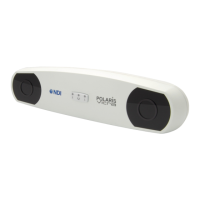
Do you have a question about the Northern Digital Passive Polaris Vega and is the answer not in the manual?
 General
| Tracking Technology | Optical |
|---|---|
| Accuracy | 0.25 mm RMS |
| Update Rate | 60 Hz |
| Operating Volume | Up to 20 m3 |
| Tracking Volume | Up to 20 m3 |
| Interface | USB |
| Compatible Tools | Tools with passive retro-reflective markers |
Provides an overview of the system, its components, and how it works.
Details the ethernet connection for multiple Position Sensors and Power over Ethernet (PoE).
Specifies the minimum hardware and OS requirements for the host computer.
Describes the main component for tracking position and orientation of markers.
Details environmental conditions and warnings for safe and proper system operation.
Step-by-step guide for connecting the system components, including warnings.
Describes the NDI ToolBox software for configuration, upgrade, and troubleshooting.
Guides users through setting up the system to track tools using NDI ToolBox.
Details the process of finding the tool tip offset using pivoting or a calibrator.
Defines the system's coordinate system and the characterized measurement volumes.
Explains how markers are detected and how tools are acquired and tracked.
Describes how reference tools establish a coordinate system for tracking other tools.
Details the internal bump sensor, its detection, and how it affects system operation.
Describes the optional laser for indicating the center of the measurement volume.
Covers enabling video streaming via RTSP protocol and using media players like VLC or GStreamer.
Provides instructions for cleaning the Position Sensor's filters and lenses using specific solutions.
Describes methods to adjust IR sensitivity using ToolBox or API commands.
Details procedures for checking calibration and using the Accuracy Assessment Kit.
Instructions on downloading and updating the system's firmware using NDI ToolBox.
Lists the operating temperature, humidity, and pressure ranges for the system.
Provides detailed technical specifications for the Position Sensor, including dimensions and power.
Declares electromagnetic emissions compliance and provides guidance for the environment.
Details electromagnetic immunity test levels and environmental guidance.
Covers FCC and Industry Canada compliance statements for radio frequency emissions.
Explains the meaning of power and error LEDs on the Position Sensor for status indication.
Addresses specific issues like tools being partially out of volume or not tracking.
Details the process for returning equipment for repair, including RMA and shipping instructions.
Outlines the hardware and software warranty terms, conditions, and exclusions.
 To Next Page