ENGLISH
9
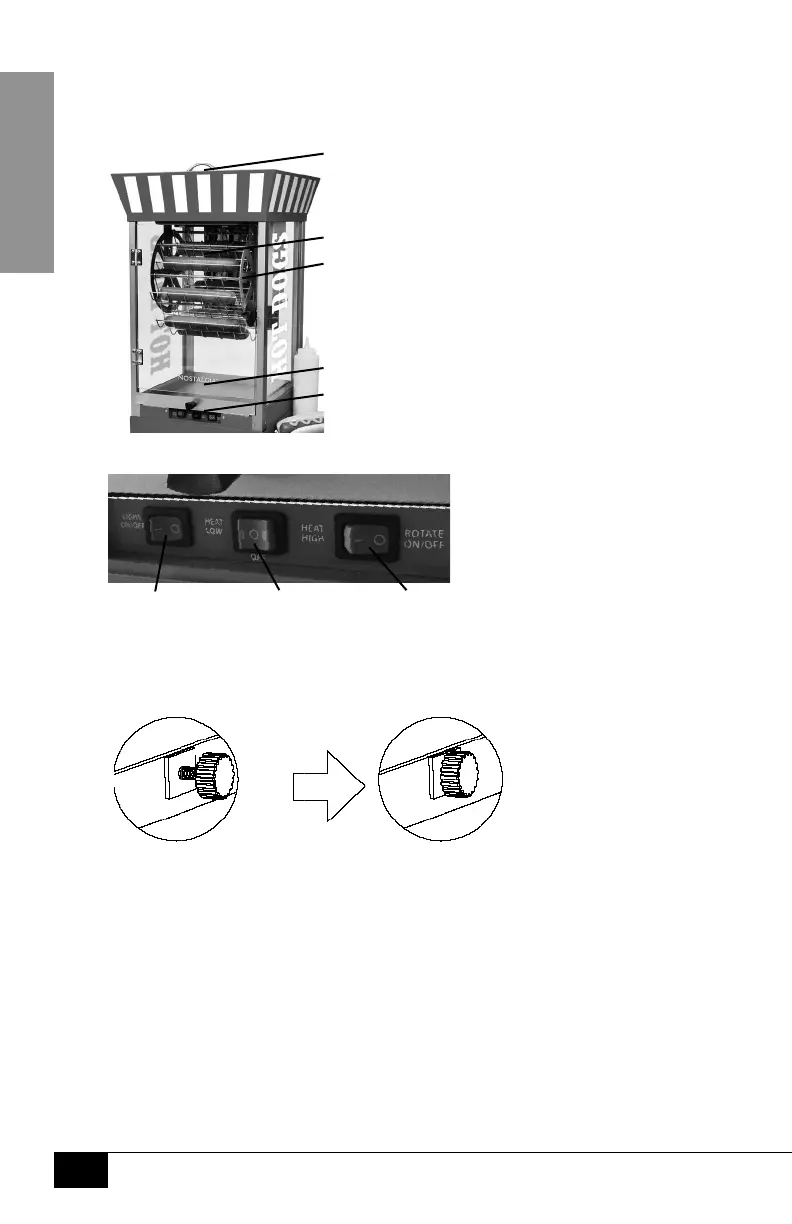
Assembly of Main Unit
Carefully guide the Carousel into the brackets located on the sides of the interior
of the main unit. Hang the Carousel Cradles on the crossbars of the Carousel.
Warming Compartment
Carousel Cradle (Qty. 8)
Carousel
Drip Tray
Control Switches
Control Switches
Power Light:
ON/OFF
Rotate:
ON/OFF
Heat:
LOW/OFF/HIGH
Locking Main Unit to Storage Compartment
Place the Main Unit (A) onto the Storage Compartment (B) so that the two side
holes match up. Lock by tightening the Lock Screws as shown below:
Attaching the Tray Handle
Using included screwdriver (N) attach tray handle (O) to
outside of tray with the included screw (P).



 To Next Page