3.3. Temperature measurement
When not enter any setting interface, the white center
point on the screen represents the temperature value of
the point, and the numerical value is displayed in the
lower left corner of the screen; the red dot represents the
maximum temperature of the whole screen, and the
numerical value is displayed in the upper left corner.
The green dot represents the lowest temperature of the
whole screen, and the numerical value is displayed under
the right color board, shown as right side.
3.4. Photography
When not enter any setting interface, press trigger key
p keyto saveand press keyto give up.
interface. Press
to enter
the
Unit: •
photography
3.8. Document management
P
Before enter any interface, press to select file management, and then you can view
pictures option and view video option; select the object to view and enter the interface; if
there is no content, prompt no content and return.
to view other pictures or videos In the picture viewing state, press the
trigger key, you can switch the display Of the corresponding visible light image.
In the video viewing state, press the trigger key to play or pause the video.Press
to
enter the delete current picture option or delete current video option; continue to press
to delete, and press to cancel.
4. More settings
4.1. Language switching
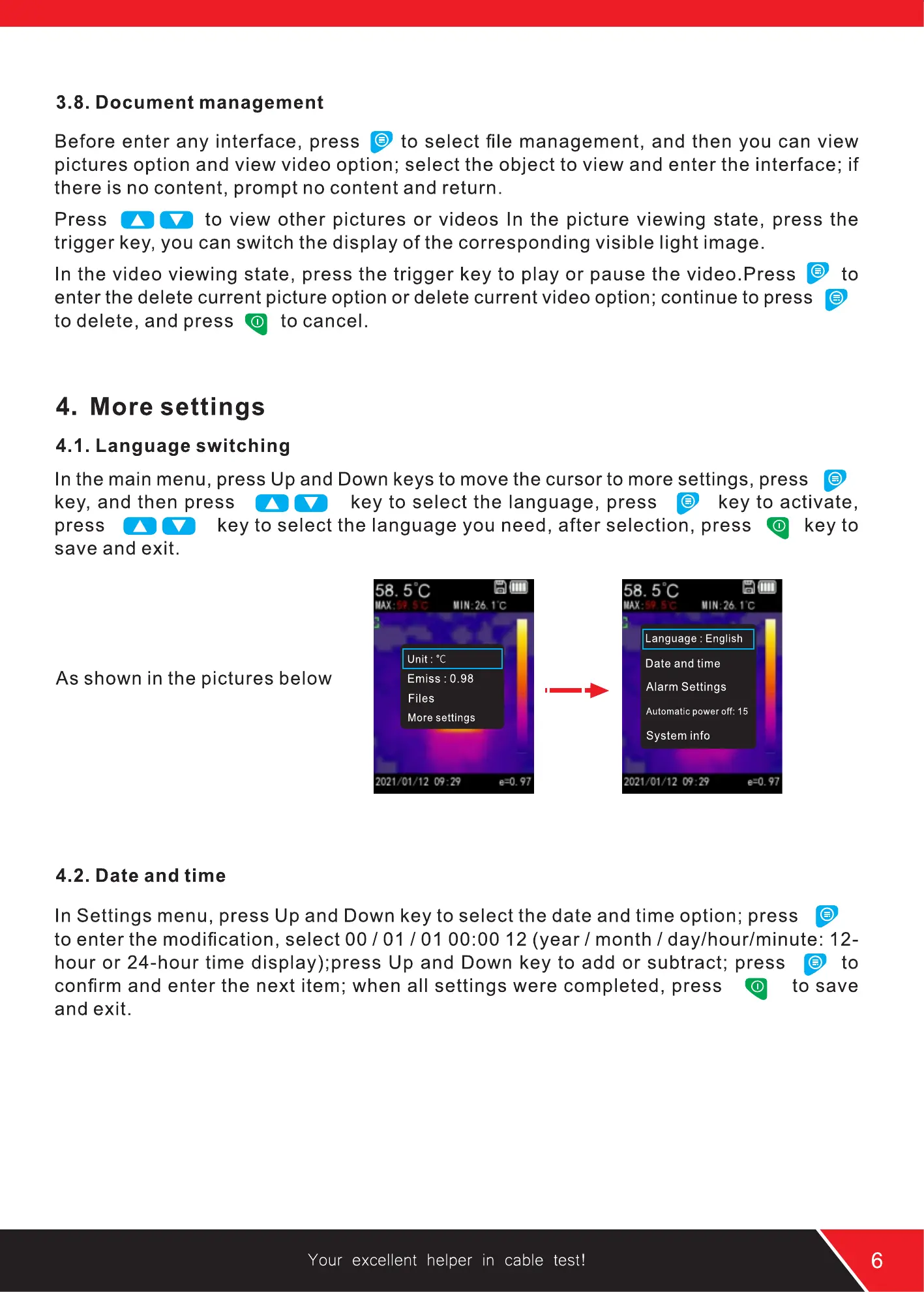
In the main menu, press Up and Down keys to move the cursor to more settings, press
key, and then press key to select the language, press key to activate,
press key to select the language you need, after selection, press key to
3.5. Unit switching
P
When the device system is on,press key,press
P
to select the unit, press key to activate, press
to adjust the unit value, and press key to exit.
The unit includes: OC/OF/K.
3.6. Reflectivity
O Okey
Emiss
Files
More settings
Menu
save and exit.
As shown in the pictures below
4.2. Date and time
unit:oc
Em,ss
Files
0.28
Language : English
Oate and time
Alarm Settings
System info
It represents the thermal reflectivity of the surface of the object. When measuring different
objects, the numerical value should be adjusted to the corresponding reflectivity, so the
temperature measurement will be accurate.
When the system is on, press key, press key to select emissivity , press
key to activate, press key to adjust emissivity, and press key to exit.
Emissivity: O. 1-1 .O adjustable.
3.7. Shutter spacing
The large interval shutter can make the image clear and the temperature measurement
accurate. Industrial temperature measurement interval is generally 3 minutes;
temperature measurement interval is generally 1 minute.
Your excellent helper in cable test!
In Settings menu, press Up and Down key to select the date and time option; press
to enter the modification, select 00 / 01 / 01 00:00 12 (year / month / day/hour/minute: 12-
hour or 24-hour time display);press Up and Down key to add or subtract; press
to
confirm and enter the next item; when all settings were completed, press to save
and exit.
Your excellent helper in cable test!


 To Next Page
 Loading...