5
Introduction
How to Read this Manual
The XL2 push buttons are displayed as icons
, , ,
, , , , , . A detailed description of the push buttons
is listed in the chapter “Overview - Buttons and operating ele-
ments”.
Menu items displayed on the XL2 page screens are shown in
this user manual by a bold font, e.g., SLMeter, Parameter, ...
1. Introduction
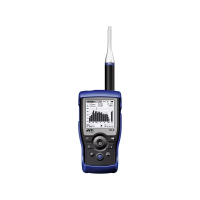
Thank you for purchasing the XL2 Audio and Acoustic Analyzer.
The XL2 Analyzer forms the unique combination of a state-of-
the-art Sound Level Meter, a comprehensive Acoustic Analyzer
as well as a powerful Audio Analyzer. The wide range of func-
tionalities is tailored for:
Live Sound •
Installed Sound•
Environmental Noise•
PA Hire•
Broadcast •
AVI-Installation •
Cinemas•
Building Acoustics•
Occupational Health•
Quality Control•
Vehicle Noise Inspection •
R&D and Service•
Education and Training •


 To Next Page