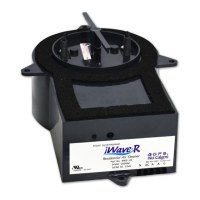
WARNING
1. The health aspects associated with the use of this product and its ability to aid in disinfection of environmental air
have not been investigated by UL LLC.
2. This product shall not be installed behind a suspended floor/ceiling or a structural wall, ceiling, or floor.
3. This product is suitable for mounting to duct of metallic Construction only. Installation must be such that the structural
integrity of the ducting is not compromised.
4. RISK OF ELECTRIC SHOCK. CAN CAUSE INJURY OR DEATH: DISCONNECT All ELECTRIC POWER SUPPLIES
BEFORE SERVICING
Limited Warranty:
The iWave-C is warranted for three years and covers any defects in material or workmanship under normal use. If during
the warranty period a claim is made, the product will be replaced. GPS’ warranty does not cover labor, return shipping
charges, damage from connecting the unit to the wrong voltage, or improper iWave-C installation in system. See GPS’
standard warranty, terms and conditions available at www.nucalgon.com for further information. Contact your local
Nu-Calgon account manager with further questions.
Operation:
Once powered, the unit initiates an internal check of all systems. After initializing, the display will blink between “On”,
“GPS” and the number of days the unit has been powered. If there is a fault, the unit display will show “FALT”.
Cleaning Cycle — The iWave-C comes with a preset cleaning cycle designed to clean the brushes every 5 days. At any
time, the cleaning cycle test button on the front panel may be pushed and the unit will initiate a cleaning cycle. While the
cleaning cycle is engaged, the display will change to “CLEA”. To change the cycle frequency, hold the cleaning cycle
button in for 5 seconds once the display shows “CLEA” and then press it until you see the number of days you want it to
wait between cycles, 1, 5, 10 and 20. Most applications will never require reprogramming.
Maintenance:
The iWave-C is designed to be maintenance free for years of trouble-free operation with the patent pending self-cleaning
system; eliminating the need to replace expensive UV lights/cells every couple of years as with competing technologies.
Although extensively tested for durability, it’s possible over years of self-cleaning cycles, the carbon fiber brushes can
wear from friction and require replacement. With the unit powered off, remove the iWave-C from the duct. Remove the
two Phillips screws that fasten the brushes to the iWave-C. Pull the brushes out of the electrical connector and insert
new brushes (available through Nu-Calgon). Replace the Phillips screws and attach the iWave-C into the duct and re-
energize the device to initiate normal operation.
Troubleshooting:
Problem Solution
Unit won’t power up Confirm proper voltage is applied and to the correct terminal
Display shows “FALT” Remove power, wait one minute and reapply power. If “FALT” still appears, try using alternate
power source, i.e. low voltage input versus high voltage input or vice versa. If FALT still
shows, call Nu-Calgon.
No Display / LED
If the correct voltage source has been confirmed and the unit does not power up contact Nu-Calgon.
2008 Altom Ct. • St. Louis, MO 63146 • 800-554-5499 • www.nucalgon.com
Calgon is a licensed trade name • (517) 4-410


 To Previous Page
 Loading...