EasyManua.ls Logo

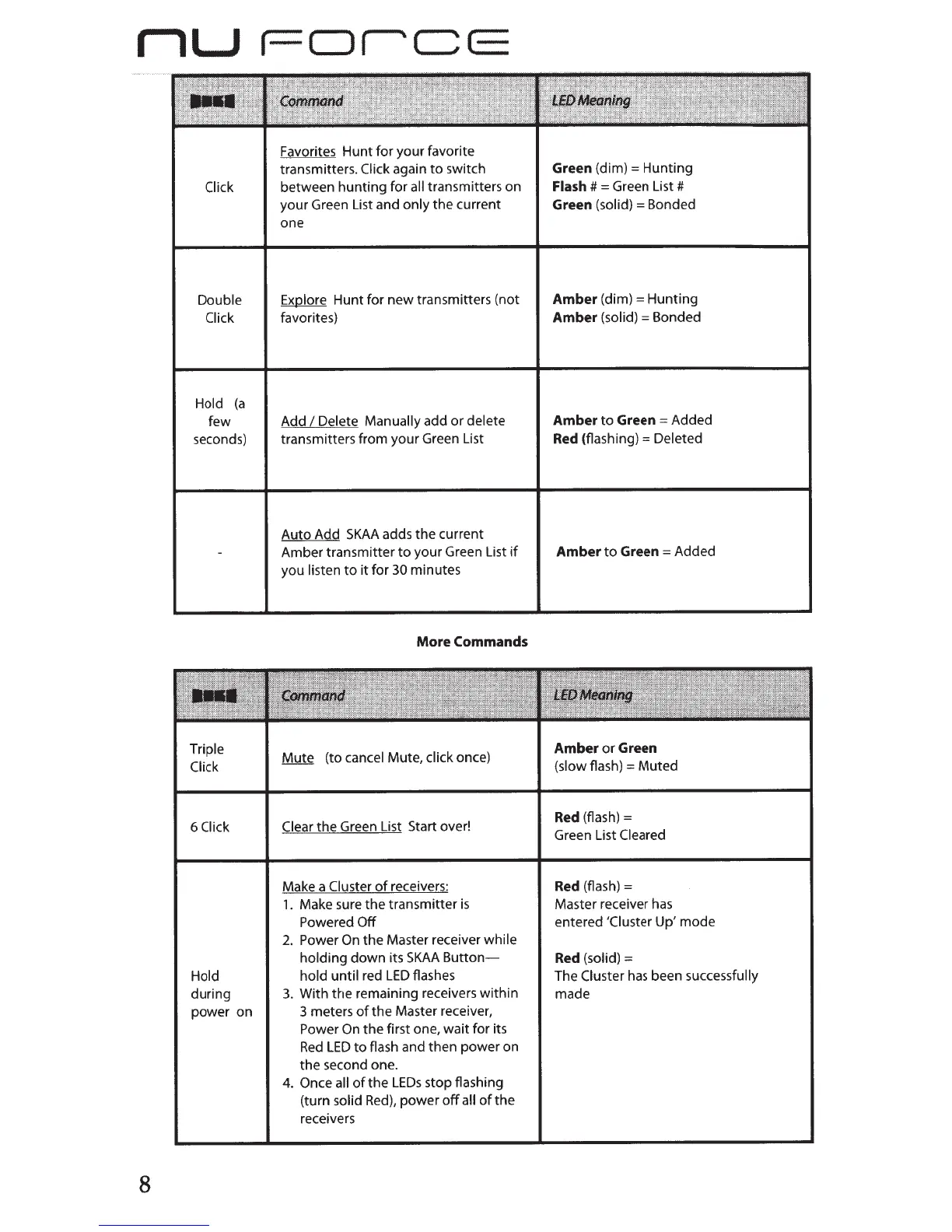
NuForce AirDAC/TX - SKAA Button Commands and LED Meanings

NuForce AirDAC/TX
17 pages
Print Icon
To Next Page IconTo Next Page
To Previous Page IconTo Previous Page
Loading...
rlU
I-DICE
8
Click
Double
Click
Hold
(a
few
seconds)
Triple
Click
6Ciick
Hold
during
power on
Favorites Hunt for your favorite
transmitters.
Click
again
to
switch
between hunting for
all
transmitters on
your Green List and only
the
current
one
Explore
Hunt for new transmitters (not
favorites)
Add
I
Delete Manually
add
or
delete
transmitters from your Green List
Auto Add
SKAA
adds
the
current
Amber transmitter
to
your Green List
if
you
listen
to
it
for
30
minutes
More
Commands
Mute
(to
cancel
Mute,
click
once)
Clear
the Green List Start over!
Make a Cluster
of
receivers:
1.
Make sure
the
transmitter
is
Powered
Off
2.
Power
On
the Master receiver
while
holding
down
its
SKAA
Button-
hold until
red
LED
flashes
3.
With the remaining receivers
within
3 meters
of
the
Master receiver,
Power
On
the
first one, wait for its
Red
LED
to
flash and then power on
the
second one.
4.
Once all
of
the
LEOs
stop flashing
(turn
solid
Red),
power
off
all
of
the
receivers
Green
(dim)=
Hunting
Flash
#
=
Green List#
Green
(solid)= Bonded
Amber
(dim)
=
Hunting
Amber
(solid)=
Bonded
Amber to Green
=
Added
Red
(flashing)=
Deleted
Amber to Green
=
Added
Amber or Green
(slow
flash)
= Muted
Red (flash)
=
Green List
Cleared
Red
(flash)
=
Master receiver
has
entered
'Cluster
Up' mode
Red
(solid)
=
The
Cluster
has
been successfully
made