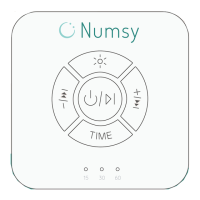
On/o
Press and hold the power button
for 0.5 sec. Play a sound of your
choice. Pause sound by briey
pressing the same on/o button.
LED breathing light
Optional button to train sleep
breathing. Start with a cycle of 10
minutes to 0. When the light gets
brighter it means breathing calmly.
When the strength of the light
decreases it means breathing out
calmly. The timer function works in
conjunction with the breathing light.
Previous sound & Volume -
Use this button to go back to a
previous song. Volume decrease
is easily adjustable by holding the
button of previous sound longer.
Next sound & Volume +
Use this button to go back to the
next song. Volume up is easily
adjustable by holding down the
button of the next sound longer.
Timer
First press is 15 minutes, second
press is 30 minutes and third
press is 60 minutes playback
time. Default setting is 14 hours of
playback. Timer is accompanied by
breathing light.
Timing indicator
No lights means continuous play
mode, 15 minutes rst light, 30
minutes rst two lights, 60 minutes
all lights.
Amber light
Amber colored breathing light
which is even more soothing for
sleeping.
1
3
4
2
7
6
5


 To Next Page
 Loading...