3
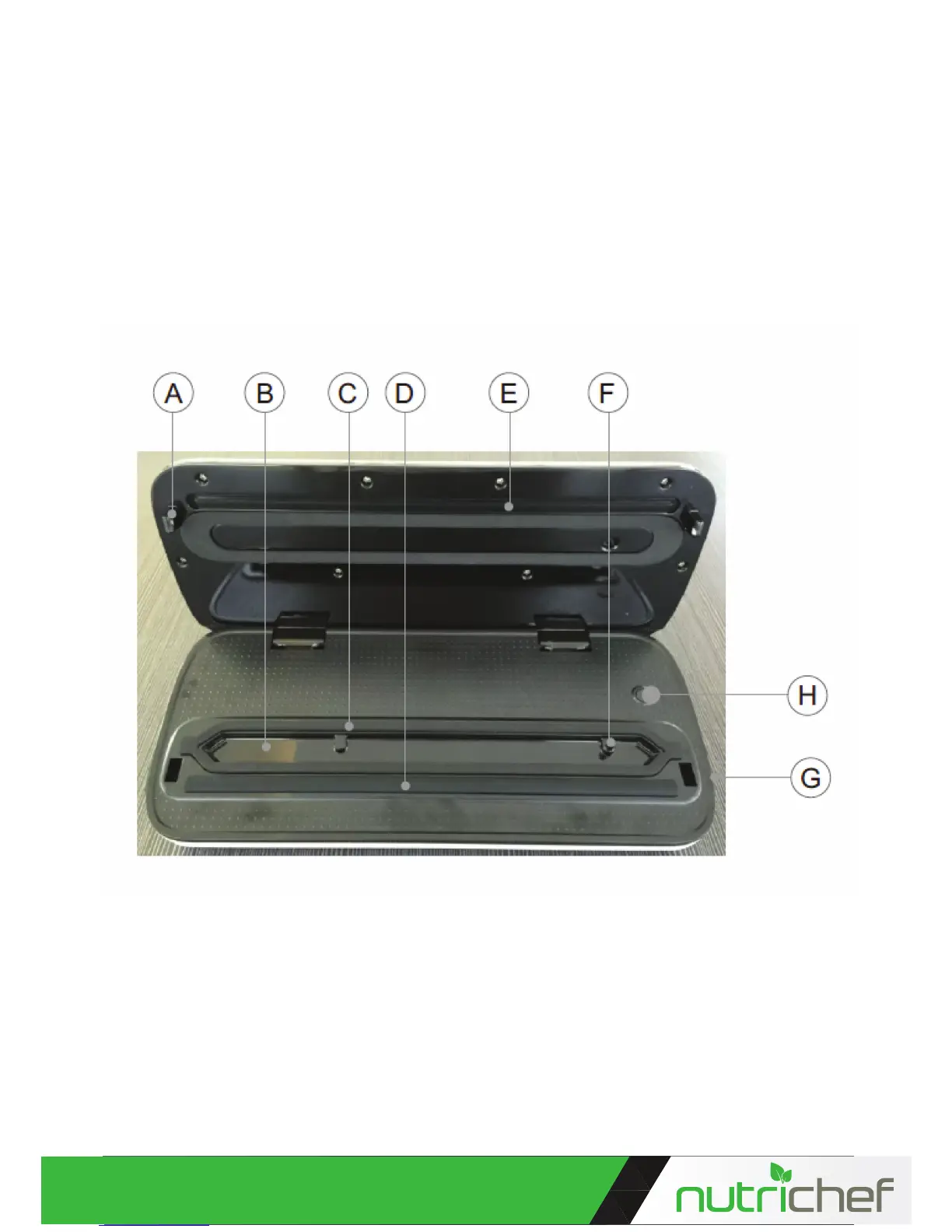
A. Locking Hook Press the cover down until it clicks to lock the bag into place.
B. Vacuum Chamber The bag must be placed within the vacuum chamber for the vacuum.
C. Lower gasket Air proof the vacuum area and prevent leaking for the vacuum
D. Rubber Lip make seal at
E. Sealing Bar 3mm width sealing bar make good seal
F. Vacuum nozzle When pumping external vacuum canister, wine stopper or other accessories, insert the
hose into the nozzle. Do not block the the nozzle when use
G. Release button Press the release buttons at two sides, then open the appliance and take out the
sealed food
H. Canister button: Press this button, the appliance begins to vacuum package the canister until the pro-
cess is completed. ( Note: This function is used together with the Emiliya canister )
1. ”Vac/Seal”button: Press this bottom to vacuum and seal bag (intervals for 40 seconds is recommended
each time)
2. ”Seal”button( with LED): Press this button to seal bag (intervals for 40 seconds is recommended each
time)
3. ”Food”button: it has two setting mode( Dry and Moist). The default mode is Dry, when you press the
button, it change to Moist model.
You can choose the model according to the food type.
4. ”Mode” button: it has two setting mode( Normal and Gentle). The default mode is Normal. When the
food is crumbly, you can press the button, then the vacuum mode is changed to Gentle. You can manually
control the degree of vacuum by pressing “Seal” button at any time, the food will be sealed automatically.
(Note: if the power is interrupted,
this setting will return to a preset standard mode).
5. ”Stop” button: allow user to stop working anytime


 To Next Page