EasyManua.ls Logo

Nvidia 3D VISION - Page 98

Nvidia 3D VISION
122 pages
Print Icon
To Next Page IconTo Next Page
To Previous Page IconTo Previous Page
Loading...
NVIDIA
已經過測試,並提供設定檔給許多熱門遊戲,確保
這些遊戲能與
3D Vision
搭配使用。所有經過測試的遊戲
都會依照相容性評比詳列於
NVIDIA Control Panel
中。
如欲開啟
NVIDIA Control Panel
,請於桌面按下滑鼠右鍵,選
擇
NVIDIA Control Panel
;亦可按下開始
› NVIDIA Corporation ›
NVIDIA Control Panel
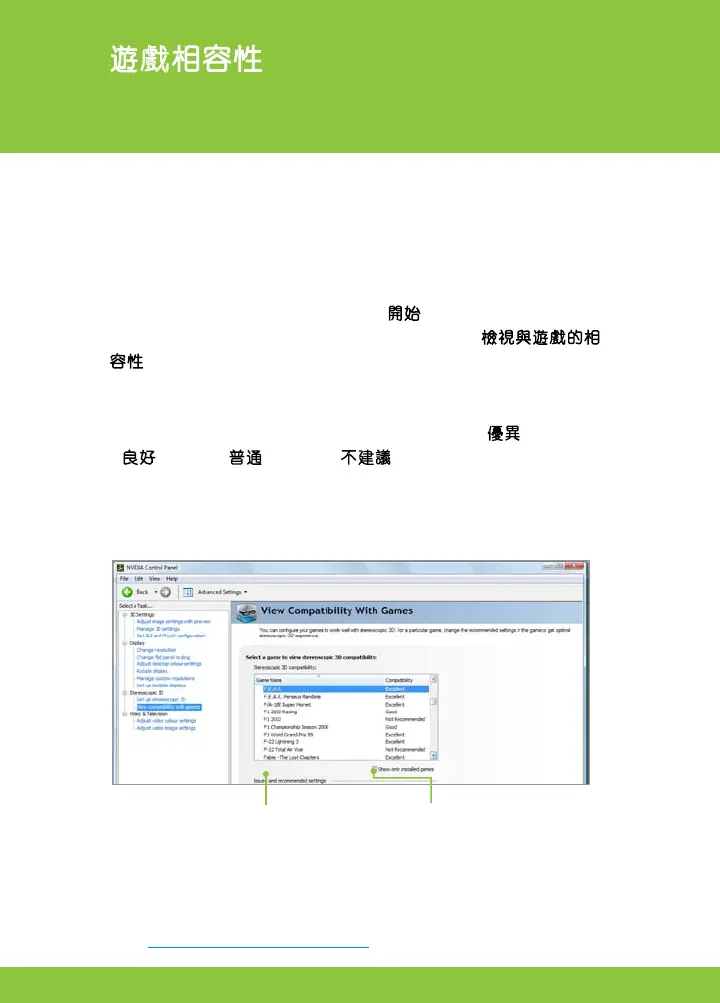
。請於左邊的窗格中選擇檢視與遊戲的相
容性(
View compatibility with games
),此選項會顯示所有
NVIDIA
使用
Stereoscopic 3D
軟體來進行測試的遊戲清單,每
個遊戲都會按照在
Stereoscopic 3D
的運作情況,以及遊戲中是
否有會干擾
3D Vision
使用體驗的問題,而得到優異
(
Excellent
)
、良好
(
Good
)、普通
(
Fair
)
或不建議
(
Not Recommended
)
的評
分。您必須遵守
NVIDIA
提出的「問題及建議設定」內容,才
能以最佳品質來觀看遊戲。若未遵守這些設定值,可能會無
法以
Stereoscopic 3D
畫面來執行遊戲,或顯示圖形偽影。
勾選此核選方塊,僅查看那些在
您的系統上載入的遊戲;若取消勾
選,則會列出所有
NVIDIA
測試的
遊戲。
針對在清單中選擇的遊戲,顯示建議的
設定值。使用快速鍵 Ctrl+Alt+Insert 即
可於遊戲的畫面上重疊顯示資訊。
05
遊戲相容性
NVIDIA 會持續更新支援遊戲的清單。
請至
www.nvidia.com.tw/3dvision
,以取得最新的遊戲清單。

Other manuals for Nvidia 3D VISION

Related product manuals