6
7
Hardware Installation
If you are installing additional RTX 2080 SUPER graphics cards for an NVLink
configuration, continue with step 6. If you are only installing one GeForce
card, go on to step 7.
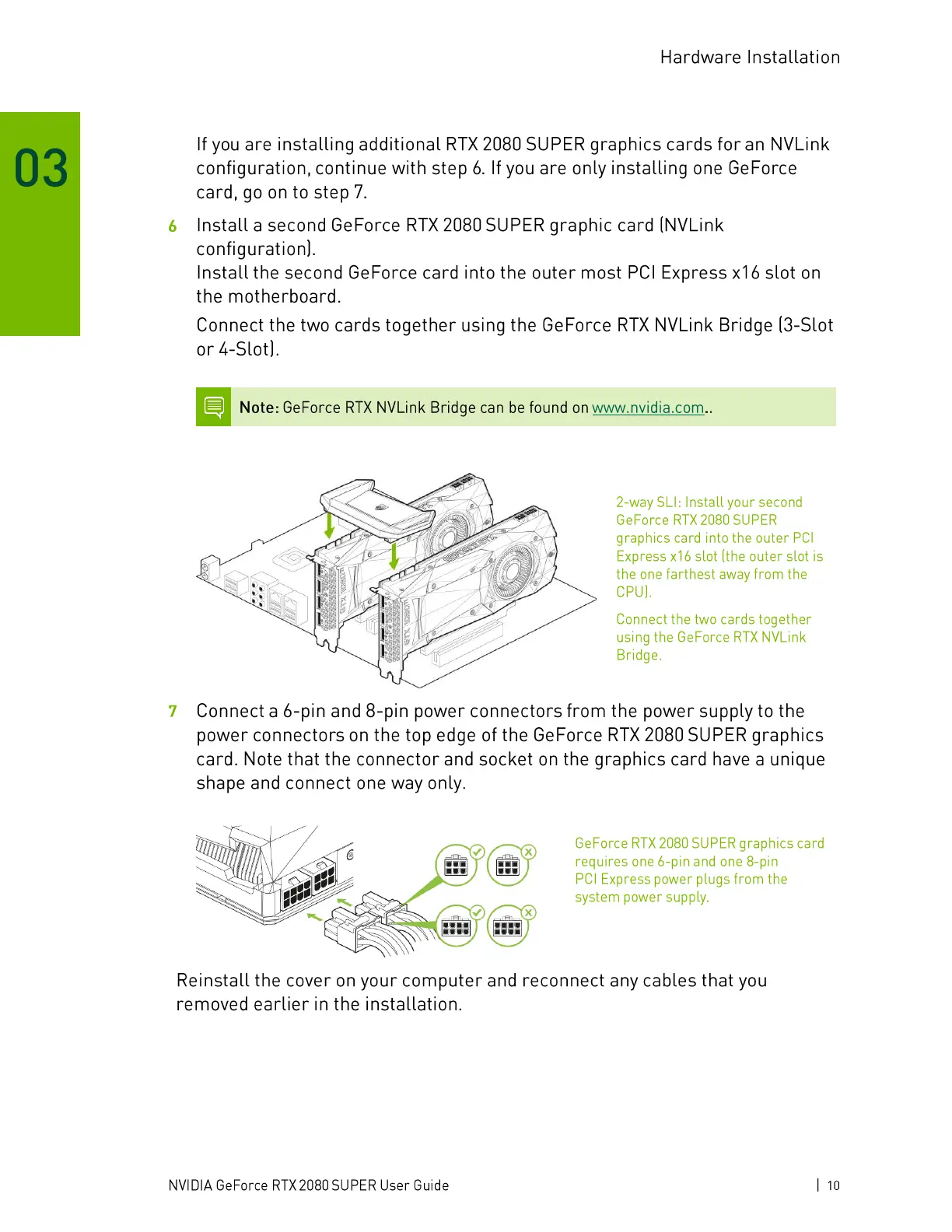
Install a second GeForce RTX 2080 SUPER graphic card (NVLink
configuration).
Install the second GeForce card into the outer most PCl Express x 16 slot on
the motherboard.
Connect the two cards together using the GeForce RTX NVLink Bridge (3-Slot
or 4-Slot).
Note: GeForce RTX NVLink Bridge can be found on www.nvidia.com..
1
2-way SLI: Install your second
GeForce RTX 2080 SUPER
graphics card into the outer PCl
Express x16slot (the outer slot is
the one farthest away from the
CPU).
Connect the two cards together
using the GeForce RTX NVLink
Bridge.
Connect a 6-pin and 8-pin power connectors from the power supply to the
power connectors on the top edge of the GeForce RTX 2080 SUPER graphics
card. Note that the connector and socket on the graphics card have a unique
shape and connect one way only.
x
GeForce RTX 2080 SUPER graphics card
requires one 6-pin and one 8-pin
PCI Express power plugs from the
system power supply.
Reinstall the cover on your computer and reconnect any cables that you
removed earlier in the installation.
NVIDIA GeForce RTX 2080 SUPER User Guide
1 10





 To Next Page