17
SETTING UP CAPSULE MINI
STEP 3
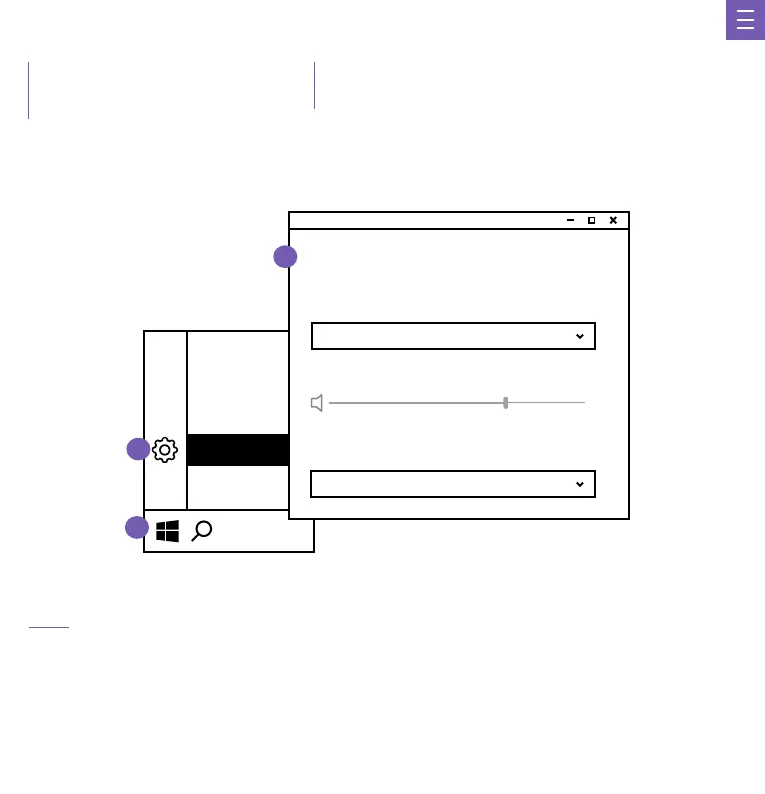
• Open your sound preferences or right click the audio icon located at the bottom of the task bar.
• Click on the "Playback devices" selection.
• Select "Speakers" or (Output). Underneath the speaker icon should read "NZXT MINI USB MIC"
• Select "Default Device"
• Click on the "Recording" (or Input) tab.
• Click on "Default Communication Device" • Select "NZXT MINI USB MIC”
CHANGE THE AUDIO SETTING
Settings
1
2
Sound
Output
Input
Choose your output device
HEADPHONES (NZXT MINI USB MIC)
Choose your input device
NZXT MINI USB MIC
Volume
60
3
INSTALACIÓN DEL CAPSULE MINI
CONFIGURATION DU CAPSULE MINI
EINRICHTEN DES CAPSULE MINI
CONFIGURAZIONE DI CAPSULE MINI
CONFIGURAR O CAPSULE MINI
캡슐 미니 설정
CAPSULE MINIの セ ット アップ
设置迷你胶囊麦克风
設置迷你膠囊麥克風



 To Next Page