09
SETTING UP THE SWITCHMIX
STEP 1
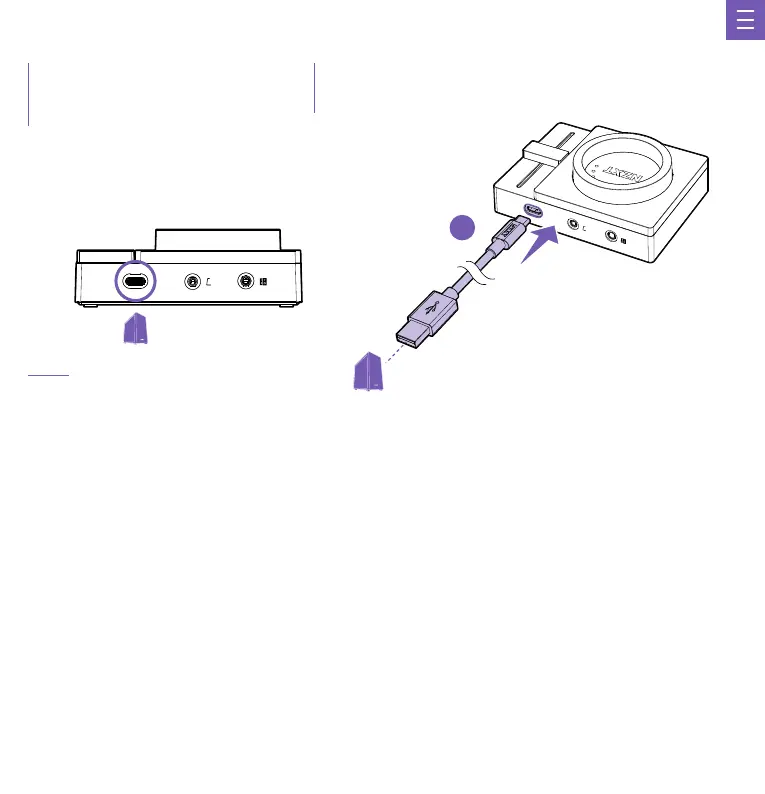
CONNECT MICRO USB INTO THE USB INPUT ON YOUR PC
The SWITCHMIX comes with a USB-C cable that connects directly to the USB input on your PC. This will utilize a 24-bit/96kHz DAC to achieve
high-quality digital to analog to conversion.
Plugging the cable into the PC will provide power to the unit. The unit will turn on and automatically begin installing the SWITCHMIX.
IMPORTANT: Keep the USB cable fully inserted and seated into the connector on the back of the Mixer for proper operation.
CONECTA EL MICRO USB A LA ENTRADA USB DE TU PC
SWITCHMIX viene con un cable USB-C que se conecta directamente a la entrada USB de tu PC. Utiliza un DAC de 24 bits/96 kHz para
conseguir una conversión digital-analógica de alta calidad.
Al conectar el cable en el PC, se suministrará energía a la unidad. Se encenderá la unidad y comenzará a instalar automáticamente el SWITCHMIX.
IMPORTANTE: Para que el dispositivo funcione correctamente, mantén el cable USB completamente insertado y asentado en el conector de la
parte trasera del mezclador.
BRANCHER LE MICRO USB SUR L'ENTRÉE USB DE VOTRE PC
Le SWITCHMIX est accompagné d'un câble USB-C qui se branche directement sur le port USB de votre PC. Il utilise un convertisseur
numérique-analogique 24 bits/96 kHz pour effectuer une conversion numérique vers analogique de grande qualité.
Le branchement du câble sur le PC alimentera l'appareil. L'appareil s'allumera et commencera à installer automatiquement le SWITCHMIX.
IMPORTANT: Assurez-vous que le câble USB est entièrement inséré dans le connecteur à l'arrière du mélangeur pour que tout fonctionne correctement.
MICRO-USB AN DEN USB-EINGANG AM PC ANSCHLIESSEN
Der SWITCHMIX wird mit einem USB-C-Kabel geliefert, das direkt an den USB-Anschluss des PCs angeschlossen wird. Dabei wird ein
24-bit/96-kHz-DAC verwendet, um eine hochwertige Digital-Analog-Wandlung zu erreichen.
Durch das Anschließen des Kabels an den PC wird das Gerät mit Strom versorgt. Das Gerät schaltet sich ein und startet automatisch die
Installation des SWITCHMIX.
WICHTIG: Für einen ordnungsgemäßen Betrieb muss das USB-Kabel vollständig in den Anschluss auf der Rückseite des Mixers eingesetzt sein.
C
CONFIGURACIÓN DEL SWITCHMIX
CONFIGURATION DU SWITCHMIX
EINRICHTEN DES SWITCHMIX
CONFIGURAZIONE DELLO SWITCHMIX
CONFIGURAR O SWITCHMIX
SWITCHMIX 설정
SWITCHMIXの セ ット アッ プ
设置 SWITCHMIX
設置 SWITCHMIX


 To Next Page
 Loading...