8.3 Distance
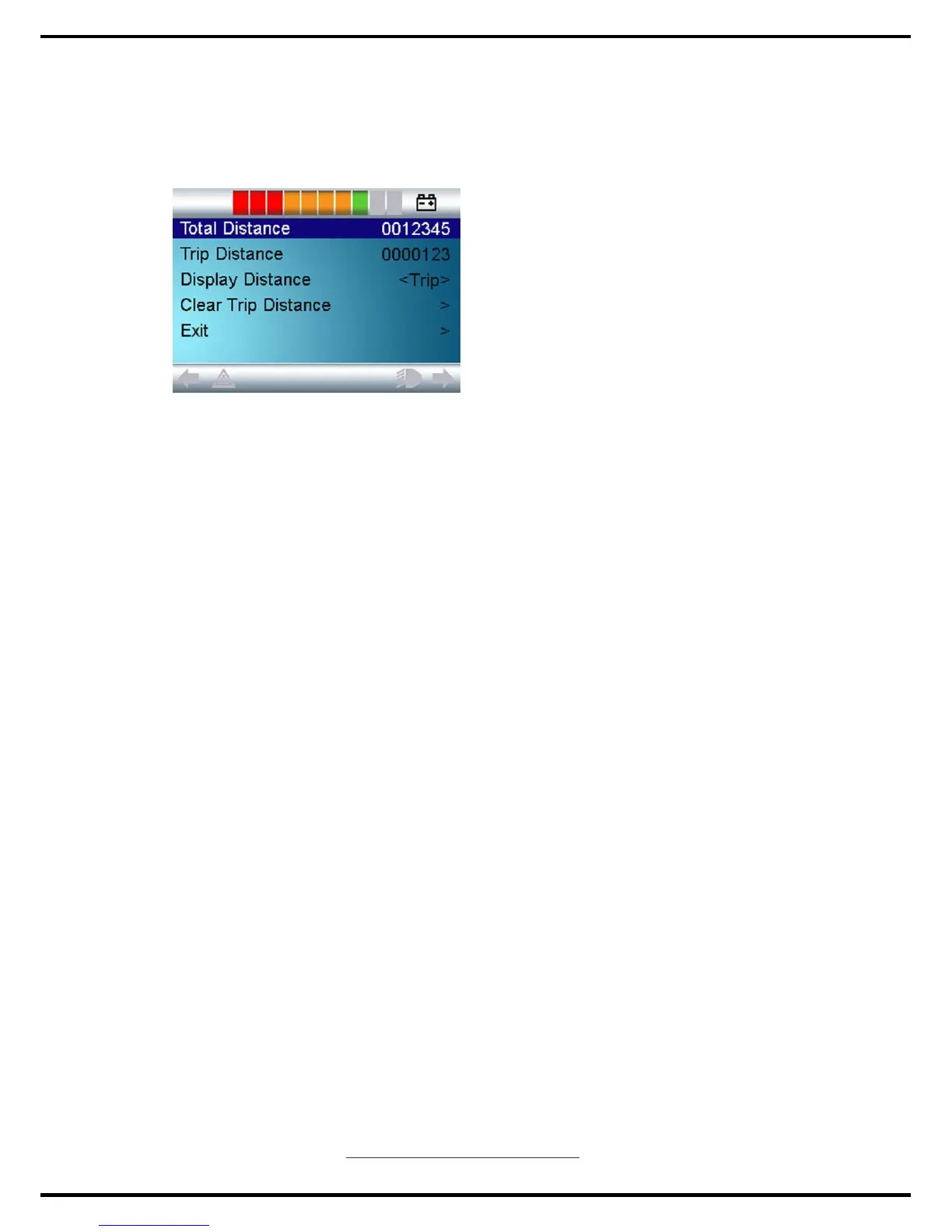
This sets the functionality of the odometer and a screen as below will appear.
Total Distance This is a value held in the Power Module and relates to
the total distance driven using that Power Module.
Trip Distance This is a value held in the CJSM and relates to the total
distance driven since the last reset.
Display Distance Sets whether Total Distance or Trip Distance appears as
the odometer display on the CJSM.
Clear Trip Distance A right joystick deflection will clear the Trip Distance
value.
Exit A right joystick deflection will return to the Settings Menu.
8.4 Backlight
This sets the intensity of the LCD backlight.
The adjustable range is 0% to 100% in steps of 10%. Adjustments are made
with left and right joystick deflections.
8.5 Background
This sets the color of the screen background. Blue is the standard, but in very
bright sunlight then a white background will make the display more visible.
The options are Blue, White and Auto. Left and right joystick deflections are
used to change between the options.
Blue means the background will be blue in al Profiles.
White means the background will be white in all Profiles.
Auto means the color will be set by the programmable parameter, Background,
which can be set to be different across the Profiles. For example, blue for the
slower Profiles that are for indoor use and white for the faster Profiles intended
www.observer-mobilityproduct.com
17


 To Next Page