ODYSTrendbook14–Quickstart
V1.1.0
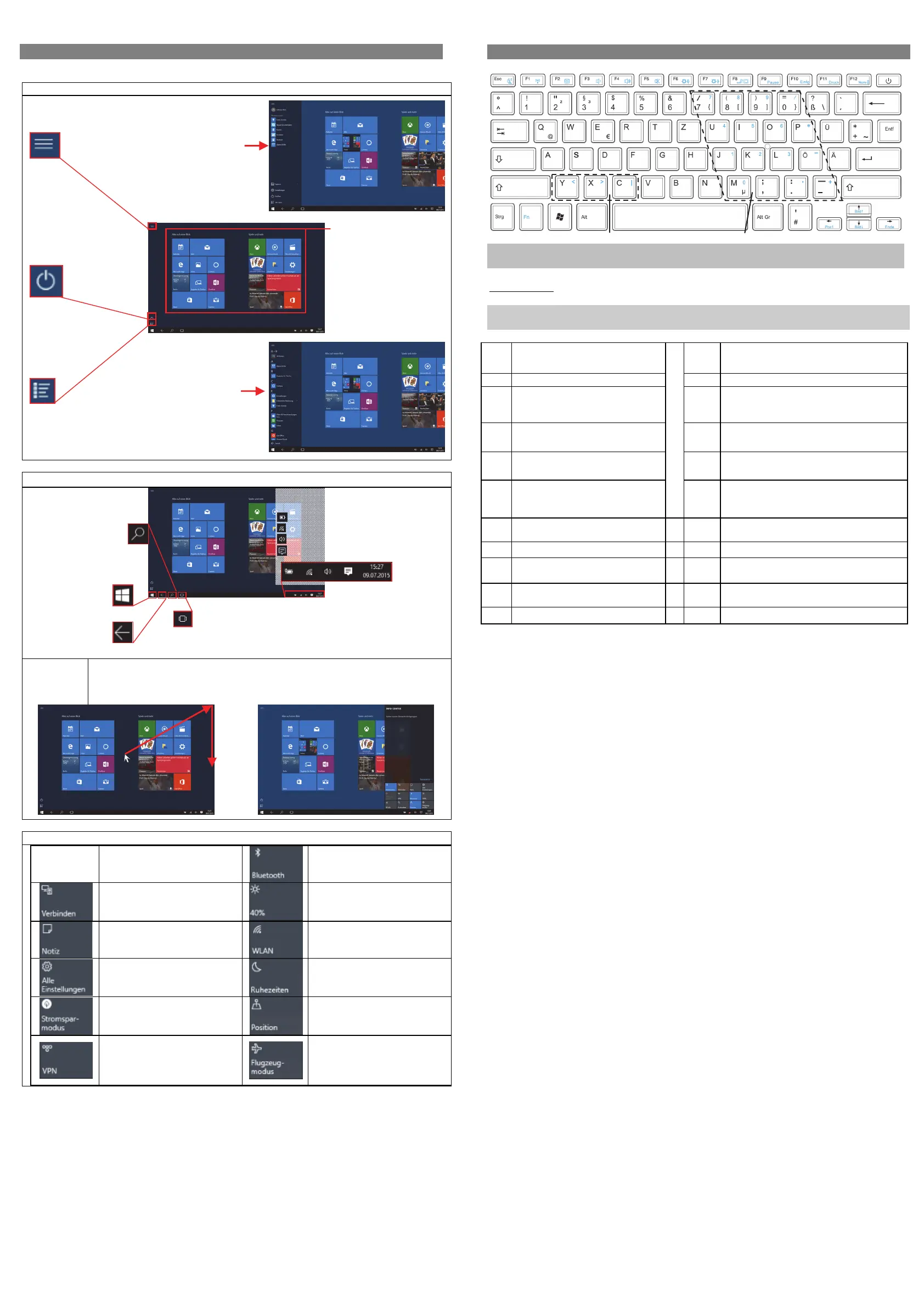
Homescreen
Oncestarted,theStart‐Screenwillbedisplayed.Theindividualiconsofferquickaccesstotherespected
application.
StartScreenElements
ElementsontheTaskbar
FunctionBar
Movethemousecursortotheupperrightcorneranddragitdownwardstoopenthefunction
barlikethis.
Hereyoumayfindimportantinformationandsettings.Alternatively,clickingtheappropriate
iconontheTaskbarwillalsoaccessthismenu.
ElementsoftheFunctions‐Bar
EnableordisableBluetooth
Bluetoothconnectionswith
otherdevices
Adjustthemonitorbrightness
OpenstheNoteProgram„One
Note“.
EnableorDisableWLAN
AccessSystemSettings
Enabledefinedrestperiods
Enableordisablepowersaving
mode
Positioningonoroff
SetandenableVPNconnections
ActivateAirplaneMode
Attention!
Allwirelessconnectionswillbe
disabled.
Usingthekeyboard
Note:
Whenthedisplayoverlapsonthekeyboard,thedisplaywillbeturnedoff.
Keyboardparts
Note:Somekeyshaveseveraldifferentassignments!
Importantkeycombinationscanbefoundatthechartbelow.
(1) Fn+Esc:Turnscreenoff/on
(12) Fn+F11:Print
(2) Fn+F1:Activateairplanemode (13) Fn+F12:ToactivatetheNumLock.
(3) Fn+F2:Lock/unlocktouchpad (14) On/OffKey
(4) Fn+F3:Decreasethevolume (15) FnFunctionkey
(5) Fn+F4:Increasethevolume (16) WindowsKey
(6) Fn+F5:Mute (17)
Fn+ytoinput<
Fn+xtoinput>
Fn+ctoinput|
(7) Fn+F6:Decreasethebrightness
(18) Numerickeypadwhenacti ve
(8) Fn+F7:Increasethebrightness
(19) Fn+:Movetothetopofthepage
(9) Fn+F8:Togglescreen
(20)
Fn+
:Pageup
Fn+:Pagedown
(10) Fn+F9:Pause
(21) Fn+:Movetotheendofthepage
(11) Fn+F10:Insert
Search
Usethesearchboxtosearch
theinternetforcertain
termsortoeasilylocate
devicesettingsand
installedApplications.
Windows‐Key
Usedtoreturnto
thestartmenu.
Back
Returntoprevious
view
ClickthisicontodisplayallopenedAppssidebyside.The
activeAppmayalsobedisplayedasthefirstwindowinthe
list
Notice:Thisfunctionisnotavailablewhennoapplications
arerunning
Importantsettingsandbackground
processesmaybefoundhere.
Batterystatusandsettings
DisplayandWirelessNetwork(Wi‐Fi)settings
VolumeSettings
OpenstheFunctions‐Bar(seebelow)
ProgramList:
Clickthisicontolistallinstalled
APPsinalphabeticalorderonthe
leftedgeoffthedisplay.
StartMenu
Clickthemenuiconwillopenthestart
menu.Hereyouwillfinduser
information,lastuseddocumentsand
linkstothefileexplorerandsystem
settings.
Start
displayss hutdownoptions
Tiles
offerquickaccesstoits
correspondingAPP.The
appearancemaybeadapted
tosuiteyoupersonalneeds
orprolonged.
1 2 3 4 5 6 7
8 9 10
11 12
15
17
16
19 20 21
18
13
14



 To Previous Page
 Loading...