English
11
ECO FUNCTION
Use the Eco function to save energy and set the temperature to a lower
value.
The function can be activated by pressing ECO.
The set Eco temperature can be changed with keys and . Change
the setting while the value is ashing. Press the ECO key, to change to
time setting. Keys and are used to set the time period for the ECO
mode. The value is ashing during setting. Press the ECO or key again
to return to the basic display.
When Eco function is on, the settings can be checked or changed by
pressing keys or .
The Eco function can be turned o before the set time is over by pres-
sing ECO key again.
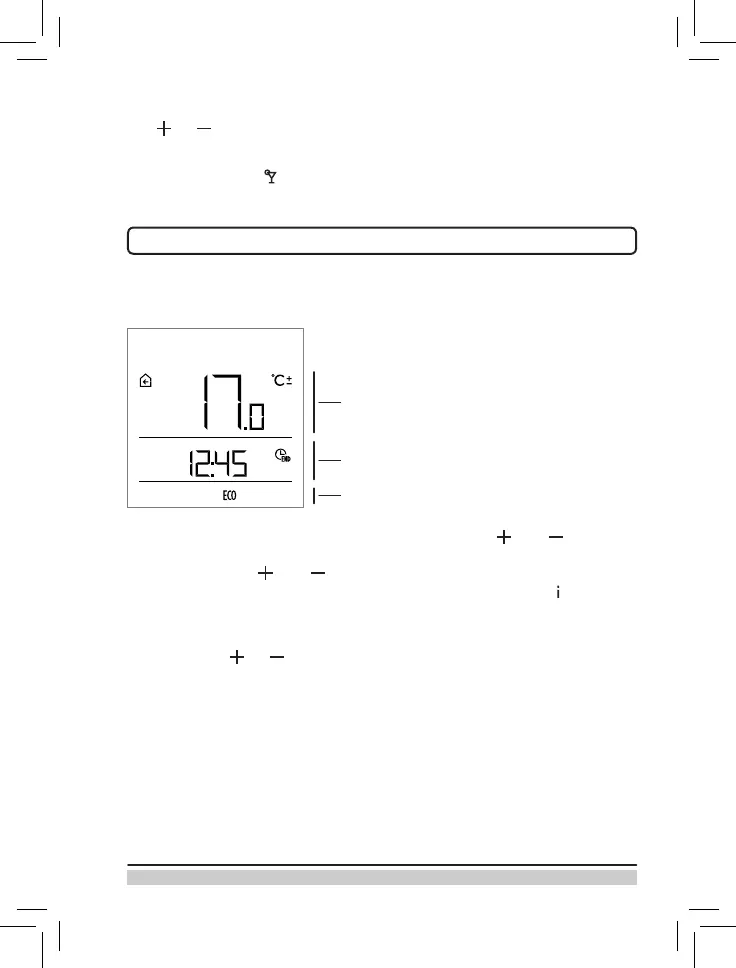
Set Eco temperature
Time when Eco function expires
Eco function display
When the Party function is on, the settings can be changed by pressing
key or .
The party function can be turned o before before the set time by pres-
sing again the key again.


 To Next Page
 Loading...