CONTENTS
Condensed Instructions ........................................................ 1
Proof
Channel Background .
..
............................................... .2
Skyscreen JII Background ...........................
..
....................... .3
Program Switches ............................
..
...
..
.............................. 4
Metric Velocities ......
..
...............................................
..
......... .5
Skyscreen Mounting ........................
..
.................................... 6
Actual Chronographing ........................................................ 8
Printer Output .................................................................... 10
Summary ..................... ........................................................
11
Banery .....................
..
..................
..
.....................................
12
Edit Mode ...........................................................................
13
Printer Paper ......................................................................
14
In Case
ofTrouble
.............................................................. 15
Glints ..............................................................
..
........
..
...
..
...
17
Orange Diffusers Can't Always Help ................................. 18
Subsonic Velocities ............................................................. 1 8
Bows ...................................................................................
19
Shotguns ...................................
..
........................
..
.............. 19
Indoor Shooting .......
..
......................................................... 19
Downrange Velocities .............................................
....
....
..
. .20
Muzzle Velocities
from
Instrumental ..........
.... ..
..................
20
Wounded Skyscreens ............
..
............................................ .20
Standard Deviation
and
Load Development ..................... .21
Carrying Case ...................................................................
.25
Specifications ..................................................................... .26
Warranty ............................................................................ .29
Oehler Research, Inc.
Post Office Box 9135
Austin, Texas
78766
Telephone
512/327·6900
FAX
512/327·6903
sales@oehler-research.com
Copyright 1991,
2010
PROOF CHANNEL TM, PROOF CHRONOGRAPH
1M
and GLINT PROOF""
are trademarks
of
Oehler
Research,
Incorporated.
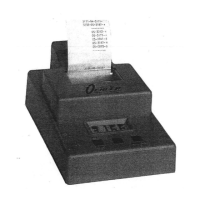
Take your Model 35P to the range, set it up, and shoot.
If
everything doesn't
work perfectly, you can then read the instructions.
Some read only this. first
page, but the rest
of
the book
will
help you get better results. We
try
to cram
forty·plus years
of
chronograph experience and the essence
of
thousands
of
conversations with users into this little book. Thank you for buying
our
product; we look forward to hearing from you.
CONDENSED INSTRUCTIONS
-+
Mount the sky screens on the rail. Use the dimples to get the correct
spacing.
Use thumbscrew with ntiddle screen.
-+
Remove bolt and place rifle on rest.
Aim
at downrange target.
-+
Place the fIrst stand approximately 8 feet from muzzle with the second
stand approximately
4'
farther downrange. Place skyscreen/rail
assembly on stands with the long bolts
fItting into tops
of
stands.
-+
Locate your head so that you look through the skyscreen window as
you look into the muzzle and see a centered bore. Adjust height and
position stands until
all are centered on boresight line.
-+
Verify gun is sighted at target and thru skyscreen windows. Any shot
hitting the target will pass through the skyscreen windows. Leave the
fore end rest in position and you can change guns.
-+
Plug skyscreen cables into the M35. Plugging
in
the start cable turns
the system on. Push reset button until you see
---
0.
-+
Fire through skyscreens. The shot number and then primary velocity
will be displayed.
It
prints proof velocity, shot number, and primary
velocity.
-+
If
the
PROOF
CHANNEL
detects an error, the display flashes and an
asterisk is printed alongside the velocity.
You can use the
OMIT
button
10
erase any velocity thaI you suspect is incorrect. Fire
additional shots as desired.
-+
Push the SUMMARY button. Printer will show high, low, extreme
spread, average or mean, and standard deviation for printary channel.
-+
Fire more shots to add to the same group, or push the RESET button to
start a new group.
Page J


 To Next Page
 Loading...