4
Operating Instructions and Parts Manual 24804
4-GALLON MOBILE
PARTS WASHER
4. The brush can be placed temporarily in the pocket molded into the lid. Ensure that the pump is switched off
beforehand.
5. Should any component require soaking, the drain plug can be inserted to allow a quantity of fluid to remain
in the tray.
6. Ensure that the fluid drains back into lower tank afterwards.
7. Turn off the pump and leave the parts to drain on the shelf.
8. When complete, turn the cleaning tank off and unplug from the mains power supply.
Clean off any accidental splashes of degreaser on skin immediately, following the degreaser manufacturer’s
instructions carefully. Seek medical attention if necessary.
WARNING
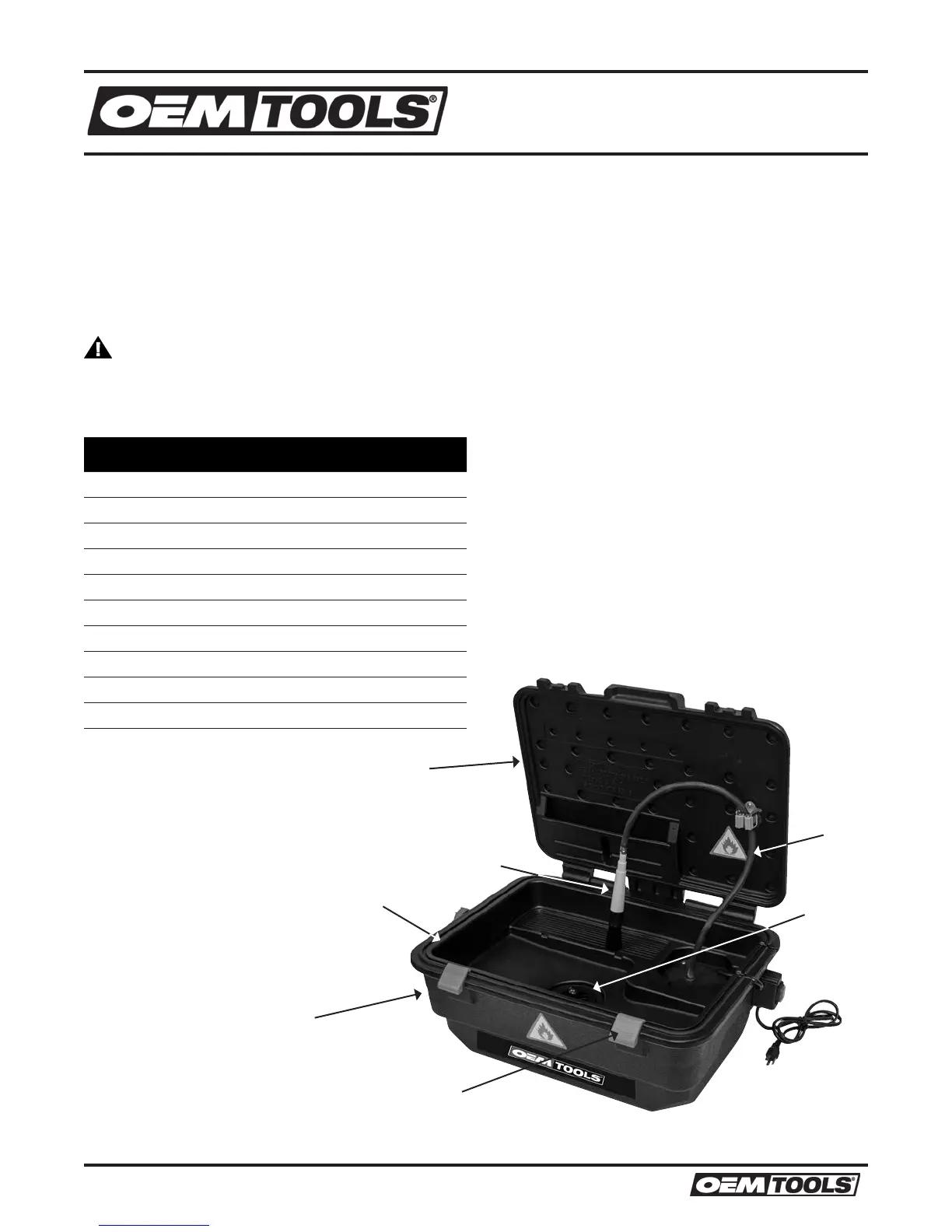
Figure Description Quantity
24804-1 Base (Tank) 1
24804-2 Lid 1
24804-3 Lid Seal 1
24804-4 Latch 2
24804-5 Tank Plug 1
24804-6 Reservoir Cap (Not Shown) 1
24804-7 Hose 1
24804-8 Brush 1
24804-9 Pump (Not Shown) 1
24804-10 Mesh Screen (Not Shown) 1
(1)
Base (Tank)
(2)
Lid
(3)
Lid Seal
(4)
Latch
(5)
Tank Plug
(7)
Hose
(8)
Brush
08/14
2014 ©OEM-TOOLS



 To Next Page