17
9.Remote key (With NFC function):
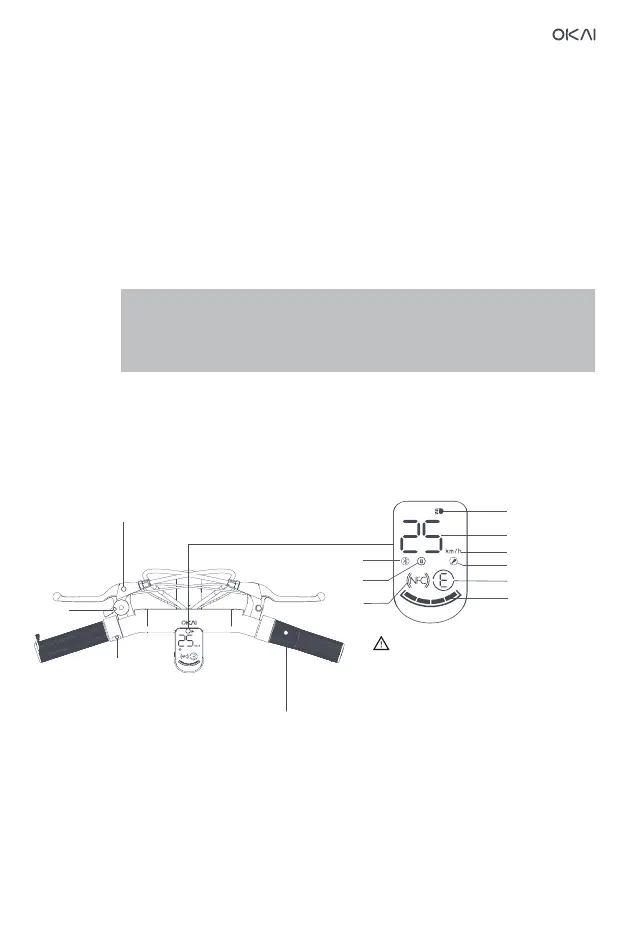
Function button (left button of hand handle) : After the vehicle is started into P mode,
press to enter riding mode,press and hold the function button for
about 3 seconds to power off;
Press the function button once to turn the headlights on/off while the
vehicle is powered on;
Press twice to switch to E (pedestrian mode) /L (economy mode) /H
(sports mode) while the vehicle is powered on;
Touch the LOGO surface of the key to turn on the
meter, or click the unlock button on the key to turn it on to enter the P
mode, and click the function button on the left handlebar to enter riding
mode.
Press five times in riding mode to switch the speed unit;
APP turns on the cruise function, which maintains a constant speed.
When the vehicle speed is greater than 5km/h, press and hold the
function button for 2 seconds to enter cruise mode at constant speed.
E mode is pedestrian mode, with a maximum speed of 5km/h, which is suitable for
use on pavement;
L mode is economy mode, with a maximum speed of 15km/h;
H mode is sports mode, with a maximum speed of 25km/h;
Brake lever
Speed up
Bells
Function button
When the driving speed exceeds
28km/h, the headlights and
dashboard will flash to alert the user
that they are speeding.
NFC
Speed display
Headlight
Bluetooth
Lock car
display
Gear
Speed unit
Fault display
Batter status


 To Next Page