
 Need help?
Do you have a question about the OKIOLABS OKIOCAM S and is the answer not in the manual?
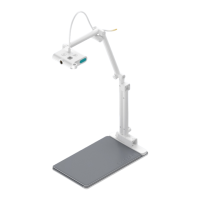
Details the features and design aspects of the OKIOCAM S model, including adjustable arm and rotatable camera.
Details the features and design aspects of the OKIOCAM T model, including an arm extender.
Instructions on taking snapshots and starting/stopping video recordings with the OKIOCAM software.
Accessing recorded media and using zoom, rotation, and exposure controls in the software.
Overview of the OKIOCAM Stop Motion software for creating stop-motion videos.
Overview of the OKIOCAM Time-Lapse software for creating time-lapse videos.
Guide to configuring OKIOCAM for use with the Google Meet video conferencing application.
Guide to configuring OKIOCAM for use with the Zoom video conferencing application.
Guide to configuring OKIOCAM for use with the Skype video conferencing application.
Guide to configuring OKIOCAM for use with the Microsoft Teams video conferencing application.
Instructions for using OKIOCAM with the Flipgrid learning platform for video responses.
Guide on integrating OKIOCAM with Screencastify for screen recording.
Instructions for using OKIOCAM with the Seesaw learning platform for video activities.
The OKIOCAM is a versatile document camera designed to enhance various educational and professional activities, from video conferencing and online learning to creating engaging multimedia content. This quick start guide provides a comprehensive overview of its features, setup, and integration with both OKIOLABS' proprietary software and popular third-party applications.
The OKIOCAM serves as a high-quality document camera, capable of capturing snapshots and recording videos of documents, objects, and live demonstrations. It is designed to be a central tool for remote learning, virtual meetings, and content creation, offering flexibility and ease of use. The device comes in two main models: OKIOCAM S and OKIOCAM T. Both models feature a rotatable camera and an adjustable arm, allowing users to position the camera precisely for optimal viewing angles. The OKIOCAM T further includes an arm extender for increased reach and flexibility.
The camera head itself is equipped with controls for adjusting focus, exposure, and white balance automatically, ensuring clear and well-lit images. A notable feature is the remappable button on the camera head, which can be assigned to various functions within the OKIOCAM Snapshot and Recorder software, providing quick access to frequently used actions. This button's functionality is exclusive to the OKIOLABS software. Additionally, the camera head includes a left-hand connector, which can be used to reverse the camera's orientation, making it suitable for left-handed users and offering greater ergonomic adaptability. The base of the OKIOCAM is foldable, contributing to its portability and ease of storage. Both models also include a tripod mount, expanding their utility for various setups and stable recording.
The OKIOCAM is designed for seamless integration with its dedicated software, OKIOCAM Snapshot and Recorder, as well as a range of third-party applications.
This software is the primary interface for capturing content with your OKIOCAM.
Beyond basic capture, the OKIOCAM Education Kit offers specialized tools for creative and productive tasks.
The OKIOCAM is compatible with a wide array of video conferencing and learning tools, ensuring its utility in diverse environments.
While the manual does not explicitly detail maintenance features, the design of the OKIOCAM suggests a focus on durability and ease of handling. The foldable base contributes to safe storage, protecting the device from potential damage during transport or when not in use. The robust construction of the adjustable arm and camera head implies a design intended for regular use in various settings, including educational environments where devices may experience frequent handling. The automatic adjustments for focus, exposure, and white balance reduce the need for manual calibration, simplifying operation and minimizing potential user errors that could lead to suboptimal performance. The provision of a tripod mount also allows for secure and stable setups, which can help prevent accidental falls or damage during use. The software-based controls for camera settings mean that adjustments are made digitally, reducing wear and tear on physical components. The availability of a Help Desk and regular software updates from OKIOLABS further ensures ongoing support and potential improvements to the device's functionality and user experience.
 General
| Camera Type | Document Camera |
|---|---|
| Resolution | Up to 2592 x 1944 (5MP) |
| Frame Rate | 30 fps |
| Field of View | Horizontal: 78°, Vertical: 64°, Diagonal: 90° |
| Connectivity | USB |
| Compatibility | Windows, macOS, ChromeOS |
| Microphone | Built-in |
| Focus Type | Auto-focus |
| Connectivity Version | USB 2.0 |
| Focus | Auto |

 To Next Page