
 Need help?
Do you have a question about the Ola S1 PRO and is the answer not in the manual?
Essential actions for safe operation, charging, and emergency response.
Prohibited actions to avoid damage, warranty voiding, and safety hazards.
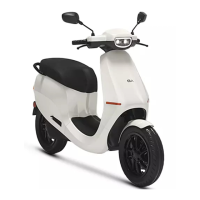
Locates and identifies key external components of the scooter.
Details brake levers, throttle, control pads, and the main dash.
Identifies parking stand, foot rest, seat, grab rail, saree guard, tail lights.
Locates floor mat, trunk space, and the charging flap.
Controls for headlamp beams (low/high) and left/right turn signals.
Buttons for operating the horn and engaging reverse mode.
Buttons to choose riding modes and power the scooter on/off.
Controls for adjusting audio volume and managing media playback.
Instructions for activating and deactivating turn signals.
Simple steps to sound the scooter's horn.
Switching headlamp beams and turning the halo lamp on/off.
Procedure to unlock the scooter using a 6-digit passcode.
How to secure the scooter by pressing the power button.
Explanation of widgets like speedometer, distance, and clock.
Display of true range and access to trunk button.
Meaning of indicators for True Range, high/low beam, and halo lamp.
Understanding icons for turn lights and parking stand status.
Difference between certified and actual (true) range values.
How rider, load, roads, mode, and weather impact range.
Steps to move the scooter from parked to riding mode.
Engaging the motor and beginning the ride.
Procedure to switch the scooter back to parked mode.
Tips for adapting to silent motor and quick throttle response.
Best for city riding, balancing acceleration and range.
For faster riding on open roads, emphasizing speed.
Maximum torque and acceleration (0-40 km/h in 3s).
How to engage reverse by stopping and pressing the button.
Procedure to disengage reverse mode.
Caution on speed and checking surroundings before reversing.
How rear brake application engages both front and rear brakes.
Energy recovery during deceleration to recharge the battery.
Dashboard notification for an open parking stand.
Audio and visual alerts if the parking stand opens unexpectedly.
System optimizes performance, range, and longevity.
Dynamic adjustments and notifications for mode transitions.
How to find and use mini-applications via Dash swipe.
Accessing common settings through the Settings Flash.
Options for screen settings and changing the passcode.
Accessing device info and other system configurations.
First step: entering your existing passcode.
Procedure to define a new security passcode.
Re-entering the new passcode to finalize the change.
Advice on creating strong, non-guessable passcodes.
Process for obtaining new software versions.
Steps for installing downloaded updates and progress monitoring.
Finalizing the update process on the scooter.
Washing the scooter to protect paint from elements.
Using appropriate cleaners, sponges, and water pressure.
Importance of maintaining 33 PSI for optimal tyre performance.
How to get assistance for tyre replacement.
Recommendations for a suitable parking environment.
Using covers and maintaining battery charge for storage.
Resolving issues with incorrect passcode entries or forgotten codes.
Troubleshooting for scooters not turning on or charging.
Steps to reboot the scooter for unresponsive dash or buttons.
Ensuring internet connection for successful downloads.
Checking battery charge and re-attempting updates.
List of tools provided for basic adjustments and maintenance.
Locating and understanding the VIN and motor identification numbers.
Details on LxWxH, wheelbase, seat height, clearance, and kerb weight.
Volume specification for the scooter's trunk space.
Information on frame type, suspension, wheels, and tyre specs.
Details on front and rear brake types and sizes.
Specifications for motor power, torque, type, and transmission.
Metrics for acceleration (0-40, 0-60) and top speeds.
Details on headlamp, speakers, dash display, and hardware.
Information on battery capacity and standard charging duration.
Coverage for transporting the scooter to service centers.
Services for flat tyres and running out of charge.
How service champions provide maintenance at your location.
Repair and maintenance services covered under warranty terms.
Duration and terms for the battery warranty.
Warranty period and conditions for scooter parts.
Items and conditions not covered by the warranty.
Further exclusions like modifications, misuse, and wear.
Process for warranty obligations and company's final decision.
Manual subject to change due to product updates.
Requirement for permission to quote or copy manual content.
Bengaluru courts handle warranty claim disputes.
Adhering to manual for maintenance and usage conditions.
Importance of retaining service records for customer reference.
Servicing at authorized centers to maintain warranty validity.
Primary contact number for inquiries and assistance.
Email contact for questions and support.
Registered address of Ola Electric Technologies Private Limited.
 General
| Battery Capacity | 3.97 kWh |
|---|---|
| Motor Power | 8.5 kW (peak) |
| Weight | 125 kg |
| Front Brake | Disc |
| Rear Brake | Disc |
| Tyre Type | Tubeless |
| Seat Height | 780 mm |
| Ground Clearance | 165 mm |
| Wheelbase | 1359 mm |
| Braking System | Combined Braking System (CBS) |
| Range | 181 km |
| Features | Bluetooth connectivity |
| Tyre Size | 110/70 R12 |
| Suspension | Front: Single Fork, Rear: Monoshock |
| Colors | Black, White, Blue, Red |
| Charging Time | 6.5 hours (0-100%) |

 To Next Page