
 Need help?
Do you have a question about the Olive Union Olive Max and is the answer not in the manual?
Lists the components included with the Olive Max earbuds and accessories.
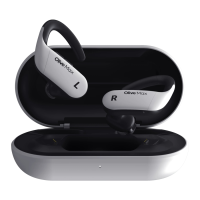
Details the components and features of the Olive Max earbuds, including mics and controls.
Illustrates and labels the components and features of the Olive Max charging case.
Instructions for charging the Olive Max earbuds and charging case using wired or wireless methods.
Explains the meaning of different LED light colors and patterns on the charging case.
Details how to use the touch controls and volume buttons on the Olive Max earbuds for various operations.
Explains the function of the setting button on the charging case for battery check, pairing, and factory reset.
Step-by-step guide for pairing the Olive Max with an iPhone via Bluetooth settings.
Step-by-step guide for pairing the Olive Max with an Android device via Bluetooth settings.
Instructions on how to download the companion My Olive app using QR code or app stores.
Addresses common Bluetooth connection errors and provides solutions for pairing issues.
Lists potential earbud issues, their causes, and recommended solutions for troubleshooting.
Guidelines for proper storage, cleaning, and general management of the Olive Max earbuds.
Important safety warnings regarding fire, electric shock, injury, and product damage from improper use.
Details the IPX7 rating for earbuds, precautions against water damage, and proper usage in wet conditions.
Lists conditions requiring medical consultation before using the earbuds for hearing health.
Instructions for disposing of the product in an environmentally responsible manner according to local regulations.
Outlines the one-year warranty period, free/paid service policies, and exchange/refund information.
The Olive Max is a wireless earbud designed to enhance hearing, offering a blend of advanced technology and user-friendly features. It functions as a personal sound amplification device, allowing users to customize their hearing experience through an intuitive app and on-device controls.
The primary function of the Olive Max is to provide personalized sound amplification, helping users with hearing challenges to better perceive their environment. It utilizes a sophisticated audio processing system to filter and amplify sounds, making speech clearer and reducing background noise. The earbuds are equipped with multiple microphones (Mic 1, Mic 2, and Mic 3) to capture sound from various directions, contributing to a more natural and immersive listening experience.
Users can adjust the volume directly on the earbuds using dedicated volume buttons, allowing for quick and convenient sound level changes without needing to access a connected smartphone. The earbuds also feature a touchpad that enables various operations through different touch actions: a single tap for music play/pause, a double tap for changing hearing modes, and a tap & hold for controlling Hear-Thru Mode (on/off) or answering/hanging up/canceling calls. This multi-functional touchpad ensures that essential controls are always within reach.
The Olive Max supports Bluetooth v5.1 connectivity, allowing seamless pairing with smartphones (both iPhone and Android devices). This wireless connection facilitates audio streaming, phone calls, and interaction with the dedicated My Olive app. The app serves as a central hub for advanced control and personalization of the hearing settings.
A key feature is the "Hear-Thru Mode," which allows users to selectively amplify ambient sounds, enhancing situational awareness. This is particularly useful in conversations or when needing to hear important environmental cues without removing the earbuds. The device also incorporates an infrared sensor, likely for in-ear detection, which can automatically pause audio when an earbud is removed and resume when reinserted.
The charging case plays a crucial role in the device's functionality. It not only recharges the earbuds but also houses a "Setting Button" that enables several essential functions. Users can check the charging case's battery status with a single press, activate "Manual Pairing" mode by pressing for 3 seconds to connect to new devices, and perform a "Factory Reset" by pressing for 7 seconds to restore default settings. The LED indicator on the charging case provides visual feedback on its status (fully charged, needs recharging) and the earbuds' status (manual pairing, resetting).
Wearing the Olive Max is designed for comfort and optimal hearing. Users are instructed to identify the left and right earbuds using their respective symbols. The earbuds are then hooked behind the ear, and the eartip is gently inserted, twisted, and rotated into the ear canal to secure it. The manual emphasizes the importance of trying different sizes and types of eartips to achieve a good fit, which is crucial for both comfort and effective sound delivery. Urethane eartips, in particular, should be compressed before insertion to expand and create a tight seal, optimizing sound quality and preventing howling.
Initial setup involves charging the Olive Max for at least 30 minutes before first use. The earbuds are placed in the charging case, the lid is closed, and the case is connected to a USB adapter via the included USB Type-C cable. The charging case's LED turns purple to indicate charging. The device also supports wireless charging, allowing users to simply place the charging case on a compatible wireless charger.
Pairing the Olive Max with a smartphone is a straightforward process. Users open the charging case lid to automatically enter pairing mode and then navigate to their phone's Bluetooth settings to select "Olive Max" from the list of available devices. The manual provides detailed instructions for both iPhone and Android users, ensuring a smooth connection experience.
The My Olive app significantly enhances the user experience by offering full control over the Olive Max. It allows users to personalize their hearing settings, perform hearing tests to tailor amplification to their specific needs, and access all the advanced functions the device offers. The app is a free download available on both the App Store and Google Play.
Troubleshooting guidance is provided for common issues. For Bluetooth connection problems, users are advised to try manual pairing, reset their smartphone's Bluetooth connection, or perform a factory reset of the Olive Max. For earbud-specific issues like no sound, beeping, or distorted audio, recommendations range from charging the battery and cleaning the eartips to taking the Olive App Hearing Test or consulting a hearing expert.
Proper storage and maintenance are essential for extending the lifespan and ensuring consistent performance of the Olive Max. Users are advised to avoid exposing the device to hairspray and cosmetics, removing them from ears before application. The earbuds should be handled carefully, avoiding drops or strong impacts, as these can damage the product and potentially affect its waterproof function.
Routine cleaning is recommended to prevent dirt or earwax buildup. The Olive Max can be gently wiped with an alcohol wipe or a damp cloth; regular soap or detergent should not be used. After use, the earbuds should be returned to the charging case for protection. It is also important to avoid storing the device in damp, humid, or overly dusty locations.
The Olive Max earbuds are rated IPX7 for water resistance, meaning they can withstand immersion in water up to 1 meter for 30 minutes. However, this rating applies only to the earbuds, not the charging case. Users are cautioned against subjecting the earbuds to strong water pressure, wearing them during diving or high-velocity water sports, or handling them with wet hands without drying them thoroughly. If the earbuds are exposed to liquids other than clean water (e.g., saltwater, soapy water, chemicals), they should be cleaned immediately to prevent damage to performance or appearance. Disassembling the Olive Max is not recommended, as it can compromise the waterproof function. The device should also not be exposed to sudden temperature changes or used in environments like saunas or steam rooms, as these can impair the waterproof function.
The manual also includes important safety warnings, advising users not to disassemble, modify, or repair the product themselves to avoid fire or injury risks. It cautions against using the device at unnecessarily loud volumes to prevent hearing loss and against exposing it to water or moisture with wet hands to avoid electric shock or malfunction. Users are also warned not to use the My Olive app while driving or operating any vehicle, to be careful with third-party cables, and to avoid storing the device in places with extreme temperatures, high humidity, or near hazardous substances. If any damage or malfunction is noticed, use should be stopped immediately. The device is not intended for use by children or individuals requiring supervision without appropriate oversight.
 General
| Water Resistance | IPX5 |
|---|---|
| Connectivity | Bluetooth |
| Features | Speech enhancement |
| Compatibility | iOS and Android |
| Earbud Fit | In-ear |

 To Next Page