EN
5
Prepare the camera
Quick Start Guide
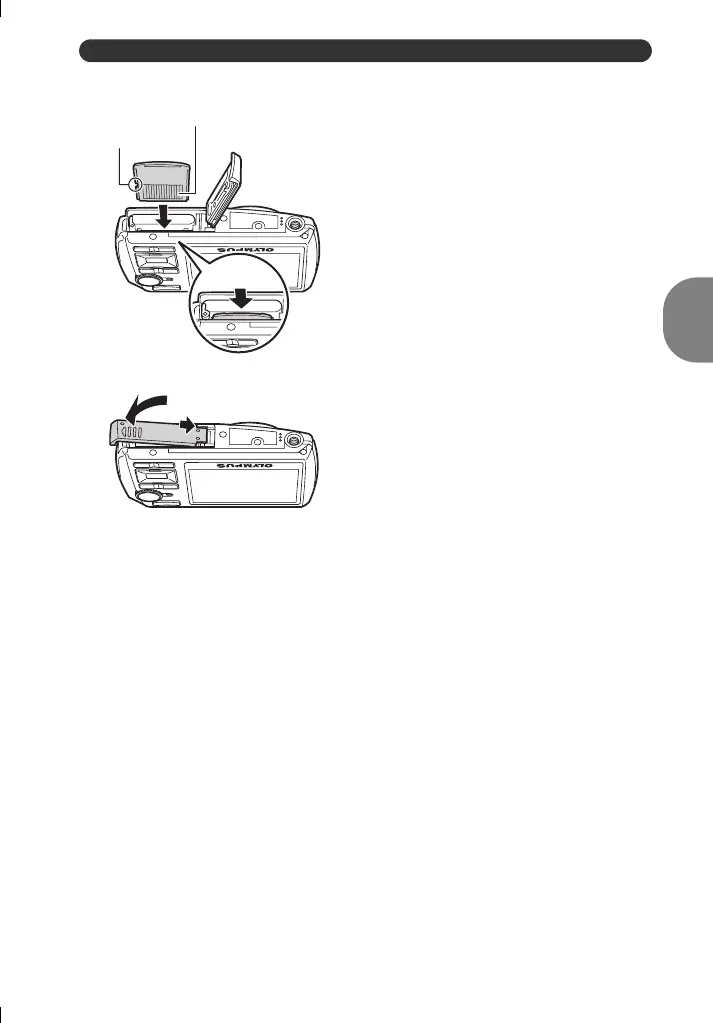
( You can shoot pictures with this camera even without using an optional xD-
Picture Card™ (hereinafter referred to as “the card”). If you shoot pictures with
this camera without using an xD-Picture Card, the pictures will be recorded in
the internal memory. For details on the card, please refer to “The card” (P. 66).
Notch
( Orient the card as shown, and insert the
card straight in until it clicks into place.
( To remove the card, push the card all
the way in, release slowly, grasp the
card, then remove.
4
5
6
Contact area
d4351_e_0000_7.book Page 5 Wednesday, August 1, 2007 1:52 PM





 To Next Page