39
Chapter 1: Getting the Lay of the Land
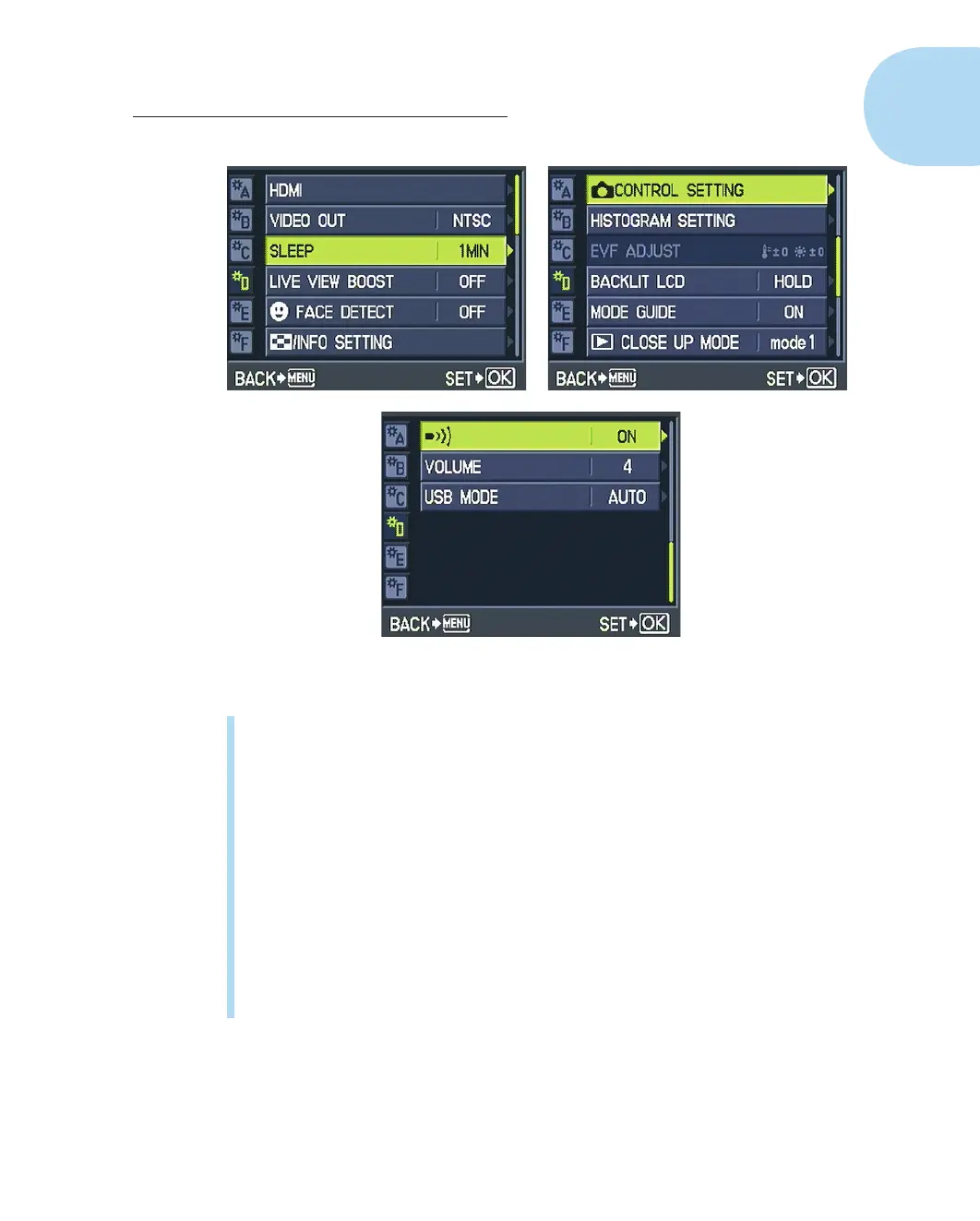
Figure 1-35: Press the up- or down-arrow key to scroll through the three screens of options.
✓ Control Setting: Use this option to enable or disable the Live Guide, Live
Control, and Super Control Panel (SCP) displays. The earlier section
“Monitoring and Adjusting Photography Settings” explains.
✓ EVF Adjust: If you attach the optional electronic viewfinder, you can
use this feature to adjust the display brightness and color temperature.
Otherwise it’s dimmed in the menu and unavailable, as in Figure 1-35.
Refer to my comments about the related control for adjusting the moni-
tor, in the preceding section, to find out more about this setting and why
I suggest you ignore it.
✓ Backlit LCD: By default, the monitor display dims slightly after an
8-second period of activity to save battery power. If you want to adjust
this timing, visit this menu option. You can increase the automatic dim-
ming delay to 30 seconds or one minute. Or you can disable the dimming
feature entirely by choosing the Hold setting.
05_879504-ch01.indd 3905_879504-ch01.indd 39 6/28/10 1:31 PM6/28/10 1:31 PM







 To Next Page