OM-1 Mark II Quick Guide 6
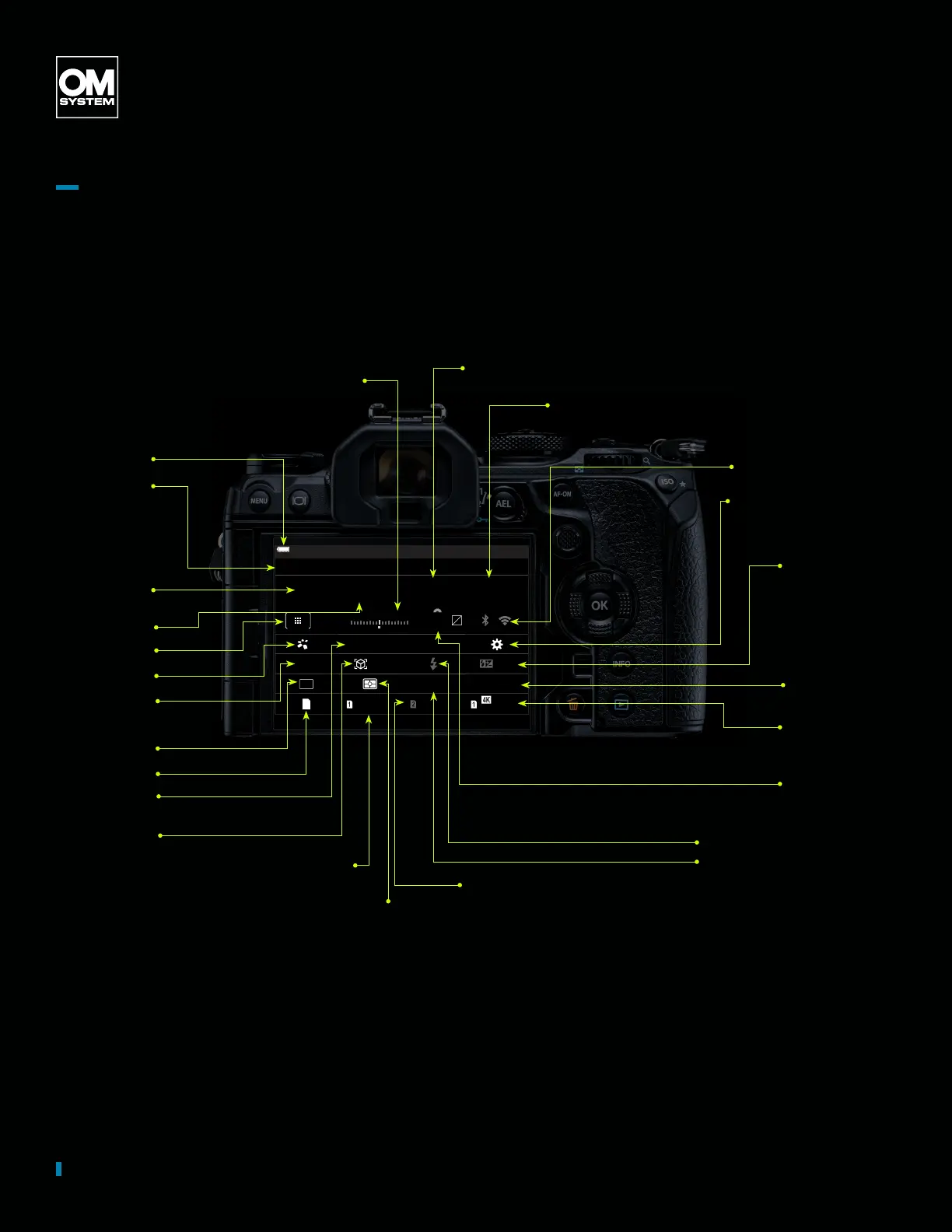
Interface
Battery level
Name of the
currently
selected
option
F
S-IS Auto
±
0.3
2024.01.01 16:30:43
0.0
P 052 0026.5
Small
S-AF
4 : 3
1/
Auto
ISO
F
60p L
-
8
Off
3
0
+
-
100
%
100
%
±
F
WB Auto
YY
Shooting mode
Shutter speed
AF Target
AF mode
Drive mode
Storage options
Picture mode
Exposure
compensation
Aperture value
Wi-Fi/Bluetooth
Button function assignment
Manual ash output
Image stabilizer
Image quality,
Available recording
time
ISO sensitivity
White balance
Subject detection
Slot 1: Image quality, number of
storable still pictures.
Slot 2: Image quality, number of
storable still pictures.
Metering mode
Exposure
compensation value
Flash mode
Aspect ratio
Super Control Panel Photo
All shooting options can be accessed via the Super Control Panel (SCP). It enables a quick and comfortable
way to get an overview of all settings and an easy way to adjust them. You activate the SCP as an overlay by
pressing the OK button. If you shoot with the viewnder, you can display the SCP by pressing the Live View
Button. That allows you to take control over all your camera settings. The touchscreen makes the operation
easy, quick, and comfortable.


 To Next Page
 Loading...




