12
2. Preparation
2.2 How to clean the device
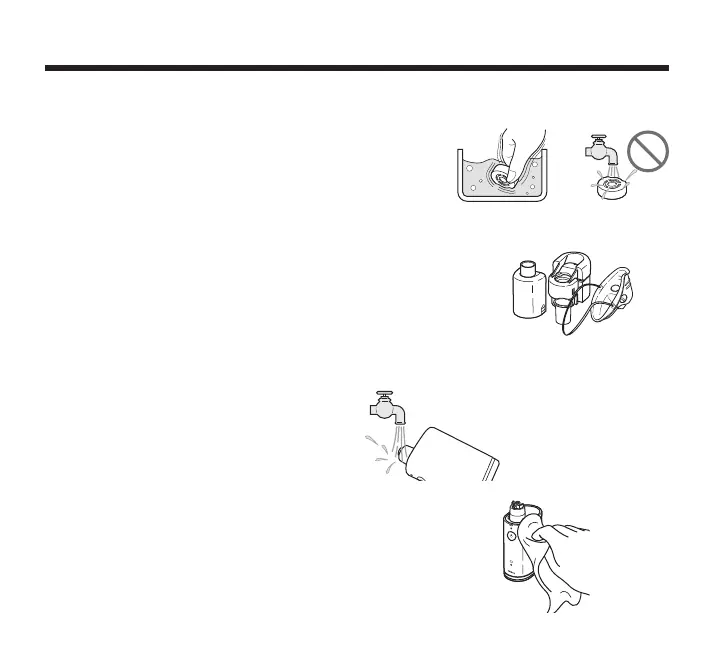
Mesh Cap
:DVKWKHPHVKFDSLQPLOGQHXWUDOGHWHUJHQWWKHQULQVHRII
with distilled water. Remove excess water and allow to air dry in
a clean place.
Some types of medications may remain on the mesh.
Make sure to clean the medication from the mesh. Do not wash
under running water.
Medication Container, Mouthpiece, Mask and Mask Adapter
:DVKWKHPHGLFDWLRQFRQWDLQHUPRXWKSLHFHPDVNDQGPDVNDGDSWHULQ
distilled water and mild (neutral) detergent.
Rinse the medication container, mouthpiece, mask and mask adapter
thoroughly with distilled water and allow to air dry in a clean place.
Note: Remove the elastic band from the mask
before cleaning.
Vibrating element and its surrounding surface
:DVKXQGHUUXQQLQJWDSZDWHU
Note: To prevent liquid from entering the device,
make sure that the battery cover is locked in
place.
Main Unit
Clean the main unit by wiping it off with a (moistened) lint free cloth.
Use a dry lint free cloth to wipe the main unit dry.
Never clean with benzene or thinner.


 To Next Page
 Loading...