Need help?
Do you have a question about the Ondigo Beat and is the answer not in the manual?
Introduces the speaker's audio capabilities and safety warnings for small parts.
Explains Bluetooth functionality, range, and device compatibility.
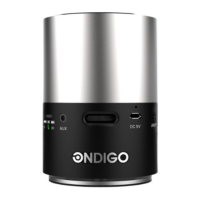
Identifies physical buttons, ports, and indicators on the speaker.
Instructions for charging the speaker's battery using the Micro USB port.
Steps to power on the speaker and details on connection indicator behavior.
Guide to pairing, connecting, and clearing paired devices via Bluetooth.
Instructions for playing music and controlling playback on the connected device.
Cautionary note about potential hearing damage from prolonged high volume exposure.
Guidelines for handling, storing, and cleaning the speaker to ensure longevity.
Details compliance with FCC rules regarding interference and operation.
This document is a user manual for the Ondigo Beat Bluetooth Speaker.
The Ondigo Beat is a portable Bluetooth speaker designed for wireless audio playback from compatible devices such as phones and music players. It offers high-quality audio with life-like sound. The speaker supports Bluetooth Specification 2.1 + EDR and the following profiles: A2DP (Advanced Audio Distribution Profile) and AVRCP (Audio/Video Remote Control Profile). It can be paired with up to 8 devices and attempts to reconnect for 30 minutes if a connected device moves out of Bluetooth range. If the device returns within range, it reconnects automatically. The speaker also features a 3.5 mm audio auxiliary port for wired connections, which closes the Bluetooth connection when in use.
Keys and Parts: The speaker features:
Charging the Battery: Before first use, the battery must be charged. The LED battery indicator is red when the battery level is low and stays on during charging. Once fully charged, the LED turns green, then switches off when the charging cable is disconnected. The speaker can be charged via a wall outlet using the provided charger or through a compatible USB port. Charging via a USB port may take longer and may not work with non-powered USB ports. The Ondigo charger provides faster charging. Only the Micro USB port can be used for charging.
Turning the Speaker On: To turn on the speaker, pull the power switch to the "ON" position. If the unit is on and not connected to the auxiliary port, the LED connection indicator will flash blue every half second, accompanied by a "toot toot" sound.
Pairing Your Device:
Clearing Pairings: To clear the paired devices list, reset the speaker by turning it off and then back on. When the speaker turns on, pairing mode is automatically activated. Then, press and hold the remote control button for 5 seconds until the blue LED connection indicator blinks. After clearing, the speaker must be paired again before use.
Listening to Music: Connect a compatible device to the speaker and start playing music.
Automatic Connection: If the speaker has been paired before, it will attempt to connect to the last used device. If unsuccessful, it will try to connect to the next device on the paired list. If the speaker is not connected, it enters standby mode and the LED connection indicator turns off. If no device is connected within 30 minutes, the speaker will turn off.
Care for Your Device:
Recycling: Always return used electronic products, batteries, and packaging materials to dedicated collection points to prevent uncontrolled waste disposal and promote recycling.
Regulatory Information: The device complies with Part 15 of the FCC Rules. Operation is subject to two conditions:
Safety Warning: Continuous exposure to high volume may damage your hearing. Listen to music at a moderate level.

 To Next Page
 General