6
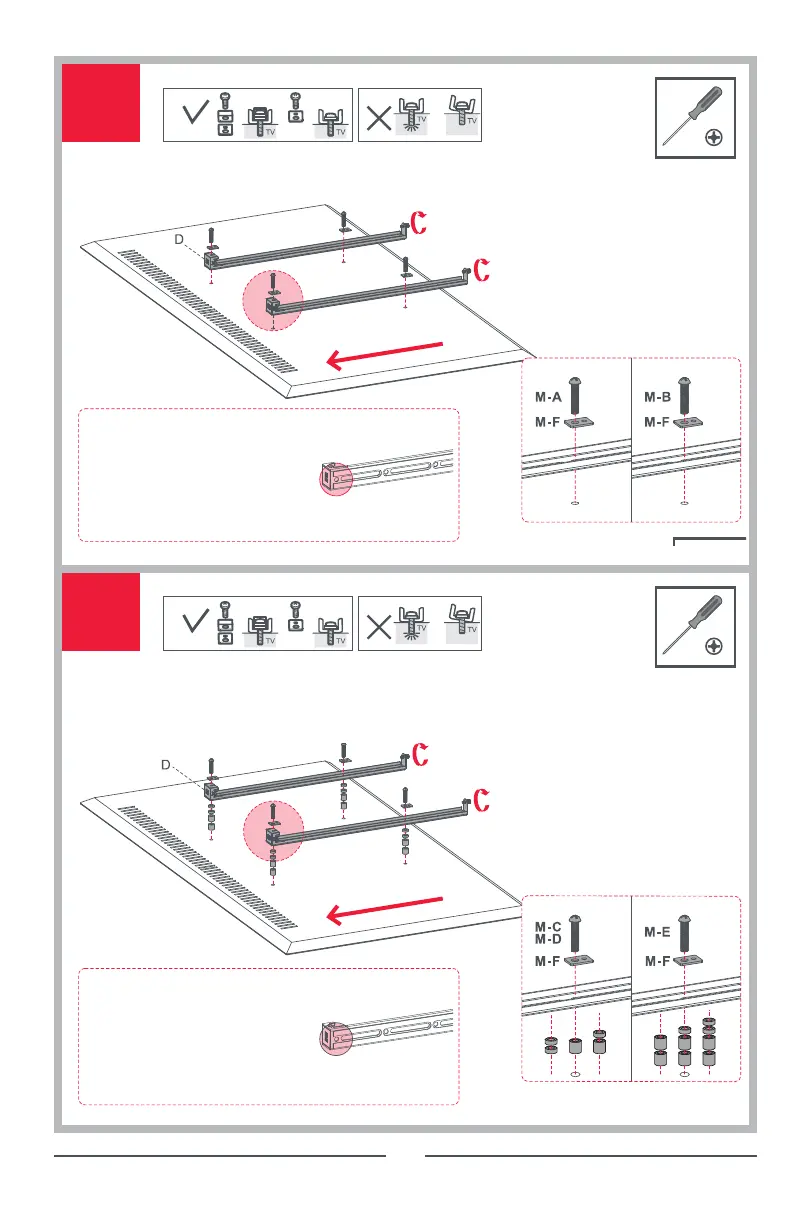
3a
3b
Note: It is recommended to use the round holes
found on the brackets to attach them to the back
of the TV using the appropriate screws and
washers provided. If the round holes do not line
up with VESA holes found on the TV, or if the screws
don’t fit you can use the slot holes on the bracket
to mount the TV - and if using the slots, you must
firmly tighten the screws to prevent the TV from
sliding down the brackets.
Note: It is recommended to use the round holes
found on the brackets to attach them to the back
of the TV using the appropriate screws and
washers provided. If the round holes do not line
up with VESA holes found on the TV, or if the screws
don’t fit you can use the slot holes on the bracket
to mount the TV - and if using the slots, you must
firmly tighten the screws to prevent the TV from
sliding down the brackets.
Manual Falcon WM7481 | 7482 140x210.indd 6Manual Falcon WM7481 | 7482 140x210.indd 6 19-12-2019 13:0819-12-2019 13:08


 To Next Page