1
2
3
4
5
6
7
8
EN
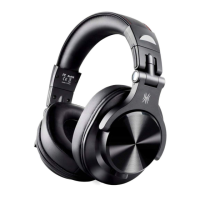
Button Controls
Product Overview
1. USB-C charging port
2. Volume up / Next track
3. Multi-function button (MFB)
4. Volume down / Previous track
5. 3.5 mm aux port
6. LED indicator
7. Built-in microphone
8. 6.35 mm port
DE
Produktübersicht
1. USB C Ladeanschluss
2. Lauter / Nächster Titel
3. Multifunktionstaste (MFB)
4. Leiser / Vorheriger Titel
5. 3,5 mm Aux-Anschluss
6. LED-Anzeige
7. Mikrofon
8. 6,35 mm Aux-Anschluss
FR
Présentation du produit
1. Port de chargement USB-C
2. Augmenter le volume / Piste suivante
3. Bouton multifonction (MFB)
4. Volume bas / Piste précédente
5. Port auxiliaire 3,5 mm
6. Indicateur LED
7. Microphone intégré
8. Port 6,35 mm
JP
製品の概要
1.MicroUSB-C充電ポート
2.音量+/曲送り
3.マルチファンクションボタン
4.音量ー/曲戻り
5.3.5mmオーディオジャック
6.LEDランプ
7.マイク
8.6.35mmポート
IT
Panoramica del Prodotto
1. Porta di ricarica USB-C
2. Aumenta il volume / Brano successivo
3. Pulsante multifunzione (MFB)
4. Abbassa il volume / Brano precedente
5. Porta ausiliaria da 3,5 mm
6. Indicatore LED
7. Microfono incorporato
8. Porta da 6,35 mm
ES
Descripción del producto
1. Puerto de carga USB-C
2. Subir volumen / Pista siguiente
3. Botón multifunción (MFB)
4. Bajar volumen / Pista anterior
5. Puerto auxiliar de 3,5 mm
6. Indicador LED
7. Micrófono incorporado
8. Puerto de 6,35 mm


 To Next Page