If the OnePlus Buds have been disconnected from your device because
you’re too far, and you return to the effective distance of the connection within 10
minutes, OnePlus Buds will automatically reconnect with your device. If there is no
reconnection for 10 minutes, the buds will automatically shut down. In this case, you
can put the buds into the charging box, close the cover, and then open it to
reconnect them.
Functions and Operations
Call functions:
● Answer a call: double-tap the touch area of the bud.
● Hang up a call: double-tap the touch area of the bud.
● Reject a call: tap and hold the touch area of the bud for 5 seconds.
Music/standby:
● Double-tap the left or right bud to play the next track by default.
● On the OnePlus phone, go to Bluetooth & Device Connection - Previously
● Connected Devices, tap the OnePlus Buds settings icon to customize the
double-tap function in the device details interface. (Note: Currently, this
feature is only available on OnePlus 6 or newer versions.)
● Optional functions: Play/pause, next track, previous track, and wake up the
default voice assistant.
Charging the EarBuds and the Box
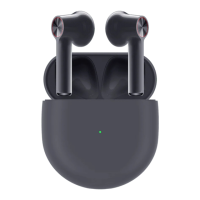
If the buds are placed in the charging box, the indicator lamp will show the
battery level of the buds, and ignore the battery level of the charging box. Take the
buds out. The indicator lamp will show the battery level of the charging box.
To charge them, put the buds in the charging box: The charging contacts at
the bottom of the buds’ handle must be clean, otherwise charging and use may be
affected.
You can connect the charging box to a power supply through the power cable
delivered with the buds to charge it. If the indicator lamp of the charging box is
always red, the charging box is charging. If it is green, the charging box is fully
charged.


 To Previous Page
 Loading...