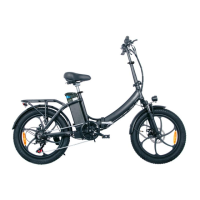
This document is the user manual for the ONESPORT OT05 electric bicycle, providing essential information for safe operation, assembly, maintenance, and troubleshooting.
Function Description
The ONESPORT OT05 is an electric bicycle designed for personal transportation. It features pedal assist and throttle capabilities, allowing riders to choose between manual pedaling, electric assistance, or full electric power. The bike is equipped with an LCD display that shows various riding parameters and allows for setting adjustments. It offers two charging modes: whole bike charging and external battery charging.
Important Technical Specifications
- Model: OT05
- IP Rating: 65 (dust tight and can withstand jetting water, but not waterproof for submersion or excessively wet conditions).
- Max Weight Capacity: 120 kg (rider and cargo combined).
- Battery: Lithium battery.
- Motor: Integrated motor with a unique serial number.
- Display: LCD display showing speed, odometer, trip distance, trip timer, voltage, average speed, max speed, gear, and battery capacity.
- Frame: Features a unique frame number.
- Brakes: Equipped with brake discs and motor inhibitor switches that cut power to the motor when brakes are applied.
- Lights: Front headlight and rear tail light.
- Gears: Adjustable pedal assist levels.
Usage Features
- Assembly: The manual provides step-by-step instructions for assembling the integral body, including adjusting the stem, attaching the handlebar, installing the front wheel, inflating tires, installing the quick release shaft, tightening bolts, and installing front lights and fenders. It also details the installation of pedals and connecting motor, headlight, and mobile phone bracket cables.
- Battery Installation and Removal: Instructions are provided for unlocking and lifting the battery, as well as installing it by connecting the battery socket to the pin and securing it with a buckle.
- Charging: The bike supports two charging methods:
- Whole Bike Charging: Plugging the charging plug directly into the body charging port.
- External Charging: Removing the battery and plugging the charging plug into the battery's charging port.
- Display Operation:
- Turning On/Off: Press and hold the On/Off button for 3 seconds.
- Increasing/Decreasing Pedal Assist Level: Short-press the "+" or "-" buttons.
- Toggling Display Information: Press and release the On/Off button to cycle through speed, odometer, trip, trip timer, VOL, average speed, and max speed.
- Cruise Control: Keep the throttle still while driving, then press and hold the "-" key for 5 seconds to activate Cruise Control mode.
- Turning On Headlights: Long press the "+" button.
- Display Settings: Access advanced settings by holding the "+" and "-" buttons simultaneously. Use the On/Off button to toggle between settings (P01, P02, P04) and the "+" and "-" buttons to adjust values.
- P01 (Brightness): Adjusts backlight brightness (1-3, 3 being brightest).
- P02 (Distance Units): Sets units to KM or MILE.
- P04 (Sleep Time): Sets LCD display sleep timer (0 for no sleep, 1-60 minutes).
- Safety Notes:
- Always wear a helmet and comply with local laws.
- Perform a pre-ride safety check before each ride, ensuring all fasteners, axles, handlebars, and seat post are secure, tires are properly inflated, and brakes are working.
- Exercise caution when riding in wet conditions as braking distance increases and tires may slip.
- Ride with increased caution at night, ensuring reflectors and lights are on and adjusted for visibility.
- Do not modify, disassemble, or replace original electrical components.
- Do not use non-ONESPORT chargers.
- Charge the battery immediately upon receipt.
- Do not leave the battery unattended while charging or charge at high temperatures.
- Keep flammable objects away from the charging area.
- Do not charge a damaged, leaking, or discolored battery.
- Store the battery away from heat and direct sunlight.
- Do not immerse the battery in liquid.
- Follow instructions for battery removal.
- Stop charging immediately if the battery fails to charge.
- Error Codes: The manual lists specific error codes and their meanings:
- 6: Battery Undervoltage
- 7: Motor fault
- 8: Throttle fault
- 9: Controller failure
- 10: Communication reception failure
- 11: Communication transmission failure
Maintenance Features
- Regular Cleaning: Clean the e-bike once or twice a week to prevent dirt and debris buildup. Use a low-pressure water stream or a wet rag, avoiding pressurized hoses that could damage electrical components.
- Lubrication: Apply lubricant to major moving parts like the chain at least once a week, after cleaning with a special solution.
- Check the Bolts: Regularly inspect for loose screws, bolts, and nuts. Tighten them as needed, but avoid overtightening.
- Tire Pressure: Check tire pressure with a gauge and inflate to the recommended pressure indicated on the tire walls.
- Brake Pads: Inspect brake pads every few weeks and replace them when necessary to ensure effective braking.
- Waterproofing: The battery and motor are sealed against water damage (IP65 rating), but avoid jet washing or fully submerging the bike. Do not attempt to disassemble the motor.
- Battery Care:
- Charge at room temperature in a dry location.
- Avoid leaving the battery fully charged or fully discharged for extended periods.
- Disconnect the battery if not in use for a long time, but top it up occasionally.
- Maintain a 30-60% charge for long-term storage.
- Store the battery in a cool, dry place out of direct sunlight.
- In winter or temperatures below 0°C, charge and store the battery at room temperature, and re-insert it immediately before riding.
- Warranty Period: 12 months from the date of shipment for defects in material and workmanship.
- Coverage: Applies to the original registered purchaser and is non-transferable.
- Exclusions: Damage from failing to adhere to instructions, water damage, and wear items (chain, tires, wheels, tubes, battery handle, brake pads, cables, housing, grips, spokes) are not covered.
- Claim Process: Report shipping damage within 14 days with photographic evidence. For other warranty services, contact ONESPORT customer service via email.
- Parts: Warranty parts are shipped within the continental EU.
- Voiding Warranty: Exposure to very wet, hot, or cold conditions, unauthorized alterations, or repairs may void the warranty.

 Need help?

 To Next Page
 General