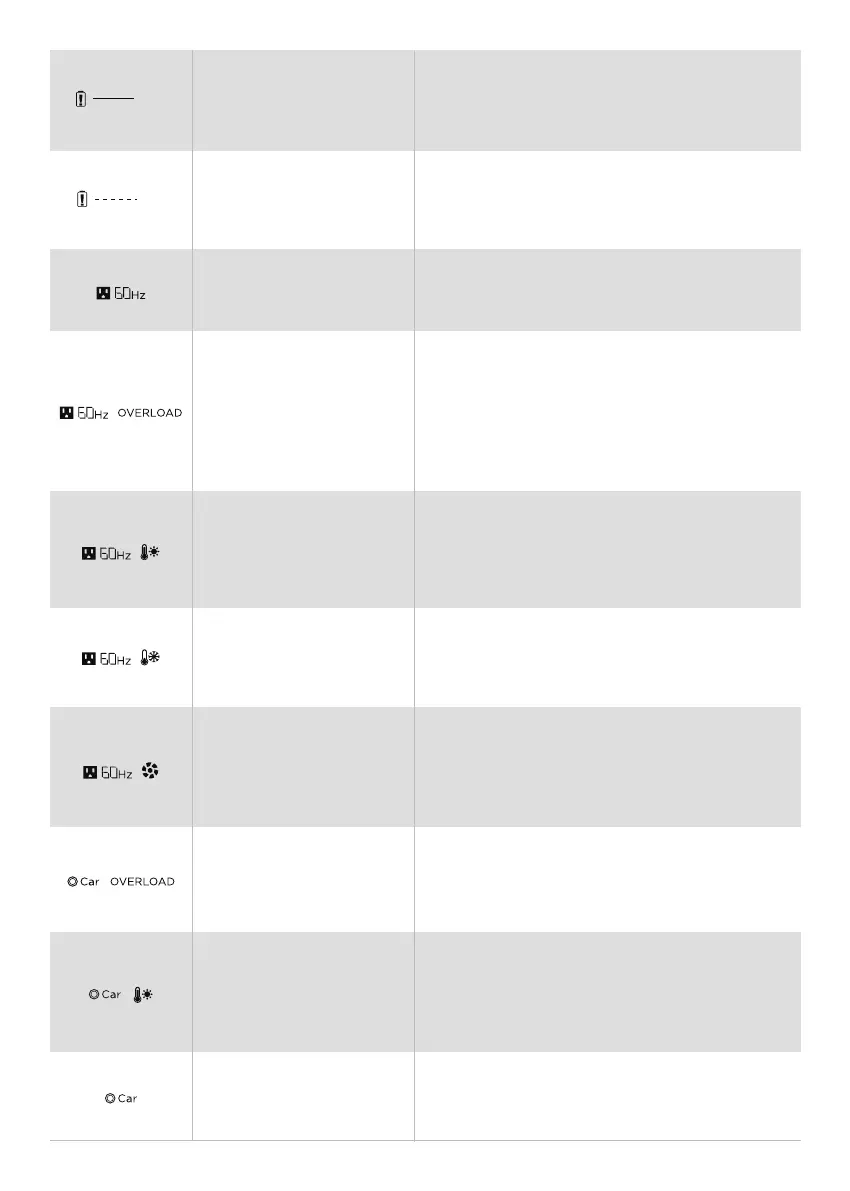
AC icon flashes. Restart ONEUP 1000. If the icon keeps
flashing, contact support@oneuppower.com.
AC and OVERLOAD icons flash together. Wait 10 seconds,
turn AC Power ON/OFF. Do not charge or discharge the
unit. If the icons keep flashing, do not charge or discharge
the unit. Please note that electrical appliances must be
operated within rated power.
AC and High-temperature icons flash together.
Let ONEUP 1000 cool down. Then turn AC Power
On/OFF the interface will automatically resume
operation.
The AC and Low-Temperature icons flash together.
Move ONEUP 1000 to a warmer place and wait for the
inverter to warm up.
AC and Fan icon flashes. Turn off ONEUP 1000 and
carefully clean and vacuum around vents on both
sides. Turn System Power On. If icon keeps flashing
contact support@oneuppower.com.
Car and OVERLOAD icons flash together.
Restart ONEUP 1000, and make sure that electrical
appliances must be operated within rated power.
Car and High-temperature icons flash together. When
temperature/XT60 Interface is recharging in a High
Temperature. Wait for ONEUP 1000 to cool down and it
will automatically recover.
Car icon flashes. Try to restart the device. If the icon
keeps flashing, please contact our product specialists
via support@oneuppower.com.
Only the Exclamation icon is flashing. Restart ONEUP
1000. If the light keeps flashing, contact support@o-
neuppower.com.
The Exclamation icon is on. Try to restart the device. If
the light keeps flashing, please contact our product
specialists via support@oneuppower.com.
Communication
Failure between Main
Board and BMS
Battery Cells Failure
Communication Failure
between Main Board and AC
Inverter Output Overload
Inverter High
Temperature Protection
Inverter Low
Temperature Protection
Fan Blockage
Car Charger Overload
Car Charger High
Temperature Protection
Communication
Failure between Main
Board and MPPT
7


 To Next Page