9 11 13 15
10 12
14
16
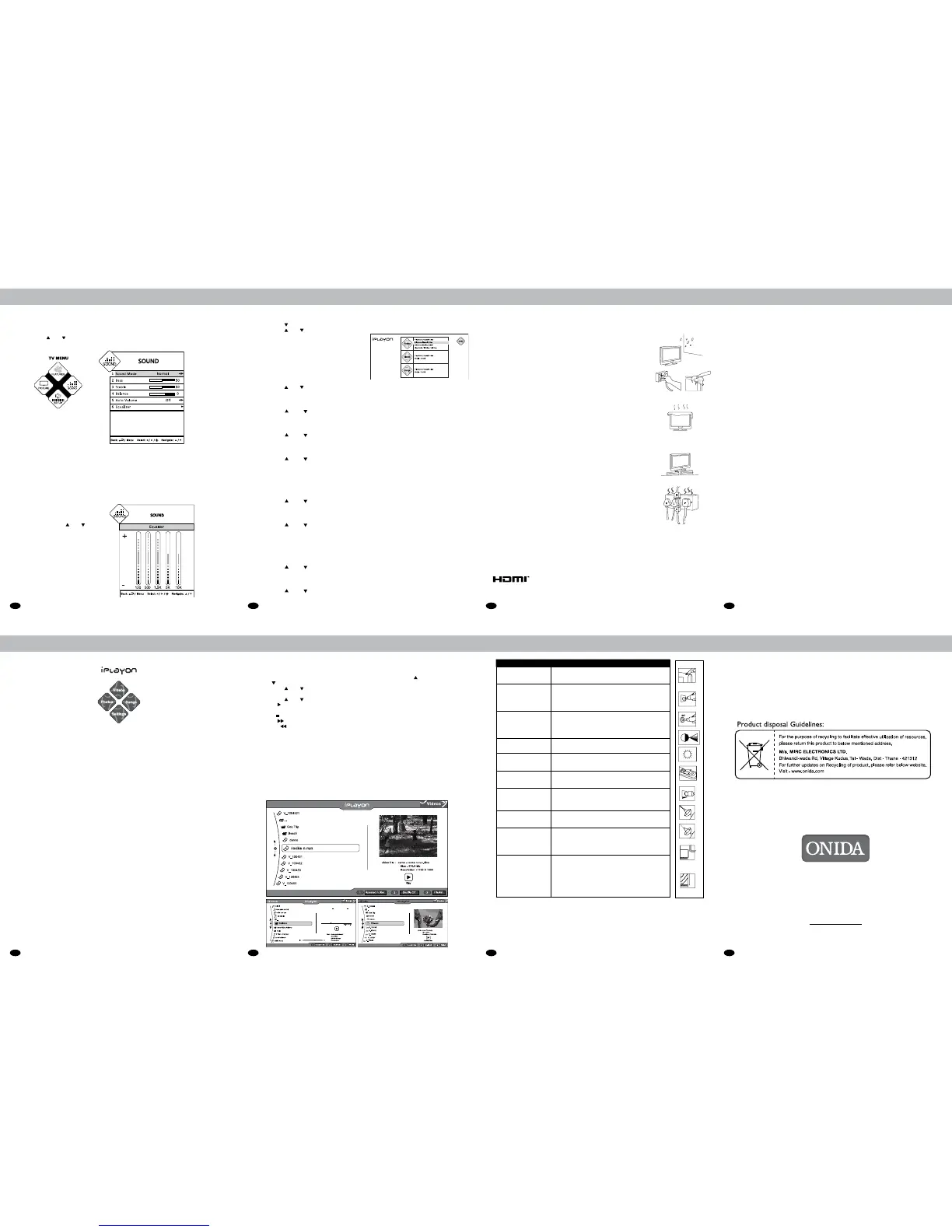
9. Sound
Sound
• PressMenu/i key on remote control or MenukeyonControlPanelofLCD/LEDTVtodisplaymain
TVMENU.
• PressV+keyonyourremotecontrolorcontrolpanelofLCD/LEDTVtoselecttheSoundMenu.
• PressCH / CH keyonyourremotecontroltotheselectthefollowingoptions
PressBack/MenukeyoncetoreturntothepreviousmenuandpresstheBack/Menu key
repeatedlytoexitfromthedisplay.
Afterselectingtherequiredoption(1-5),pressV+/V-foradjustmentasperyourliking.
AfterselectingtheEqualizerbypressingV+/V-
youcanselecttherequiredfrequencyband,
andadjustitbyusing
CH / CH from
remotecontrolorcontrolpanelofTVasper
your liking.
Equalizer Screen
1. Sound Mode
2. Bass
3. Treble
4. Balance
5. Auto Volume
6. Equalizer
10. iplayon
The ONIDA LCD/LED TVgivesusertheexibilitytoconnectUSBdrivesandviewitscontents.
Thedesignismadesuchthattheusercanseephotos,viewvideosandplaysongs.Thedesign
takescareofsupportingmajorityofformatsforphotos,videosandsongs.
Onjustonekeyclick,theuserisabletoentertheiPLAYONMode.
USB Ports Selection (Optional)
1) IfUSBDeviceisconnectedtoUSB1portofLCD/LEDTV,thenLCD/LEDTVwilldetectand
display“MemoryDeviceConnected”andSymbol“USB1”willbeGREENcolour.Nowyoucanselect
Videos/Songs/Photos.
2) IfUSBDeviceisconnectedtoUSB2portofLCD/LEDTV,ThenyouhavetoPressNumericKey“2”
fromtheRemoteControl,toselecttheUSBDevice.AfterpressingNumericKey“2”StatusofUSB2will
become“MemoryDeviceConnected”and“USB2”SymbolbecomeGreen.Nowyoucanselect
Videos/Songs/Photos.
3) IfTwoUSBDeviceareconnectedtobothUSBportsofLCD/LEDTV,ThenbyDefaultLCD/LEDTVwill
displayUSB1“MemoryDeviceConnected”andSymbol“USB1”becomeGreen.Ifyouwanttoselect
USB2.ThenyouhavetopressNumericKey“2”fromtheRemoteControl.Now“USB2”Symbol
becomeGreen.NowyoucanselectVideos/Songs/Photos.IfyouwanttoselectUSB1.Thenyouhave
PressNumericKey“1”fromremotecontrol,thenstatusofUSB1willbecome“MemoryDevice
Connected”and“USB1”SymbolbecomeGreen.NowYoucanselectVideos/Songs/Photos.
iPLAYONenablestoviewphotos,listentoaudiolesandwatchvideossavedonUSBdevices.
• InsertaUSBdeviceinUSBjackonthesideoftheTV.
• PressiPLAYON key to enter iPLAYON menu.
• IfnoUSBdeviceisconnectedtotheTV,amessage“NoDeviceConnected”isdisplay
withUSBicon.IfUSBisconnected“MemoryDeviceConnected”isdisplayed.
• Onlythefollowingleformatsaresupported.
Photos:JPEG,BMP,PNG
Songs:MPEG-1,MPEG-2(LayerI/II),MP3,Digital(AC-3),AAC-LCandWMA.
Video:SupportsMPEG-1,MPEG-2,MPEG-4,DVD,DivX,DivX4,RealMedia,
AVI,FLV,MKV,H264RMVB,MOV,MJPEGANDAVC.Itwillsupportupto720p.
• ToexitiPLAYONmode,pressiPLAYONkeyfromiPLAYON main menu screen.
*Note:
1.Otherthanaboveorconvertedformatmaynotbesupported.
2.CustomercanaccessonlyoneUSBatatime.
iplayon
Settings
• Press iPLAYONkeyonremotecontroltodisplayiPLAYON menu.
• PressCH keytoselectSettings.
• PressCH / CH keytoselecttheoptionsinsettingsmenu.
• Pressbackkeytocomeoutofsettingmenu.
Photos
• PlayMode
• SlideInterval
• SlideShufe
• ViewOption
Play Mode
Thisistosethowphotosshouldbeplayedinsidefolder.
• PressCH
/ CH keytoselecttheplaymodeoptioninsettingsmenu.
• PressV+ / V- keytoselectplaymodes(RepeatFolder/RepeatFile/RepeatNone)
Slide Interval
Throughslideinterval,thetimegapbetweenimagesduringtheslideshowcanbeset.
• PressCH(
) / CH( ) keytoselecttheslideintervaloptioninsettingsmenu
• PressV+ / V- keytoselectinterval(Off,5seconds,10secondsand15seconds)
Slide Shufe
Thiswillchangethesequenceofphotosdisplay.
• PressCH(
) / CH( ) keytoselecttheslideshowshufeoptioninsettingsmenu.
• PressV+ / V- keytoselectshufe(On/Off)
View Option
Thistobeselectthetypeofview.
• PressCH(
) / CH( ) keytoselecttheviewoptioninthesettingsmenu.
• PressV+ / V- keytoselectfromthefollowingoption(Tileview/Listview).
Songs
1.PlayMode
2.Shufe
Play Mode
Thisistosethowsongsshouldbeplayedinsidethefolder.
• PressCH(
) / CH( ) keytoselectplaymodeoptioninsettingmenu.
• PressV+ / V- keytoselectplaymodes(RepeatFoder/RepeatFile/RepeatNone)
Shufe
Thiswillchangethesequenceofsongsplay.
• PressCH(
) / CH( ) keytoselecttheshufeoptioninsettingsmenu.
• PressV+ / V- keytoselectshufe(On/Off)
Videos
1.PlayMode
2.Shufe
Play Mode
Thisistosethowvideosshouldbeplayedinsidethefolder.
• PressCH(
) / CH( ) keytoselectplaymodeoptioninsettingmenu.
• PressV+ / V- keytoselectplaymodes(RepeatFoder/RepeatFile/RepeatNone)
Shufe
Thiswillchangethesequenceofvideosplay.
• PressCH(
) / CH( ) keytoselecttheshufeoptioninsettingsmenu.
• PressV+ / V- keytoselectshufe(On/Off)
Photos / Songs / Videos
• PressiPLAYONkeyonremotecontroltodisplay iPLAYON menu.
• PressV - key to select Photos / Press V+ keytoselectSongs.PressCH
toselectVideos/Press
CH to select setting.
• PressCH / CH keytoselectthefolder
• PressOK keytoenterthefolderwhichwillshowphoto/music/videolesinsidethefolder.
• PressCH / CH toselectNext/Previousfromphoto/music/videoles
• Press II onRemoteControlorOK keyoncontrolpaneltoplayorpausetheselected
photo/music/videoles.
• Press keytostoptheplayingphoto/music/videoles.
• Press I keytofastforwardthetrackby2x,4x,8xand16xspeed.(applicableformusic/videole)
• PressI keytofastrewindthetrackby2x,4x,8xand16xspeed.(applicableformusic/videole)
Creating Playlist:
• List View: Tocreateplaylistinlistview,pressV+keywhenhighlightisonaparticularimagele.
Ayellowdotisseenonthelename.Thismeansthattheleisselectedtobeintheplaylist.
Theusercanselectmultiplelesinthisway.
• Tile View: TocreateplaylistinTileView,pressOKwhenthehighlightisonaparticularimagele
thumbnail.Aredtickmarkisseenonthele.Thismeansthattheleisselectedtobeintheplaylist.
Theusercanselectmultiplelesinthisway.
• Theplaylistcreatedinlistviewwillremainthesameeveniftheuserswitchestotileview,
andviceversa.
• Toun-selecttheleinaplaylist,gototheleandpressV-keyorOKKey.Theyellowdot
ortheredtickmarkwillberemoved.Hencethelewillberemovedfromtheplaylist.
iplayon
11. Safety Precautions
SafetyLabelsarefoundonyourLCD/LEDTVaswellasonpackaging
materials.
Importantguidelinesaregivenbelow:
1. Water and moisture:Donotusetheproductnearwaterorareasofhigh
moisturecontentsuchasswimmingpools,bathtubsorwetbasements.
2. Heat sources:Keeptheproductawayfromheatsourcessuchasradiators,
heaters,stovesandother heat-generating products (including ampliers).
Batteries,whetherpackedorinstalledshouldnotbeexposedtoexcessive
heatlikesunlightorre
3. Cleaning:Unplug the powercordfromthe ACoutletbeforecleaning the
product. Use a damp cloth to clean the product. Do not use liquid
cleaners or aerosol cleaners
4. Ventilation:Theventsandotheropeningsinthecabinetaredesignedfor
ventilation.Donot cover or block these ventsand opening asinsufcient
ventilation can cause overheatingand/or shorten the life of the product.
Do not place the product on a bed, sofa, rug or other similar surface,
sincethey can blockventilation opening.This productwas not designed
to operate in an enclosed environment. Do not place the product in an
enclosedspace such as abookcase or rack, unlessproper ventilationis
providedorthemanufacturer’sinstructionsarefollowed.
5. Stand: Do not place the product on an unstable cart, tripod or table.
Placing the product on an unstable base can cause the product to fall,
resulting in serious personal injuries as well as damage to the product.
Only use a standard bracket as recommended by the manufacturer or
soldwith theproduct.Onlyuse mounting hardwarerecommendedbythe
manufacturer.
6. Power: The main plugshould be inserted fully into the power outlet to
avoida re hazard. Hold the plug rmly when unplugging.Ifyoupull,the
cordmay bedamaged. Prevent dust collection on the plug pinsor outlet
and do not use too many plugs on the mains multi-outlet, which may
result in overheatingof the outletsand cause are hazard. Never touch
thepowerplugwithawethand.This maycauseanelectricshockhazard.
Plug,asaninterruptingtool,shouldbealwaysoperational.
Trade Mark Information
HDMI-ThisTVincorporatesHigh-DenitionMultimediaInterfaceHDMI
TM
technology.TheHDMI
TM
logoandHigh-DenitionMultimediaInterfaceare
trademarksofHDMIlicensingLLC.
14
12. Trouble Shooting
Problem CheckItem
Nopictureonscreenand
nosoundfromspeakers
• MakesurethattheTVsetisnotinthestandbymode
• TurnontheMAINPOWERbuttonoftheACoutlet
NoPictureinAVmode
• CheckthebrightnesssettingoftheTV.
• CheckCCFLlampofLCD/LEDpanelmayhave
malfunction.
• MakesureacablewithnoVIDEOinputssignalis
connectedtotheRF,AV.
Pictureisdisplayedbutno
soundfromspeakers
• Checkthevolumelevel.
• Makesuresoundisnotmuted.
• Makesuretheconnectorsoftheoptionalspeaker
systemaresecurelyinsertedinAVOUTandTV
Volume is at maximum.
Pictureistoolight
• MakesureCOLORandCONTRASTsettingis
not set too low.
Pictureistoodark
• Makesurebrightnesssettingisnotsettoolow.
• CheckCCFLlampofLCDpanelmayhavemalfunction.
Remotecontroldoesnot
work
• Changethebatterywiththenewbattery.
• Makesuretheinfraredtransmitterwindowisnot
receivingstronglightsuchaslightfromuorescentlamps.
Thepictureisnotsharp
Thepicturemoves
• Thereceptionmaybeweak.
• Thestateofbroadcastmayalsobebad
• Makesuretheantennaisfacingtherightdirection
• Makesuretheoutsideantennaisnotdisconnected
Thepictureisdoubledor
tripled
• Makesuretheantennaisfacingtherightdirection
• Theremaybereectedelectricwavesfrom
mountainsorbuildings.
Thepictureisspotted
• Theremaybeinterferencefromautomobiles,
trains,highvoltagelines,neonlightsetc.
• Theremaybeinterferencebetweentheantenna
cableandpowercable.Trypositioningthem
furtherapart.
Therearestripesonthe
screen
orcolorfade
• Istheunitreceivinginterferencefromotherdevices
• Transmissionantennasofradiobroadcasting
stationsandtransmissionantennasofamateur
radiosandcellularphonesmayalsocause
interference.
• Usetheunitasfarapartaspossiblefromdevices
thatmaycausepossibleinterference.
Note:IfLCD/LEDTVfailstooperatenormallyorifthereisanyothermalfunction,SwitchOFF
theTVfrommainsandSwitchONagain.
TheLCD/LEDpanelshaveveryhighresolutionpixels,morethantwomillions.Youmaysee
tinyblackand/orbrightpixels(Red,Blue,Green).Thisisnotanindicationofmalfunction
anddoesnotaffecttheperformanceandreliabilityoftheproduct.Thisphenomenonisnot
subjecttoexchangeorrefund.
MIRC ELECTRONICS LTD.
Onida House, G-1, MIDC, Mahakali Caves Road, Andheri (East), Mumbai - 400093
MADE IN INDIA
www.onida.com I Email: response@onida.com
3988 9000
prex State Capital STD Code
13. Warranty
Warranty
Terms And Conditions Of The Warranty
• The Onida LCD/LED TV set is guaranteed against manufacturing defects of parts &
componentsforaperiodofoneyearfromthedateofpurchase.
• In the event of any manufacturing defect during the warrenty period, the defective part
willbereplaced/repairedbytheCompanyfreeofcost.
• ThisWarrantyislimitedwithinmunicipallimits.
• Thiswarranty does notextend to any partof the set whichhvas been damaged dueto misuse, neglect,
accident or improper installation, damages caused by pets or any external agents such as lightning,
ooding,reetc.
• Further this warranty shall cease to be operative in the event of the set having been tempered with,
servicedorrepairedbyanyagencynotauthorisedbytheCompany.
• The company does not also cover loss or damage in transit whether carried by the Company’s
transportorbythepurchaser.
• The Company will not be liable for the dealer’s expenses, if any, charged in carrying out the
termsofthiswarranty.
• TheCompanywillnotbeliableforanydelayinrectifyingtheset,intheeventofnon-availabilityofspares.
• TheCompanywillalsonotberesponsibleforlosses,directorindirect,arisingoutofthedelay,ifany.
• This warranty does not cover ghosting or fading effect, in the picture, caused by the situation of
thepurchaser’sresidence,wherethesetislocated.
• This warranty does not extend to accessories (including aerial), ,if any, supplied with this set. In the
event the set requires attention at the Company’s Service Station, the Company shall arranged the
toandfrotransportationduringwarrantyperiod.
• If the purchaser desires to send this set for a general check up/repair to the Service Station, he will
havetobearthetoandfrocost.
• Maximum care is taken to ensure that the set and aerial are shockproof. However the Company
will not be liable for any loss or damage cause to property, for death & disability caused to human
lifeforanyreasonwhatsoever.
• ThiswarrantyisissuedsubjecttojurisdictionofcivilcourtsinMumbai.
Warranty Is Null And Void, If
• TheServiceCentercopyofwarrentycardisnotdispatchedwithin10daysofthedateofpurchase.
• TheTVsetisnotpurchasedfromtheauthorizeddealersoftheCompany.(Customersarerequestedtocheck
theDealer’sAuthorityCerticate).


 To Next Page
 Loading...